NETGEAR is aware of a growing number of phone and online scams. To learn how to stay safe click here.
Forum Discussion

Degas
Dec 22, 2018Aspirant
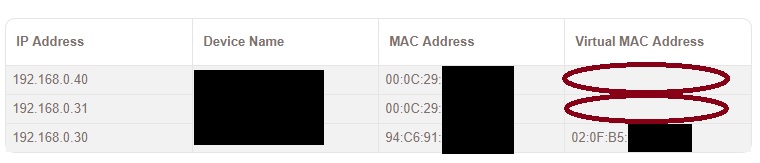
VIRTUAL MAC ADDRESS
My EX8000 had connected the router of ASUS RT-AC5300 via 5G signal, and PC workstations are connected by LAN cable, after connected almost one day, PCs will have a virtual mac address and connected t...

Christian_R
Dec 27, 2018NETGEAR Employee Retired
Hello Degas,
1. Please ensure your extender is on the latest FW and observe
2. Do you have MAC address filtering or access control enabled on your router?
~Christian
- DegasDec 27, 2018Aspirant
Hi Christian,
Thank you for your reply.
1. My extender had been updated to newest firmware but the result is just the same.
2. MAC address haven't filtering or access control enabled on my router.
- DegasDec 27, 2018Aspirant
Hi Christian,
Thank you for your reply.
1. My extender had been updated to newest firmware but the result is just the same.
2. MAC address haven't filtering or access control enabled on my router.
- Christian_RDec 28, 2018NETGEAR Employee Retired
Hello Degas - I have sent you a message. Please respond at your earliest convenience.
~Christian
- DegasDec 29, 2018Aspirant
Hi Christian,
I think I have been solved the problem, it might be wifi channel problem, I set the router channel bandwidth and control channel from auto to fixed, and it is seem stable now, I hope the extender connection could be stable in future.
Thank you for your help.
Best Regards,
Degas