NETGEAR is aware of a growing number of phone and online scams. To learn how to stay safe click here.
Forum Discussion

mpl2910
Dec 21, 2018Aspirant
WiFi Extender EX7000 blocked out on Nighthawk X4 R7500v2
Hi Everyone,
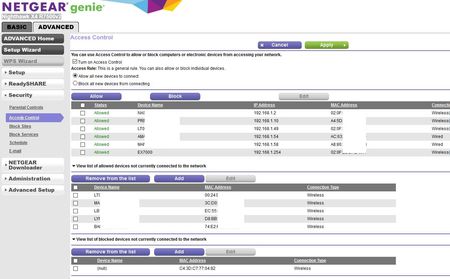
I hope somebody has a suggestion for my Access Control issue with my Nighthawk X4 R7500v2 with Extender EX7000:
The extender shows up in Access Control just fine. All works until...
 Dec 22, 2018
The extender is mapping the mac addresses of it's attached devices to "virtual" mac addresses.
You can try connecting your devices with the ACL turned off, and note the new mac addresses you'll see in the router. Then you'll need to add those new addresses to the ACL list. You can also see this mapping in the extender's device list ( https://kb.netgear.com/26262/How-to-setup-devices-on-EX7000-when-MAC-address-filter-is-enabled-on-the-router ).
Note this will also interfere with any address reservation you are doing for the client devices - the Nighthawk won't let you reserve the same IP address for two different mac addresses.

Christian_R
Dec 26, 2018NETGEAR Employee Retired
Hello mpl2910,
Please let me know if you're still experiencing the same issue of devices that are connected to the LAN port.
~Christian
mpl2910
Mar 07, 2019Aspirant
Hi Christian,
Sorry for the long delay.
The ACL/Internet problem is solved after factory resetting the router and the extender and reconfiguring both.
However, the Extender does only connect to the router if I enable broadcasting the SSID's on the router. Entering the SSID and password in manually will not connect the Extender to the router. Changing the broadcast option on the Extender does not effect the connection to the router. Even once connected successfully, I cannot switch the router to stop broadcasting without loosing the connection to the Extender.
Long story short, this is not an option I like and the hole process has reduced my trust in the products. I will pull a Ethernet cable and stop using the extender.
Thanks for your help and your valuable input. Much appreciated ;-)