NETGEAR is aware of a growing number of phone and online scams. To learn how to stay safe click here.
Forum Discussion

VolFish
Oct 23, 2015Aspirant
WN3000RP-200UKS (V3) - Issue having 3+ connected to network
Hi, We have five of these to be used in the same large premesis to provide non-wireless devices with wireless connectivity. They are on the latest firmware (V1.0.1.20) and running in extender mo...

nhann
Oct 27, 2015NETGEAR Employee Retired
Hi VolFish,
If all of your Extenders are using the same SSID as your Router, it could be leading to the performance issues you mentioned.
Please see page 23 of 43 for SSID name change:
http://www.downloads.netgear.com/files/GDC/WN3000RPV3/WN3000RPv3_UM_2Sep2014.pdf
More about extenders FAQ:
http://kb.netgear.com/app/answers/detail/a_id/24801/~/what-is-a-wireless-extender%3F
- VolFishOct 28, 2015Aspirant
Hi,
None of them are enabled as an access point and therefore are not putting out a wireless signal for clients to join. They are only providing a wired connection to devices.
They are not connecting directly to a router, but rather various Ubiquiti Unifi UAP, are you aware of any compatibility issues connecting to these devices?
- nhannOct 29, 2015NETGEAR Employee Retired
Hi VolFish,
Is this your current network setup?
Modem---(wire)---router - - - (WiFi) - - - to 5 WN3000RPv3 ------(wired)-----to multiple Ubiquiti Unifi UAP - - - (WiFi) - - - devices.
Try not to have the same SSID across all the devices, as mentioned before.I'm not aware of any compatibility issues with Ubiquiti devices and am not able to test them.
You may want to check with their support site and if there are any limitations or configurations as to how many you can have in your network.
- VolFishOct 30, 2015Aspirant
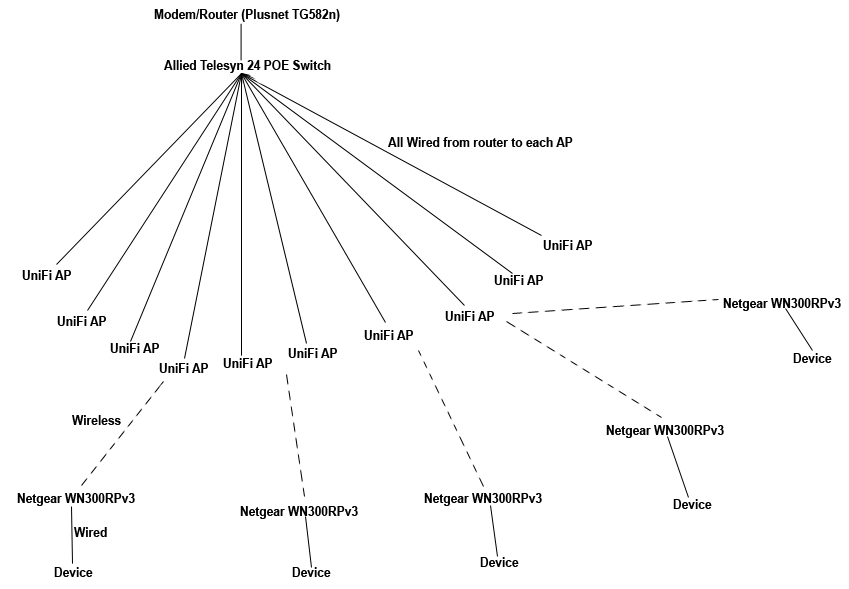
Here is the setup...
All of the Unfi devices have the same SSID, as mentioned the Netgear devices are not acting as an access point and have this option turned off.