NETGEAR is aware of a growing number of phone and online scams. To learn how to stay safe click here.
Forum Discussion

Swapnil_1989
Feb 20, 2017Aspirant
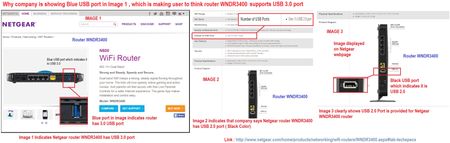
Inconsistency observed in information provided for Netgear router WNDR3400 on Netgear webpage,
I wanted to buy a budget wifi router,while searching on internet i came across Netgear WNDR3400 router. When i saw USB port support is also provided i decided to buy the product but the USB port disp...
- Mar 05, 2017Hi ElaineM as it was as major issue which I found out can I expect a compensation (gift) for the same ?
As it was a defect which your QA team forgot to identify.

StephenB
Feb 21, 2017Guru - Experienced User
Swapnil_1989 wrote:
But on each and every online shopping sites also it's showing blue USB port image of router which directly says the perticular model supports USB 3.0
USB 3.0 mandates the blue insert color, but USB 2.0 was silent on that. So a USB 2-only product is compliant with the original USB 2 spec even if it uses the blue color. The purpose of the color change was to make it easy for users to see which ports within the same product were USB 3 and which were not. It wasn't intended to advertise that the model itself supported USB 3.
The WNDR3400v1 goes back to 2010, and the WNDR3400v2 was introduced in 2011 - well before the USB 3.0 spec was published in 2013. So both would be clearly USB 2.0 compliant (even if they used blue inserts) at the time they were introduced.
The artwork currently on Netgear's site shows a black insert color on the WNDR3400v3, and the diagrams all clearly say USB 2.0 port. But resellers use whatever art work they want, and in my experience it often doesn't match the shipped product - especially in a case like this, where you have three different hardware changes over the lifetime of the product..
You could of course return/exchange the router for a newer one - and if you purchased a WNDR3400v1 or v2, I suggest you do that, since the products were built in 2014 or earlier.
Since you care about the speed of the router storage, I suggest you check out the router reviews before purchase (smallnetbuilder.com measures storage speed in all their reviews). Even with USB 3.0 connectors, the router storage can be limited by other factors, including the disk format, and the router's CPU performance and the network speed.
William10a
Feb 21, 2017Master
If the speed of storage is important a nas server would give the best possible speed.
- StephenBFeb 21, 2017Guru - Experienced User
William10a wrote:
If the speed of storage is important a nas server would give the best possible speed.
I agree (and use NAS servers myself). Though many of the newer higher-end routers test out quite well.