NETGEAR is aware of a growing number of phone and online scams. To learn how to stay safe click here.
Forum Discussion

MasterOfLaws
Mar 31, 2016Aspirant
WNDR3700: how to create accespoint and general information
Hi, Hereby I would like to ask for your support regarding to my home network. Situation: For a couple of years I own the WNDR3700 router, which I use as a router. It's connected with a cable ...
 Apr 01, 2016
The WNDR3700 can be used as an Access Point, but only when it is physically wired to the main router. If your house is wired for Ethernet or you are able to install Ethernet (Powerline can used as an alternative), then you can enable AP Mode in the WNDR3700's setup via ADVANCED > Advanced Setup > Wireless AP.
Personally, I prefer and recommend an alternative form of setting a router up as an Access Point. It's an old school method that was used before Netgear added the AP Mode setting. My instructions for setting this up can be found in another thread (link). Note, in particular the difference in using a LAN port instead of the WAN port!
MasterOfLaws
Apr 06, 2016Aspirant
Thanks!
I guess the old school method seems better regarding the hardware acceleration. Besides, it looks like the WNDR3700 does not support AP-mode (or maybe it does..). The steps ADVANCED > Advanced Setup > Wireless AP cannot be followed, since I cannot find the option 'advanced setup'. Other pages do not offer me the option to turn on wireless AP.
However, under Maintance > Router status > Wireless Port, I see that Wireless AP is turned 'on'.
An explanation about wireless AP is given in the sidebar:
- Wireless AP. Indicates if the access point feature of the router is enabled or not. If not enabled, the Wireless LED on the front panel is off.
So it seems that my AP mode was turned on already. However, I do not know how to turn it off or how I turned it on.
Do you know how I can turn AP mode off (and on) for my WNDR3700 (it seems like it has the latest firmware)?
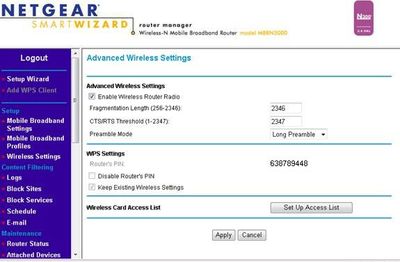
My Netgear configuration screen does not look like the screenshots in this link, but like this (example):
TheEther
Apr 06, 2016Guru
It looks like your firmware may not have the AP Mode setting. I believe the Wireless AP setting is different, so don't touch it. Your only choice is to use the old school method.
- MasterOfLawsApr 11, 2016Aspirant
"the old school method of setting it up as an Access Point. Disable AP Mode. In LAN Setup on the WNDR3700, configure a static IP address in the same subnet as the Wifi-modem. Make sure the IP address is outside of the DHCP range managed by the Wifi-modem. Otherwise, you risk the possibility of a duplicate IP address. Disable the DHCP server on the WNDR3700. Finally, connect the Wifi-modem LAN port to a WNDR3700 LAN(important!) port. Leave the WNDR3700 Internet port disconnected."
Above you can see your tutorial on how to create an acces point specifically for my situation (I just changed some names). Got some questions though:
-what do I need to choose as static IP address for my WNDR3700 and how do I know the subnet of my wifi-modem? (given that the provider says that their modem's standard ip adress is 192.168.0.1).
-How do I know the DHCP range of my wifi-modem? I understand that it would be a problem if I give my router a static IP, while my wifi-modem is trying to give that same IP to some other device due to it's DHCP.
-what happens when I turn off DHCP on my WNDR3700? Is it safe? And do I need to choose a static IP for all devices (PC, smartphone, gameconsole) that connect to my WNDR3700, since DHCP is turned off?
Thanks.
- TheEtherApr 11, 2016Guru
MasterOfLaws wrote:"the old school method of setting it up as an Access Point. Disable AP Mode. In LAN Setup on the WNDR3700, configure a static IP address in the same subnet as the Wifi-modem. Make sure the IP address is outside of the DHCP range managed by the Wifi-modem. Otherwise, you risk the possibility of a duplicate IP address. Disable the DHCP server on the WNDR3700. Finally, connect the Wifi-modem LAN port to a WNDR3700 LAN(important!) port. Leave the WNDR3700 Internet port disconnected."
Above you can see your tutorial on how to create an acces point specifically for my situation (I just changed some names). Got some questions though:
-what do I need to choose as static IP address for my WNDR3700 and how do I know the subnet of my wifi-modem? (given that the provider says that their modem's standard ip adress is 192.168.0.1).
Your modem's subnet is most likely 192.168.0.0/255.255.255.0. You can log into your modem and confirm.
-How do I know the DHCP range of my wifi-modem? I understand that it would be a problem if I give my router a static IP, while my wifi-modem is trying to give that same IP to some other device due to it's DHCP.
You will need to log into your modem to see the DHCP range. Assign your WNDR3700 an IP address outside of that range. You may need to change the range to free up an address.
-what happens when I turn off DHCP on my WNDR3700? Is it safe? And do I need to choose a static IP for all devices (PC, smartphone, gameconsole) that connect to my WNDR3700, since DHCP is turned off?
If you set up everything properly (especially, connect a WNDR3700 LAN port to the modem), then it's safe. You do NOT need to assign static IP addresses to your other devices. Your modem will function as the DHCP server in your network.
- MasterOfLawsApr 11, 2016Aspirant
I think I managed to get it working.
First I changed settings in my modem:
DHCP range (was 254): 200
Starting from 192.168.0.10 (didn't change)
Subnetmask: 255.255.255.0 (didn't change, same as WNDR3700)
Apply
Then I changed in my WNDR3700:
Lan setup > ip: 192.168.0.230
DHCP off
Applying changes fails, because of a conflict with the wan ip. So I kept trying other ip addresses that were out of the DHCP range of the modem (everything above 192.168.0.210). Still the same error. Then I tried changing it in this: 192.168.1.XXX (I do not know what I put in the XXX since I didn't think that this would work). The changes were accepted.
Then I switched the cable from WAN to a LAN port in my WNDR3700 and then I got internet: wireless on my laptop and wired via the WNDR3700. My wired PC is showing that it's connected with my modem (it's SSID is showing in the network settings instead of the WNDR3700's), while it's physically connected to my WNDR3700. The WAN port is empty.
speed (tested with speedtest.net:
wired: 150 mbps (as the provider promises)
wireless: 58 mbps (seems right, however I'm sitting right next to the router)
So it seems that everything works correct now: I can connect to both my modem and WNDR3700.
Only problem is that I cannot log into my WNDR3700 anymore.
I'd like to be sure if everything is installed correctly, how can I find out? And how can I login into my WNDR3700?
Thanks for your support!