NETGEAR is aware of a growing number of phone and online scams. To learn how to stay safe click here.
Forum Discussion

StanH
May 12, 2021Tutor
Can I remove NETGEAR USB Control Center?
Should I remove "NETGEAR USB Control Center" 11/21/17? The three buttons on its screen are grayed out. Only [About] works. I think it might be replaced by Netgear Genie 8/19/2020 or otherwise not bei...

michaelkenward
May 13, 2021Guru - Experienced User
StanH wrote:
Should I remove "NETGEAR USB Control Center" 11/21/17?
That is to control printers.
StanH wrote:
I think it might be replaced by Netgear Genie
The USB control centre is not the Netgear Genie?
 StanHMay 18, 2021Tutor
More Information:
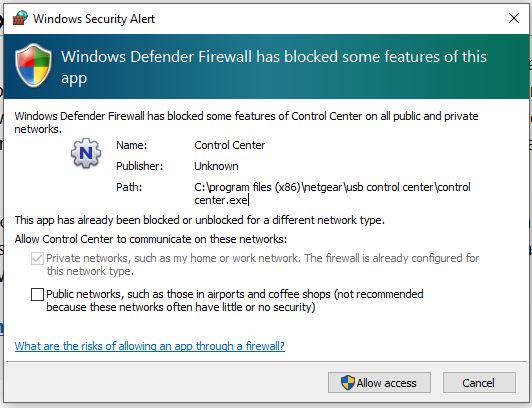
Windows Defender Firewall has blocked some features of control center.exe. The message is "This app has already been blocked or unblocked for a different network type" I don't understand the message. Is control center.exe needed for my R7000 network? I do have a printer on the R7000 USB port.
Kile Location:
C:\program files (x86)\netgear\usb control center\control center.exeDate:
7/29/2013 11:28 AMSize:
4,019 KB- michaelkenwardMay 18, 2021Guru - Experienced User
StanH wrote:
The message is "This app has already been blocked or unblocked for a different network type" I don't understand the message. Is control center.exe needed for my R7000 network?
You can get some insights into the message, and what is going on, by visiting this bit of Windows:
>> Control Panel >> System and Security >> Windows Defender Firewall >> Allowed applications
In my case there is a whole raft of things. I usually allow them through:
Firewall Allowed applications
As you can see, there are several Netgear things in there.