NETGEAR is aware of a growing number of phone and online scams. To learn how to stay safe click here.
Forum Discussion

Ger1234
Sep 27, 2016Aspirant
Internet drops R7000
Hello, I'm experiecing Internet Drops on my R7000 router. The router is placed behind a Ubee (Ziggo) modem in bridged mode and the problem occurs on LAN and Wifi connections. I read on other...
- Jan 07, 2017
Didn't have time to run wifi speedtests, but everything is still pretty stable (at least not noticeable) with the last settings I made.
I wil close this topic, with the accepted solution of disabling QoS.
Ger1234
Oct 12, 2016Aspirant
Hi James,
I ran 5 speedtest connected directly to the modem and all the tests resulted in 150Mbps without any drops.
When I do this test with the router connected I have variable results. Sometimes 150Mbps without any drops, but also an average of 80Mbps, 120Mbps and one time 40Mbps with drops.
The speedtest I used is from http://www.ookla.com/ and only measures for a couple of seconds.
Do you know if there is a way I can run this kind of test for a longer period?
Is it possible that it has something to do with the latest Firmware of the router?
Regards,
Gerhard

kryptonix
Oct 12, 2016Guide
Hi Ger and James,
I'm currently having exact the same issue, for me switching to 5ghz 600mbit instead of 5ghz 1300mbit solved this issue with the drops. I have the drops on Ziggo and KPN, as I'm switching to KPN fiber I currently have both.
Using netspot I could see that the connection to the router completely drops and then comes back up very fast, so it looks like a speed drop but the connection is actually lost for a second or two and then comes back up. Do you also see these kind of results?

I also have the 40/80/120/350/20/75/60 mbit test range. One moment up and running second test - same server - different result.
- Ger1234Oct 15, 2016Aspirant
Hi Kryptonix,
The change you suggest didn't work, I changed it back to 1300Mbit, but unfortunatelly the max. speed I now have is 0,25 MBit and it looks like I dont seem to get it back to the faster instable situation.....
(Rebooted modem and router)
I also did some checks again with only the modem and not the router in between and everytime I test the speed is stable at 150Mbit, so it must be related to the router or combination with dutch ISP's (because you mentioned KPN fiber also gave you the same problems).
Is this something Netgear can have a look at?
I'm not the only one having this problem. Do you know a way I can get back to the intable faster situation (without going back to factory defaults)?
Are there more things I can try? Turning off Wifi 5Ghz if that could cause the problem or going back to another firware version?
Thanks for your effort.
Regards,
Gerhard - Ger1234Oct 15, 2016Aspirant
Little lost now.
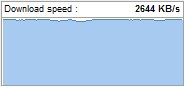
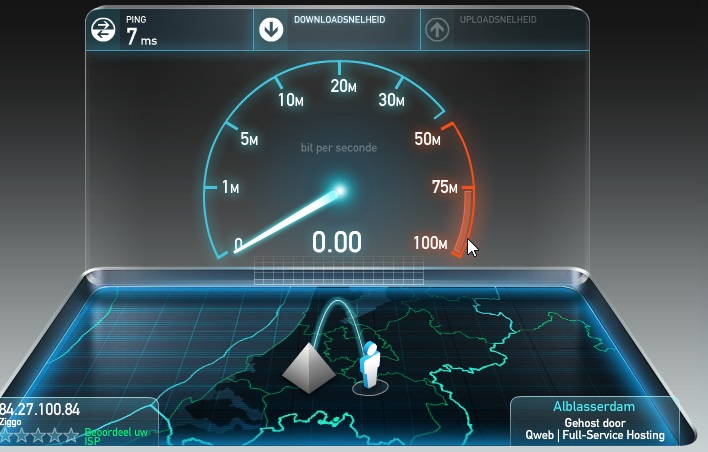
I started a download with a speed om 2,5 mb (screenshot 1, which is correct because ), but when I use the Ookla speedtest at the same time I get a time-out with a speed of 0Mbit (screenshot 2)......
Regards,
Gerhard
 JamesGLOct 17, 2016NETGEAR Employee Retired
Hi all,
Could you try to load the previous firmware and check the connection speed. Make sure to test the connection on wired.
JamesGL
Community Team- kryptonixOct 19, 2016Guide
Hi James,
Flashed back to 1.5.7 and that seems to resolve a lot of issues. But firmware version 1.7 seems to reduce the range of 5ghz so much that the drops/no connections seem to appear.
What I've also changed to make sure everything works is;
- Changed the MTU to 1472, my max MTU size using ping
- Reset - flashed - reset sequence to make sure no leftover configurations
- After new firmware reset all connections on devices - delete network preferences on the device to make sure there are also no confugurations saved
- Put the antennas in a classic \ | / but aimed at the spots where I need the beamforge to go to.
- Enabled WMM
- Disabled Webtracker
- Disabled QoW up and down
This seems to work but the range is still not what I expected, If I move my laptop directly next to the router (in the beamforge) my max signal percentage used to be around 71% with this setup it's 79/82%.
Hopefully this helps.
Kryptonix
- Ger1234Oct 28, 2016Aspirant
Hi James and kryptonix,
Sorry I couldnt respond sooner, I was on holiday.
Is it wise to reset to factory defaults first (current firmware version and if necessary to previous)?
Regards,
Gerhard
- JamesGLOct 30, 2016NETGEAR Employee Retired
Hi Ger1234,
It depends. If the issue does not persist after the downgrade then no need to reset but if it does then reset should follow.
JamesGL
Community Team - Ger1234Nov 12, 2016Aspirant
Hi James,
My connection seems pretty stable at the moment (last 2 weeks) and I haven't changed anything.
Ziggo had done some maintenance, maybe that helped some how.
The only thing that doesn't work is the Ookla speedtest (only see a speed of 0,25mbit instead of 150mbit).
When I run other tests, like download tests with large files the downloadspeed is correct.
I don't know if Kryptonix is still having problems, otherwise we could close this thread in my opinion.
Regards,
Gerhard
- JamesGLNov 13, 2016NETGEAR Employee Retired
Hi Ger1234,
Try using the speed test site of your ISP if they have one. I am not really about the result of the Ookla.
JamesGL
Community Team
- Ger1234Nov 14, 2016Aspirant
Hi James,
My ISP uses Ookla (speedtest Ziggo).
I flashed back to the previous version, no differences so far.
Will run some more tests this week.
Regards,
Gerhard
- JamesGLNov 16, 2016NETGEAR Employee Retired
Hi Ger1234,
Looking forward for more updates from you.
JamesGL
Community Team