NETGEAR is aware of a growing number of phone and online scams. To learn how to stay safe click here.
Forum Discussion

LOLGuy
Jan 05, 2017Guide
Nighthawk AC1900 (R7000) Slow WiFi Download Speeds
Hi All, Using R7000 as an wireless access point running from a FIOS Quantum modem/router on 150/150 service. While WiFi upload speeds are very strong via various Speedtest servers (~130 Mbps), d...
- Jan 09, 2017
Disabling 5GHz? No.
Eliminated the Quantum router and now have the R7000 as the only device. No issues. Turns out the Quantum was failing and my Frontier CO is in the process of installing additional capacity. Frontier was the cause of the erratic readings and router the cause of the disparity between Up and download.
Had a couple of issues with R7000 settings but Netgear's customer service was very helpful.

beanamonster
Jan 05, 2017Initiate
Are you using the 5GHz channel, by chance? In my house, the 5GHz get's incredibly low speeds, and seems to slow down the 2.4GHz connection just by broadcasting. If you're not overly attached to the 5GHz, I recommend disabling it in your router settings.
For my router, I do the following: Log in to your router, (1) click the ADVANCED tab, (2) click the "Advanced Setup" dropdown and select "Wireless Settings", then (3) uncheck "Enable Router Radio" under "Wireless Advanced Settings (5GHz a/n)".
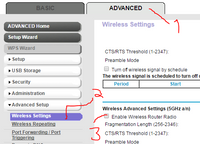
Also, I might just be stupid, but have you ever gotten these devices to get above a 30mbps speed?
From what I've seen, some devices aren't capable of very high speeds. Phones and tablets sometimes have a pretty low bandwidth. I've seen an iPhone 6s achieve speeds of over 400mbps where an iPhone 5 could only achieve about 80, so it could vary by brand and model.
Laptops, on the other hand, should be able to reach a higher speed than 30, unless it's pretty old.
Anyway, I'm probably not very helpful, but since no one else has replied yet, I thought I'd try to give some insight.
Good luck.

StephenB
Jan 05, 2017Guru - Experienced User
That sounds unusual. 5 Ghz generally has less interference and gets better speeds at short range. A longer ranges 2.4 ghz can outperform it. I haven't heard of any other case where simply enabling the 5 ghz radio hurts 2.4 ghz performance. I'd be interested in hearing if others have seen this.
beanamonster wrote:
In my house, the 5GHz get's incredibly low speeds, and seems to slow down the 2.4GHz connection just by broadcasting.