NETGEAR is aware of a growing number of phone and online scams. To learn how to stay safe click here.
Forum Discussion

LOLGuy
Jan 05, 2017Guide
Nighthawk AC1900 (R7000) Slow WiFi Download Speeds
Hi All, Using R7000 as an wireless access point running from a FIOS Quantum modem/router on 150/150 service. While WiFi upload speeds are very strong via various Speedtest servers (~130 Mbps), d...
- Jan 09, 2017
Disabling 5GHz? No.
Eliminated the Quantum router and now have the R7000 as the only device. No issues. Turns out the Quantum was failing and my Frontier CO is in the process of installing additional capacity. Frontier was the cause of the erratic readings and router the cause of the disparity between Up and download.
Had a couple of issues with R7000 settings but Netgear's customer service was very helpful.

beanamonster
Jan 05, 2017Initiate
Are you using the 5GHz channel, by chance? In my house, the 5GHz get's incredibly low speeds, and seems to slow down the 2.4GHz connection just by broadcasting. If you're not overly attached to the 5GHz, I recommend disabling it in your router settings.
For my router, I do the following: Log in to your router, (1) click the ADVANCED tab, (2) click the "Advanced Setup" dropdown and select "Wireless Settings", then (3) uncheck "Enable Router Radio" under "Wireless Advanced Settings (5GHz a/n)".
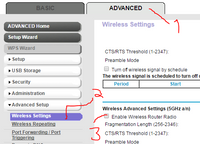
Also, I might just be stupid, but have you ever gotten these devices to get above a 30mbps speed?
From what I've seen, some devices aren't capable of very high speeds. Phones and tablets sometimes have a pretty low bandwidth. I've seen an iPhone 6s achieve speeds of over 400mbps where an iPhone 5 could only achieve about 80, so it could vary by brand and model.
Laptops, on the other hand, should be able to reach a higher speed than 30, unless it's pretty old.
Anyway, I'm probably not very helpful, but since no one else has replied yet, I thought I'd try to give some insight.
Good luck.
LOLGuy
Jan 05, 2017Guide
Devices used to benchmark are capable and have achieved much higher speeds via the Quantum router. Speed was never the issue with that device but range wasn't the best in a larger two-story house where the signal is coming in from the first floor of one corner and diminshes greatly by the time it gets to the second-story opposite corner.
 StephenBJan 05, 2017Guru - Experienced User
LOLGuy wrote:
Speed was never the issue with that device but range wasn't the best in a larger two-story house where the signal is coming in from the first floor of one corner and diminshes greatly by the time it gets to the second-story opposite corner.
Mine is 3 story. I was able to shift my router to the center of the 2nd floor, which helped a lot with coverage.
If you connect the R7000 to the network with a LAN port do you get better uplink speeds?
- LOLGuyJan 05, 2017Guide
The R7000 is attached to the Quantum router via a LAN connection. Wifi is disabled on the Quantum.
How did yo relocate your router? Cable run?
Thanks for your responses.
- StephenBJan 06, 2017Guru - Experienced User
LOLGuy wrote:
The R7000 is attached to the Quantum router via a LAN connection. Wifi is disabled on the Quantum.
The normal setup instructions for AP mode have the R7000's internet port connected to the Quantum router. I'm suggesting that you try one of the four LAN ports instead. One side effect is that you might not be able to reach the router UI unless you set a static IP address for it. But connectivity would still be there, so you could test performance, and then just move the connection back.
I'm basically wondering if something isn't quite right with that connection path between the R7000 and the Quantum - bad internet port in the R7000 router or maybe a bad LAN port in Quantum, or maybe a bad cable. Is the cable grade Cat 5e or Cat 6?
LOLGuy wrote:
How did you relocate your router? Cable run?
Pretty much (though a bit more complicated). The house is wired for ethernet, with switches in the basement, along with the Verizon ONT, quantum router, and my ReadyNAS.
Note with FIOS I still need the Quantum router, otherwise I lose TV services. I could of course just put the Quantum on the second floor, and not use the R8500 at all.. But I prefer the R8500. So I double-route (the quantum router's LAN is set to 192.168.1.x, the R8500 routes that to a 10.0.0.x home network).
One more complication is that the second floor rooms only had one cable each, and normally I'd have needed two. I use a virtual LAN (VLAN) setup to let me put both the 192.168.1.x traffic and 10.0.0.x traffic on a single ethernet cable. Kind of tricky, but I wanted to avoid hiring someone to run another cable (I can run my own to the first and third floors, but getting to the middle floor isn't so easy).