NETGEAR is aware of a growing number of phone and online scams. To learn how to stay safe click here.
Forum Discussion

jsguy16
Feb 21, 2016Aspirant
ReadyCloud does not show folders or files on USB drive
Router is R7000 Firmware V1.0.5.48_1.1.79, Windows 10, Chrome Browser. Have tried unregistering and re-registering. Have same issue with ReadyCloud desktop app.
- Feb 06, 2017
Hello JamesGL,
I have an R7000 router and had the same issue as the other posters here.
Updated to the latest firmware and all file are now accessible.
Thanks for the tip.
jsguy16
Feb 22, 2016Aspirant
I can access the drive locally. I tried another web browser, but same issue. I have not had time to try another computer, and I don;t want to reset to the router to factory settings because I have some customer settings for VOIP.
I set up several different ReadyCloud accounts, and I tried removing and adding the the accounts in the USB ReadyCloud section of the router. Same issue.
What other firmware would you suggest?
Thanks!
jsguy16
Feb 23, 2016Aspirant
I saved my router settings then did a factory restore. After that, I was unable to access the router menu. I eventually learned that some months ago my netgear router was connected to a DMZ IP address set up on the Comcast Modem/Router. Bridge mode is not an option due to the intregrated security system. I believe that my netgear router had a static IP address of 10.0.0.4. I tried to access the netgear router using 10.0.0.4, 192.168.1.1, routersetup.net, etc. I did several resets with a paper clip, but was never able to access the menu, even though IP config shows the address as 192.168.1.1 and I am able to ping to that address. I also can not see any WIFI from the Nighthawk router, and yes the WIFI is turned on. I also tried unplugging the power for a minute, no help. I am thinking the router is broken now.
- jsguy16Feb 24, 2016Aspirant
I was able to solve the router access issue by removing Kaspersky Internet Security from my laptop. Now I believe original issue....that I an not see any folders or files on my USB drive...may be related to my setup. I have my R7000 connected to a Comcast Modem/Router. I have a Static WAN address on my R7000 of 10.0.0.4, and a DMZ port with 10.0.0.4 on the Comcast router. I have a VOIP phone that needs special settings.
 JamesGLFeb 27, 2016NETGEAR Employee Retired
Hi jsguy16,
Please check your inbox.
- xmirobruixMar 07, 2016Aspirant
Hi,
I am facing the same issues.
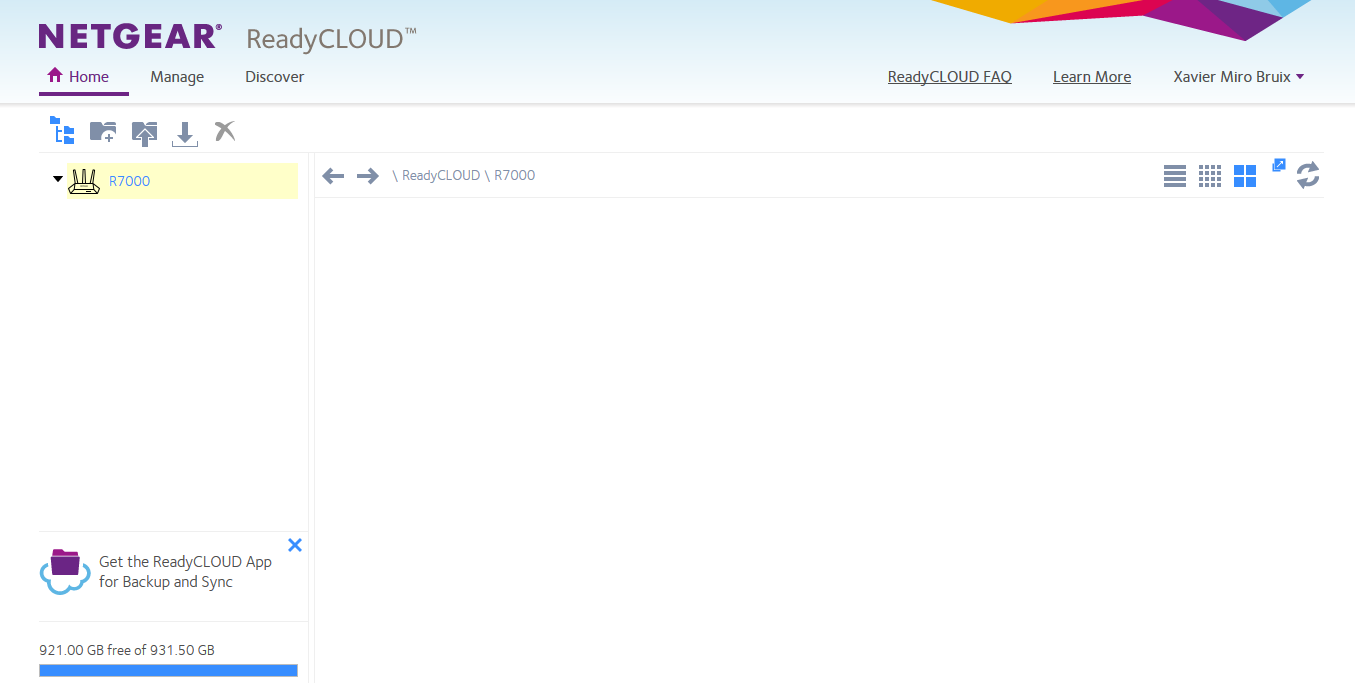
Last week I installed the Nighthawk R7000 with an external drive (Seagate Expansion 1TB Portable External Hard Drive USB 3.0 (STEA1000400)) with an NTFS file system. After the installation I created an account in ReadyCloud and after entering the account info in routerlogin.net I saw the folders of my external hard drive through http://readycloud.netgear.com. However, when I tried it a second time and later on I cannot see it anymore. See the screenshots below.
The firmware in the router is 1.0.4.30
When I am in the LAN I can access the external drive \\readyshare without problems.
So far I have tried,
1. As suggested in https://community.netgear.com/t5/Nighthawk-WiFi-Routers/Compatible-USB-drive-for-ReadyCloud/td-p/989569 I have unregistered it in the Netgear UI on www.routerlogin.net, I have deleted my original ReadyCloud account on www.readycloud.netgear.com and created a brand new one. Than go back and register it on www.routerlogin.net. It didn't work
2. I have unplugged and replugged the USB drive on the router as suggested in https://community.netgear.com/t5/Nighthawk-WiFi-Routers/ReadyCloud-with-R7000-and-Attached-USB-Drive/td-p/1051976
3. I have tried in Firefox 44.0.2, Chrome 50.0.2661.11 and with the Android application running on a Huawei P7-L10 with Android 4.4.2
What else can I do?
Thanks!