NETGEAR is aware of a growing number of phone and online scams. To learn how to stay safe click here.
Forum Discussion

Miras
Nov 19, 2016Aspirant
USB drives are loosing configuration after reboot
Hello all, I have two USB drives connected. Once I do configuration of ReadyShare folder path for both of them everything works just fine. But when router reboot or power cycle,then directory path...
- Dec 02, 2016Hi James,
No worry, just figured out! Evolution is unstoppable... DD WRT is on board and drives works as charm!
In any case that upgrade is must have to enjoy that great router we paid for.
Hope thats help to other;)
Miras
Nov 19, 2016Aspirant
To be more specific, here are two picture.
One is after setting USB drives directories and permision:
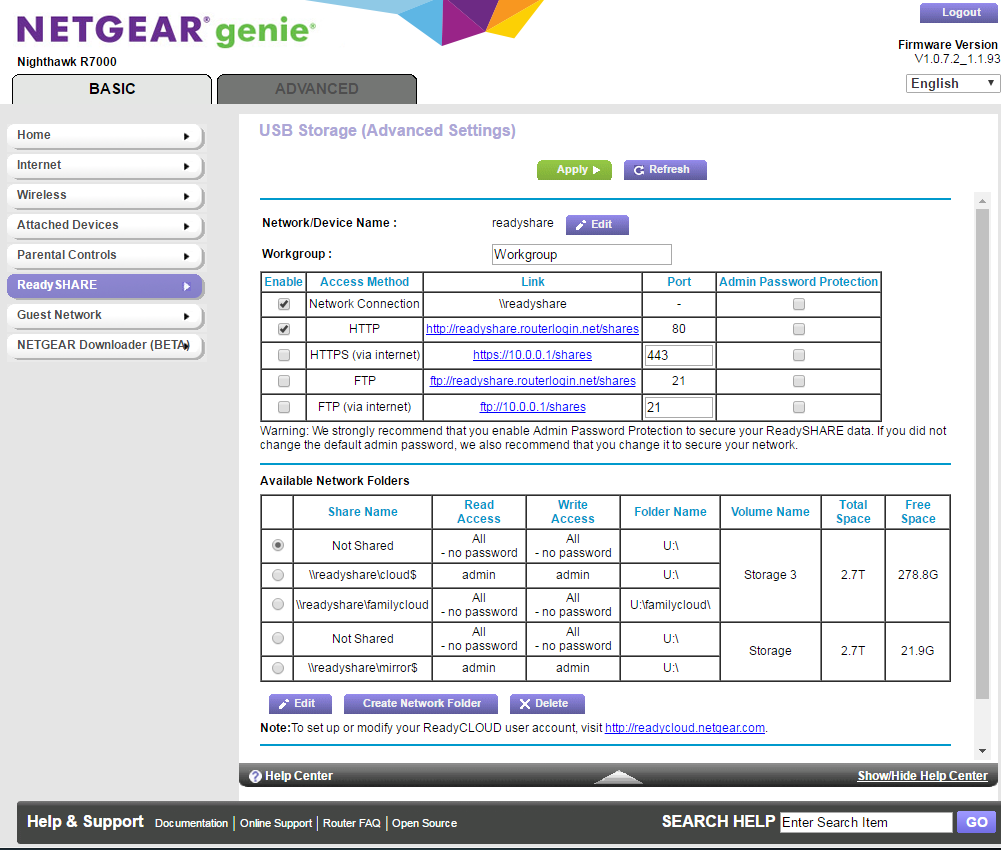
You can see three shares:
USB3.0 "cloud$" and "familycloud"
USB2.0 just "mirror$"
End evertything works as it should.
But second picture is after reboot or power cycle where defined shares dissapear and remain only:
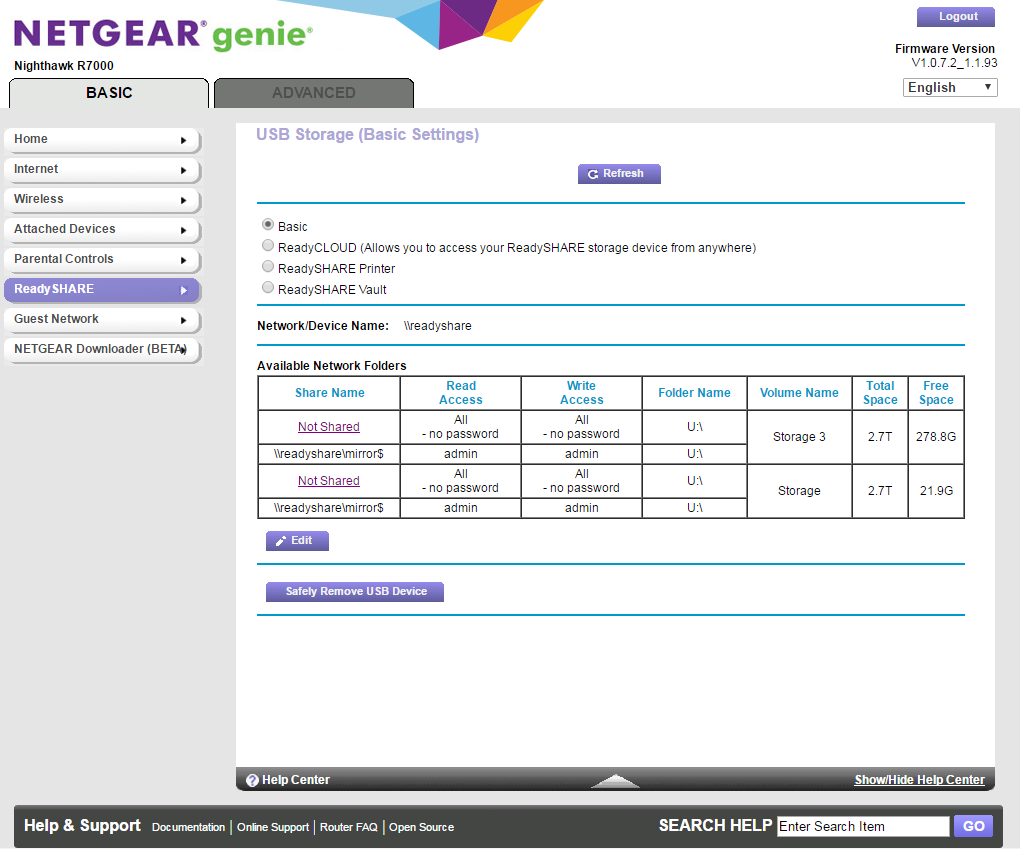
USB3.0 "mirror$"
USB2.0 "mirror$"
it is obvious that both cannot work with same name:( so only one of them works until I set it again.... everybody know that router has to reboot from time to time, and set every day again is quite booring....
If anybody could help pleas. thank you in advance Mira
 JamesGLNov 20, 2016NETGEAR Employee Retired
Hi Miras,
Can you check the ReadyShare setup under advanced tab if still the same.
JamesGL
Community Team
- MirasNov 21, 2016Aspirant
Hi JamesGL,
at first thank you for your reply.
I tried doing the same in advance tab, and result was the same. Path directory were merged to one.Here is my drives configuration:
I have two sata drives connected via these USB enclosures: https://gear-up.me/axago-usb-3-0-sata-3-5-quot-external-aline-box.html
Sata drives are also entirely the same.
So I was thinking like a both USB has the same "signature" and thats why router mix up after boot initialization.
So I tried connect ordinary USB Flash drive instead of disk in USB2.0 and problem disappeared.
Defined path directories are persistent after reboot or power cycle.
Both sata dirives in enclosures are named by router as "USB_Storage" and both assigned with U:\ character.
On other side USB Flash drive was named as "T_Drive" with different character,and maybe thats the reason why it works...Solution could be replace one sata drive enclosure by different one, nativ USB2.0, different maker...so it´s "signature" will differ?
What do you think?- JamesGLNov 23, 2016NETGEAR Employee Retired
Hi Miras,
Probably that might be the problem. They should have different folder directory. Here is mine which is working fine although I am using a 4TB with 3 partitions.


JamesGL
Community Team