NETGEAR is aware of a growing number of phone and online scams. To learn how to stay safe click here.
Forum Discussion

robmartinez108
Oct 15, 2025Tutor
I just spent $400 on a new Netgear Nighthawk router
I just spent $400 on a new Netgear Nighthawk router only to find out it has the same problem as the old out of service RAX43 router. If it’s a Windows issue, I don’t think MS is too interested in ...
- Nov 05, 2025
It has been several days without any issues accessing Readyshare after I disabled the Protection Engine feature on my Netgear RS600 router. I am marking this thread as solution found but I would have preferred to keep the Protection Engine enabled. Hopefully, in the future a fix can be found so as to be able to use both Readyshare and Protection Engine at the same time. Thanks to FURRYe38 and the others who helped to narrow down the cause of the issue.
robmartinez108
Oct 17, 2025Tutor
Hellorobmartinez108,
Spending $400 on a new router only to face the same ReadySHARE and admin page access issues is frustrating. If both routers show similar behavior, it could point to a firmware or compatibility issue—possibly with Windows SMB settings. I recommend checking for the latest firmware updates and ensuring SMB 1.0 is enabled in Windows if required. Netgear support should address this, especially since it impacts core router functionality.
Best Regards,
Donna Taylor
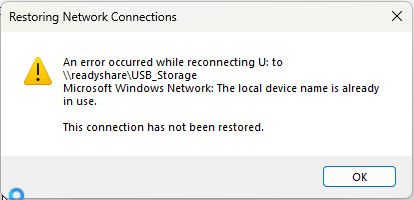
Thanks for your reply. I’ve had SMB v1 enabled since before I purchased the new router. So, just for troubleshooting, I disabled SMB v1. Immediately, my connection to readyshare and the admin page was terminated. I got a slightly different error message attached below. This tells me that new Netgear Nighthawk RS600 routers are still using SMB v1. With SMB v1 enabled, I can get temporary access to readyshare. After about 20 minutes, the router drops my connection and that is when I get the error message that my local device is already in use. I did upgrade the new router to the latest firmware before I disabled SMB v1. My only hope now is that before the RS600 goes out of upgrade service, Netgear will fix the firmware so that SMB v1 will no longer be necessary for Windows 11 devices. That is, if it turns out that SMB v1 is causing the connection problems.

StephenB
Oct 18, 2025Guru - Experienced User
Please stick with one discussion thread.
While is it clear that you need to keep SMB 1 enabled, that is NOT the cause of your "device already in use". That is happening because the PC didn't fully close the session when the connection got dropped. So as far as it is concerned, U: is still in use by the old (failed) session.
I gave some advice on your other thread here:
That includes ways to easily access the share without mapping it to a drive letter.
Part of the puzzle here is why the connection is dropping. Some PCs (particularly laptops) will power down their network hardware during periods of inactivity. Is the connection dropping when you are actively using the PC? Or is it happening when you step away for a while?
- robmartinez108Oct 18, 2025Tutor
Sorry about the other thread. It looks like I started it but I don’t know how that happened because I always use a bookmark to get back to this thread. But that’s how my experience with Netgear has been lately. As for when a computer gets dropped, it is always random. Sometimes it gets dropped when I am actively using it other times when it is idle. Sometimes after 20 minutes of booting the PC, sometimes after an hour of use. And other times right after booting the PC. There is no set pattern to when the PC gets dropped. I have tried both mapping the drive and deleting all mapped drives. It doesn’t make a difference. I prefer mapping the drive because it is easier to see when the connection gets dropped. As for using the IP Address instead of the drive letter, that doesn’t work either. I have been using Netgear routers for at least 20 years. I can’t pinpoint when this issue started but it was sometime after the Windows 11 24H2 update. I am now updated to version 25H2. Most of the time my computers are shut down until I bootup a single PC. After about 20 minutes of use, the PC will lose the connection to readyshare and the router admin page. That’s when the error message appears saying that the device is already in use. It happens even when only one Windows PC is turned on. There are a few ways I can reconnect. But I never had to do that before 24H2. One way is to manually change the IP Address of the disconnected PC. Another way is to switch from a wireless connection to a wired connection. Lastly, I can remove the USB drive from the router and plug it straight to the PC. But these work arounds are unacceptable after paying so much for an RS600 Nighthawk router. For months I have been asking questions to AI chatbots. They have suggested all sorts of solutions from deleting the Windows Credentials to readyshare to disabling the security requirement for SMB. It seems to me that the days of plug and play routers are over. But maybe this new information will give you a clue to what’s going on. At least, thanks for asking.
- robmartinez108Oct 18, 2025Tutor
StephenB wrote:
Please stick with one discussion thread.
Part of the puzzle here is why the connection is dropping. Some PCs (particularly laptops) will power down their network hardware during periods of inactivity. Is the connection dropping when you are actively using the PC? Or is it happening when you step away for a while?
I don’t know what happened to the original thread. But replies for that thread have been turned off. The connection dropping happens very randomly with no definable pattern. Sometimes when I am actively using it and other times when it’s just sitting idle. Sometimes after 20 minutes of use and other times the connection is good for an hour. The connection gets dropped whether I map the drive or delete all drive mapping. After the connection is dropped, trying to connect using the IP Address doesn’t work. I have been able to reconnect by manually changing the IP Address of the disconnected PC and also by switching from a wireless connection to a wired connection. Probably, this begins a new session. I can’t pinpoint exactly when the session dropping began, but it was sometime after the Windows 11 24H2 update. I am now updated to 25H2. My new router is a Nighthawk RS600 updated to the latest firmware. It isn’t just puzzling, it’s frustrating.
- StephenBOct 18, 2025Guru - Experienced User
robmartinez108 wrote:
After the connection is dropped, trying to connect using the IP Address doesn’t work. I have been able to reconnect by manually changing the IP Address of the disconnected PC and also by switching from a wireless connection to a wired connection.
If it drops again, try running CMD and entering net use * /d /y Then see if you can map the share to a drive letter.
If that also works, you can create a script that executes that command and then remaps the share. Not a fix, but could reduce the frustation.
robmartinez108 wrote:
The connection dropping happens very randomly with no definable pattern. Sometimes when I am actively using it and other times when it’s just sitting idle. Sometimes after 20 minutes of use and other times the connection is good for an hour.
That sounds unlikely to be related to the PC power settings. Still, that is something easy to check.
Open the Windows Device Manager, find your network adapter in the list and right-click it. If there is a Power Management Tab, then go there, and make sure "Allow the computer to turn off this device to save power" is NOT checked.
Another test you could run is to connect a thumb drive to the router instead of the T5. That would determine if the problem is drive compatibility. The power spec on your T5 is 800 mA. Per the USB 3.0 spec, the USB port on the router is supposed to be able to deliver 900 mA, so a bit more than the spec'd drive max. Still, there might be some situations where the drive briefly draws more power than the port can deliver. If the drive then briefly goes off-line, the router might drop the connection.
If you see the same symptoms with the thumb drive, then that would rule out the T5 as a possible cause.