NETGEAR is aware of a growing number of phone and online scams. To learn how to stay safe click here.
Forum Discussion

tomiaurednik
Mar 29, 2017Tutor
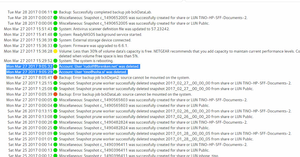
User has been Auto deleted - all data lost
Netgear RN10400 , fw: 6.6.0, 2 x 1TB, RAID 1. User has been Auto deleted - all data lost. Can not acces local user home dir?!? Can someone check this? Or tell me, in which log can I check th...
- Apr 11, 2017
Please if you haven't already. Have a read of Having ReadyCLOUD problems since 3/30/17?
This announcement has been updated over time.
I'm going to mark this as the solution to make sure those visiting this thread see this post.


Tore1
Mar 30, 2017Tutor
Hi
When i go to https://readycloud.netgear.com/client/en/welcome.html i click signin.
That mostly works - but not allways..
When it works:
When i then click the nas in the Home tab, it says the nas is offline.
I have restarted the nas ½ hour ago, its working fine. I can acces files from it, from windows file explorer or from my TV.
What should i do?

HansK
Mar 30, 2017Apprentice
I can also can only acces my NAS via my admin account. Why do I not see any response from one of the support people from Netgear?
- 4u2fastMar 30, 2017Guide
Same over here. Noway to access Readycloud. What a mess. I can't even recover my Password or create a new account. Everytime I try that I am getting an Error message. What is going on there with those netgear support guys???
- mmudMar 30, 2017Aspirant
I've had this problem off and on since I bought the product last year. Last night I tried to register my router again, it failed, Passwords failed. Password recovery failed. From what I'm seeing, their DB connction is hosed. Various error messages I've seen in the last 24 hours:
1. connection pool timeout / connection refused
2. unknown host directory.ngxcld.com
3. error 0000000000
Would just like this to work right, once... Have not had a great experience at all and am considering just going with iCloud... :(
- 4u2fastMar 30, 2017Guide
Same error messages in my case. I guess they shut the thing down.
- HansKMar 30, 2017ApprenticeNo more acces via admin account anymore 😤😢
 britrbMar 30, 2017Guide
Noaccess to my NAS Documents folder, or my [emailaddress] folder. Cant sign in to admin or the web page. Getting desperate - work stuff needed!
- perrij3Mar 30, 2017Guide
britrb,
I was able to log into the admin dashboard using the default login information:
username: admin
password: password
Not sure why it is going back to the default settings, but this will at least allow you to log into your admin dashboard.
Related Content
NETGEAR Academy

Boost your skills with the Netgear Academy - Get trained, certified and stay ahead with the latest Netgear technology!
Join Us!
