NETGEAR is aware of a growing number of phone and online scams. To learn how to stay safe click here.
Forum Discussion

tomiaurednik
Mar 29, 2017Tutor
User has been Auto deleted - all data lost
Netgear RN10400 , fw: 6.6.0, 2 x 1TB, RAID 1. User has been Auto deleted - all data lost. Can not acces local user home dir?!? Can someone check this? Or tell me, in which log can I check th...
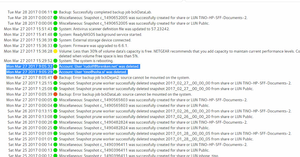
- Apr 11, 2017
Please if you haven't already. Have a read of Having ReadyCLOUD problems since 3/30/17?
This announcement has been updated over time.
I'm going to mark this as the solution to make sure those visiting this thread see this post.

mdgm-ntgr
Mar 31, 2017NETGEAR Employee Retired
Destroying shares is a destructive process and we have warnings in the GUI about this if you manually go to delete a user/share.
We have looked at some affected systems and been unable to recover data from the deleted home shares as yet. You should disable volume maintenance for now and better yet boot into volume read-only mode (so no changes are made to your volume) to try to make sure nothing happens that may jeopardise data recovery just in case our investigation uncovers ways to recover data from deleted home shares.
It's unfortunate that this happened but ultimately having an up to date backup is your responsibility.

HansK
Mar 31, 2017Apprentice
mdgm wrote:Destroying shares is a destructive process and we have warnings in the GUI about this if you manually go to delete a user/share.
We have looked at some affected systems and been unable to recover data from the deleted home shares as yet. You should disable volume maintenance for now and better yet boot into volume read-only mode (so no changes are made to your volume) to try to make sure nothing happens that may jeopardise data recovery just in case our investigation uncovers ways to recover data from deleted home shares.
It's unfortunate that this happened but ultimately having an up to date backup is your responsibility.
Dear Netgear support people
yes, there is a definite warning when you try to delete a share. You even have to type DESTROY to complete this action. Up until this point you are right. Too bad that we did not initiate this action ourselges and no warning what so ever was resented before Netgear deleted these shares. We did not even have to type in DESTROY. SO please, don't say "we told you so".
For the part of the backup of our data, that's specificaly the reason why I bought and installed a NAS with four identical drives in a Raid configuration. This doesn't protect me from deleting complete shares but then, that's not what we've done.
so a bit more than just this warning about our own responsibilities and a meager sorry from you is at its place.
 britrbMar 31, 2017Guide
Start up this morning, cant access admin page now so I cant make any changes - and I could last night, however the network drives are back in working order...? Whats going on?
Also, was this an attack or a **bleep** up?
Related Content
NETGEAR Academy

Boost your skills with the Netgear Academy - Get trained, certified and stay ahead with the latest Netgear technology!
Join Us!
