NETGEAR is aware of a growing number of phone and online scams. To learn how to stay safe click here.
Forum Discussion

Digital999
Jan 13, 2023Luminary
626
Removed two disks from an older system and installed in the ReadyNAS system. INstalled into existing system and get an error message. What do I do to get the system to recognize these driv...
 Jan 14, 2023
Digital999 wrote:
Yes, we want tow different volumes of different sizes. Lots of history there but that is what we want.
Have you switched to flexraid? If you haven't, then that is the first step. If you see a green stripe on the XRAID control, then click on it. (the green stripe signifies XRAID is on).
Then you'd select the two disks and create a new volume on them.
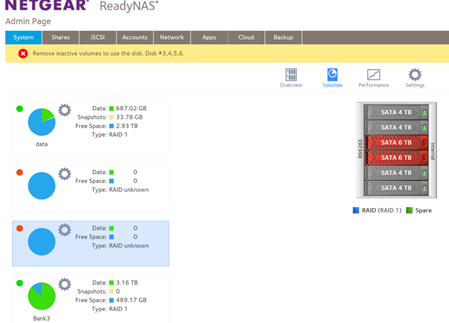
Not sure what is going on with disk 4. It kind of looks like you'd already created a volume, but and not just formatted the drives??? If that is the case, you'd need to click on the volume settings wheel for bank-3 and bank-4, and delete those volumes (before you can create a new RAID-1 volume).
StephenB
Jan 13, 2023Guru - Experienced User
Digital999 wrote:
What do I do to get the system to recognize these drives and add to the current configuration?
The NAS doesn't realize that these are from an old volume. One option is to power down, and remove them, and then power up without them. Then connect the drives to a PC and either remove the partitions with Windows Disk Manager, or simply format the disks.
If you remove the partitions, then the NAS will think they are blank when you hot-insert them, and automatically add them to the array (one at a time). If you reformat them, you will need to select them from the NAS web ui, and format them again in order to get them added to the array.
- Digital999Jan 14, 2023Luminary
Thank you for your reply -- much appreciated.
Moving disks to a PC environment and back after reformatting is way past what our field folks could handle successfully.
Instead I powered down, removed the drives, powered up and inserted them one at a time and formatted each drive with the ReadyNAS software.
Then I fiddled -- now each drive is recognized and one of them is characterized as a new volume -- Bank 2.
As you can see the two drives are 'sort of' recognized. One is a JBOD and the other is ??
Any suggestions on how to move forward to make them (3 and 4 from the top) into a RAID 1 volume?
- StephenBJan 14, 2023Guru - Experienced User
Digital999 wrote:
Thank you for your reply -- much appreciated.
Moving disks to a PC environment and back after reformatting is way past what our field folks could handle successfully.
Instead I powered down, removed the drives, powered up and inserted them one at a time and formatted each drive with the ReadyNAS software.
Then I fiddled -- now each drive is recognized and one of them is characterized as a new volume -- Bank 2.
As you can see the two drives are 'sort of' recognized. One is a JBOD and the other is ??
Any suggestions on how to move forward to make them (3 and 4 from the top) into a RAID 1 volume?
- Digital999Jan 14, 2023Luminary
The actual reply did not seem to post. Post again please.
- StephenBJan 14, 2023Guru - Experienced User
Digital999 wrote:
Any suggestions on how to move forward to make them (3 and 4 from the top) into a RAID 1 volume?
Is that what you want? Personally I'd stick with XRAID, which would give me a single 22 TB volume.
If you make 3+4 RAID 1, then you'd have a 12 TB volume plus a 6 TB volume - so 4 TB less space overall.
- Digital999Jan 14, 2023Luminary
Yes, we want tow different volumes of different sizes. Lots of history there but that is what we want.
Related Content
NETGEAR Academy

Boost your skills with the Netgear Academy - Get trained, certified and stay ahead with the latest Netgear technology!
Join Us!
