NETGEAR is aware of a growing number of phone and online scams. To learn how to stay safe click here.
Forum Discussion

Digital999
Sep 27, 2022Luminary
USB/SATA External Disk Backup – Recent bug or stupid design decision
We have a variety of external disks (150+ over many sites) that we attach to the NAS for external backup that are taken to off-site storage. It is part of the normal operational routine. Been worki...
Digital999
Sep 27, 2022Luminary
These are only external drives that attached via the rear SATA/USB port of the ReadyNAS.
They were formatted as NTFS drives. They have been in use for the past six plus months. Now we have failure.
Stuff used to work but now the drives are not recognized by Windows 11 or Easeus. If not recognized then it is impossible to change any values or repartition or reformat.
My sense is that the ReadyNAS OS/system has 'fiddled' with the drive in a way that does not allow them to be recognized on a Windows system.

StephenB
Sep 27, 2022Guru - Experienced User
Digital999 wrote:
My sense is that the ReadyNAS OS/system has 'fiddled' with the drive in a way that does not allow them to be recognized on a Windows system.
If the file system somehow became seriously corrupted, then it is possible that Windows wouldn't recognize the format. However, if EASEUS was subsequently able to re-partition the drive, then Windows should certainly be able to format it.
After you repartitioned the disk, did you re-initialize and format it with the windows disk manager?
Have you tried using Seatools in the PC?
- Digital999Sep 27, 2022Luminary
This issue gets more interesting.
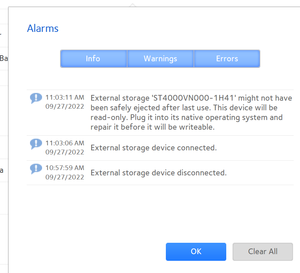
Here is the ReadyNAS admonishment about read only.
Took the drive to a Windows 11 system and ran EaseUS after a clean workstation boot. Drive was seen.
No Windows admonishment regarding repair or the equivalent.
Can open the drive in File Explorer.
Can copy data to the drive using File Explorer. Disk Manager sees the drive as well.
Seems like it is OK in the Windows system. It is obvious that the file system is not corrupted or damaged.
Took the drive back to the ReadyNAS and received the same error message.
Something hinky here – works in Windows but ReadyNAS blocks it. Could this be a result of the recent OS upgrade just released?
By most standards this is an operational anomaly.
Of course we just want it to work like it used to. Just received another report of same problem from a different location.
- Digital999Sep 27, 2022Luminary
As an additional comment, this is a perfectly fine and operational off-site backup drive that we rely on for operations in case of a disaster. Reformatting or partitioning the drive does not work since the data gets destroyed.
At this point we have three such drives that have occured in the past several days.
- StephenBSep 27, 2022Guru - Experienced User
Digital999 wrote:
No Windows admonishment regarding repair or the equivalent.
Can open the drive in File Explorer.
Can copy data to the drive using File Explorer. Disk Manager sees the drive as well.
Seems like it is OK in the Windows system. It is obvious that the file system is not corrupted or damaged.
Took the drive back to the ReadyNAS and received the same error message.
Did you try right-clicking on the drive, selecting "properties" and then "Tools". Then click on the control to check the drive for file system errors.
Also, you might try the steps in the article I linked in earlier.
Digital999 wrote:
Could this be a result of the recent OS upgrade just released?
Possibly. I don't connect USB drives to any of my NAS myself (I use NAS->NAS backup). Also I am still on 6.10.7.
- Digital999Sep 27, 2022Luminary
With all due respect, your suggestion is off-base. We do not need to fix a 'read only' error on the hard drive. It works perfectly in the Windows system.
Only when plugged into the ReadyNAS system does it fail.
Please escalate this issue to the Netgear support staff -- you have the relationship, I do not. There is an obvious problem and it seems related to the recent OS upgrade; at least that is my sense.
There is no reason for the ReadyNAS system to contaminate a perfectly good HDD just because it was unplugged without ejecting it. Users make mistakes and this is an obvious example of not handling the mistake properly.
Windows allows the drive to be connected/disconnected without any issues. My expectation is that Netgear should follow the same conventions.
Related Content
NETGEAR Academy

Boost your skills with the Netgear Academy - Get trained, certified and stay ahead with the latest Netgear technology!
Join Us!
