NETGEAR is aware of a growing number of phone and online scams. To learn how to stay safe click here.
Forum Discussion

Retired_Member
Feb 05, 2016we develop a app [Nero MediaHome] for ReadyNAS
I’m Xiaokang from Nero, follow the guideline, I registered at 1/6/2016, but no response until now, so write this mail. Now we develop a app [Nero MediaHome] for ReadyNAS, some description as f...

siigna
Feb 18, 2016NETGEAR Employee Retired
Give it one more shot. I've made some more changes to the account.

dmacleo
May 07, 2016Guide
so who do we report issues to here?
on 104 and 314 models the lauch button doesn't work.
nothing seems to work with this app
- siignaMay 09, 2016NETGEAR Employee Retired
dmacleo wrote:
so who do we report issues to here?
on 104 and 314 models the lauch button doesn't work.
nothing seems to work with this app
fremske wrote:
Hello,
It seems the Nero HomeMedia application is not working on ReadyNAS ARM devices.
After installing the package on my ReadyNAS 102 box via de app repository. The Nero application does not seem to work.
You can not launch the applications via de front-end and also no web service or external link is available. Please fix or repond how to mitgate this issue.
Sincerly yours,
Fremske
The app does not appear to have a web interface. It's a simple DLNA server (appears to be based on MiniDLNA, which is already included in ReadyNAS) configured to scan all media contained in /data.
 StephenBMay 12, 2016Guru - Experienced User
We have some dedicated media players that can access SMB and NFS shares directly. And we do use VLC that way also.
I use plex on my mobile devices (Android and IoS), and recently started using bittorrent sync to manage content I want to pre-load onto the mobile device. I think plex pass can also do the pre-load, but I am using free plex.
Many folks here use ReadyDLNA.
- dmacleoMay 12, 2016Guide
@xiaokang wrote:dmacleo,fremske StephenB thanks for your feedback.
Which client do you use? Windows Media Player or Nero Streaming Player? or TV?
can't get that far there are no options to configure app on nas itself. on/off is only button that works
this is on rnas 104 and 314 models
the launch button is grey and does nothing
- Retired_MemberMay 13, 2016
Thanks for your feedback.
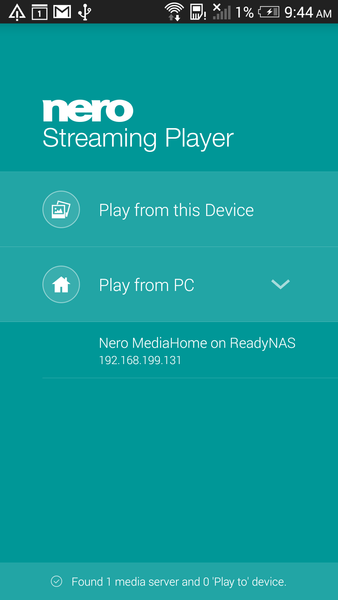
Nero MediaHome is a DLNA server, will scan all media files under /data automatically.
It's better to use Nero Steaming Player on Phone or TV to browse files and play them.
Android:
https://play.google.com/store/apps/details?id=com.nero.streamingplayer
iOS:
https://itunes.apple.com/app/apple-store/id1020666442?mt=8I don't know you can detect Nero MediaHome or not, or can browse files or not.
Wait your feedback.


Related Content
NETGEAR Academy

Boost your skills with the Netgear Academy - Get trained, certified and stay ahead with the latest Netgear technology!
Join Us!
