NETGEAR is aware of a growing number of phone and online scams. To learn how to stay safe click here.
Forum Discussion

powellandy1
Aug 21, 2020Virtuoso
Add SSD to RN528X
Hi Following on from https://community.netgear.com/t5/New-ReadyNAS-Users-General/Add-SSD-drive-s-to-RN528X/td-p/1776859 I've just had a go at adding an M2 SSD to my new 528X. It seems have wo...
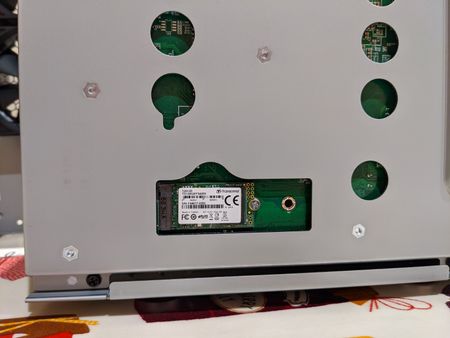

powellandy1
Aug 21, 2020Virtuoso
I guess one question I have would be:
Ideally an SSD should be partitioned on 2048 sector boundry and this was the sgdisk default. I overrode it to 64 sectors to mirror the original partitions exactly. Is this necessary?? Or as long as they are the same size in sectors does thte starting sector matter??

Sandshark
Aug 21, 2020Sensei
When creating volumes on a drive that the GUI cannot see, it is best to use the Netgear utility volume_util (aka rnutil volume_util), not do everything manually. volume_util --help will point you in the right direction. Once the volume is created, the GUI should see it, and everything else can be done from there.
Note that this is for devices the GUI is not designed to see, such as the M2 SSD here or a drive in a non-Netgear external SAS chassis (on compatible rack mount systems), not for a drive that simply fails to show up when it should.
- powellandy1Aug 21, 2020Virtuoso
Thanks.
I'll factory reset, clear the SSD and have a play.
- powellandy1Aug 21, 2020Virtuoso
Hi
First issue. It doesn't look like volume_util recognises the SSD:
root@MediaMaster:~# volume_util -s disk
==============================================
Disks
==============================================
Disk sda:
        HostID: 0a436c4c
        Flags: 0x3000
        Size: 3907029168 (1863 GB)
        Free: 14
        Controller 0
        Channel: 0
        Model: ST2000DM001-1CH164
        Serial: W1E24PDJ
        Firmware: CC24
        Class: SATA (3)
        RPM: 7200
        SMART data
                Latest Self Test:               Passed
Despite lsblk seeing it
root@MediaMaster:~# lsblk
NAME      MAJ:MIN RM   SIZE RO TYPE  MOUNTPOINT
sda         8:0    0   1.8T  0 disk
├─sda1      8:1    0     4G  0 part
│ └─md0     9:0    0     4G  0 raid1 /
├─sda2      8:2    0   512M  0 part
│ └─md1     9:1    0 511.4M  0 raid1 [SWAP]
└─sda3      8:3    0   1.8T  0 part
  └─md127   9:127  0   1.8T  0 raid1 /data
sdb         8:16   0 111.8G  0 disk
As a result I can't seem to use any of the other volume_util commands (expand/create/format etc..). Am I missing something??
Interestingly before I factory reset I ran volume_util -s as above and despite having created and added the partitions in the first post volume_util still only showed sda.
ThanksAndy
- powellandy1Aug 21, 2020Virtuoso
Disk also doesn't appear here:
root@MediaMaster:~# rnutil get_disk_info
Device:             sda
Controller:         0
Channel:            0
Model:              ST2000DM001-1CH164
Serial:             W1E24PDJ
Firmware:           CC24
Class:              SATA
RPM:                7200
Sectors:            3907029168
Pool:               data
PoolType:           RAID JBOD
PoolState:          2
PoolHostId:         a436c4c
Health data
  ATA Error Count:                0
  Reallocated Sectors:            0
  Reallocation Events:            0
  Spin Retry Count:               0
  End-to-End Errors:              0
  Command Timeouts:               0
  Current Pending Sector Count:   0
  Uncorrectable Sector Count:     0
  Temperature:                    30
  Start/Stop Count:               37726
  Power-On Hours:                 26988
  Power Cycle Count:              5224
  Load Cycle Count:               178978
Related Content
NETGEAR Academy

Boost your skills with the Netgear Academy - Get trained, certified and stay ahead with the latest Netgear technology!
Join Us!
