NETGEAR is aware of a growing number of phone and online scams. To learn how to stay safe click here.
Forum Discussion

euhr
Nov 04, 2020Aspirant
Expansion chassis not detecting in ReadyNAS 4312S
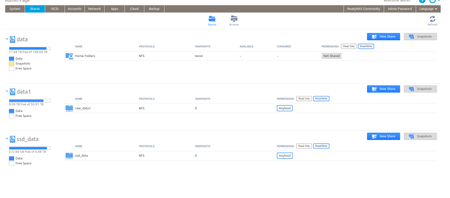
Hello, We have a ReadyNAS 4312S with EDA 4000 Expansion chassis. It has 36 slots populated (12 slots in 4312S + 24 disks in Expansion Chassis). 30 * 8TB Disks in RAID6 - /data volume 5 * 14...
euhr
Nov 08, 2020Aspirant
Thanks for sharing the script StephenB and thanks for the inputs Sandshark
Couple of points:
- In the NAS, 'ls /data/._share --all' shows up the volumes in CLI and everything is working as expected, its just that volumes don't show up in the GUI. Will running this script fix that issue? (and not break anything else?)
- The NAS is on ReadyOS 6.9.3 but I believe the script expects v6.10.0 or higher. Is it stll safe to run the script?
Thanks once again for your help.
 StephenBNov 08, 2020Guru - Experienced User
euhr wrote:
- In the NAS, 'ls /data/._share --all' shows up the volumes in CLI and everything is working as expected, its just that volumes don't show up in the GUI. Will running this script fix that issue? (and not break anything else?)
I haven't seen any cases here where the script has broken anything. I don't know if the script will fix your issue though.
euhr wrote:- The NAS is on ReadyOS 6.9.3 but I believe the script expects v6.10.0 or higher. Is it stll safe to run the script?
The documentation does say that it might not work on 6.9.x or older. Sandshark might have run on on 6.9.x, hopefully he will chime in.
- SandsharkNov 08, 2020Sensei
I have not actually run it. I mostly studied it to learn the structure of the ._shares folder. I did run just an extracted portion that identified the shares to verify it found everything on the expansion unit, but not the rest. I run OS 6.9.6 (current long term support version, to which you really should update after you get this fixed) and see nothing in the script that looks to be incompatible. But I also don't use ISCSI, which the script also fixes, so don't know if there is anything different in 6.10.x in that area.
Given this is a production NAS, you may want to consider using Netgear Support instead of going in and fixing it yourself. Even if you have a backup, that's a lot of data to restore if something gets more messed up and you have to factory default.
- euhrNov 08, 2020Aspirant
Got it, thanks
- euhrNov 08, 2020Aspirant
Thanks

Related Content
NETGEAR Academy

Boost your skills with the Netgear Academy - Get trained, certified and stay ahead with the latest Netgear technology!
Join Us!
