NETGEAR is aware of a growing number of phone and online scams. To learn how to stay safe click here.
Forum Discussion

shuvam
Jun 22, 2019Aspirant
File service connection failure: RN21200 2-bay home NAS
My NAS box is just a month old. It has two 6TB IronWolf drives operating in RAID 0, giving me 10.9TB effective capacity. Firmware version is 6.10.1 which is the latest as of 10 minutes ago. Short...
- Jul 03, 2019
Hi shuvam,
The SMB service on your NAS is now fixed.
The NFS service seems to be fine. It appears to be enabled currently on your NAS. It has been running for 2 days now.
Can you check if you can access your shares via SMB and NFS?
Regards,

shuvam
Jun 23, 2019Aspirant
I poked around in the log files, found a lot of entries clearly indicating that the SMB daemon is not starting up, but couldn't figure out why. The NMB daemon is working well, it appears.
I pulled out contiguous sets of lines from three log files and created the PDF file:
- systemd-journal.log
- smbd.log
- nmbd.log
and you can see the lines here. These are not grep outputs -- they are contiguous sets of lines, nothing omitted in between.
Any idea what is going on?

StephenB
Jun 23, 2019Guru - Experienced User
I suggest that you send a link to the full log zip to JohnCM_S and ask him to analyze them for you. Do that via private message (the envelope icon on the upper right of the forum page) - don't post the link publicly.
I am wondering what the 10 email alerts might say. You might want to fix the configuration for email alerts, and see if they are then sent correctly.
- shuvamJun 23, 2019Aspirant
StephenB -- will send the full log zip, thanks for pointing me to the wizard. And the email alerts problem -- I've fixed it. Sent a test mail, it reached.
Retired_Member -- I checked the workgroup name -- it's given as WORKGROUP. So, at least from the UI, there's nothing left to do. And the NULL for SMB encryption -- this too has been this way, and untouched from Day 1. It didn't stop the smbd from starting earlier. I'll just wait to get some more clarity before I specify anything in this field, I think.
- StephenBJul 02, 2019Guru - Experienced User
Can you enable ssh and log it as root? That might let you experiment (starting/stopping services, etc).
If you modify things then Netgear has the right to deny support. But if you are just poking around a bit that shouldn't be an issue. https://kb.netgear.com/30068/ReadyNAS-OS-6-SSH-access-support-and-configuration-guides
- JohnCM_SJul 02, 2019NETGEAR Employee Retired
Hi shuvam,
We cannot really tell why SMB will not start on your NAS. It looks like it does start sometimes. Can you enable SDM (Secure Diagnostic Mode) on the NAS so we can take a look? You may enable it by going to System > Settings > Support on the NAS local admin page. Please PM me the 5-digit code after enabling it.
Regards,
- shuvamJul 02, 2019Aspirant
Hi StephenB
I have enabled SSH in the initial days itself, and I can log in. I created a non-root user and changed its shell from /bin/false to /bin/bash, so I can now log in as non-root over SSH too. I don't know what commands to try to start and stop services.
However, I tried starting the SMB service from the System --> Settings page of the admin web interface, and it popped up a dialog box, I clicked OK, it went through the motions of starting the service, and again reverted to the service being off. As you know, there are these long green "lights" on the web interface to show which services are active. SMB always shows inactive. Interestingly NFS shows service active, and I can't connect to NFS either, though I could till a few days back.
Any suggestions what commands I should try from the root shell prompt? I don't think it's just /etc/init.d/smbd start.
Hi @JohnCM_S I just enabled SDM and sent you PM with the 5-digit port number. Thanks for trying to help.
- JohnCM_SJul 03, 2019NETGEAR Employee Retired
Hi shuvam,
The SMB service on your NAS is now fixed.
The NFS service seems to be fine. It appears to be enabled currently on your NAS. It has been running for 2 days now.
Can you check if you can access your shares via SMB and NFS?
Regards,
- shuvamJul 03, 2019Aspirant
Thanks a lot, JohnCM_S
I tested access from my Linux laptop.
The Windows SMB access seems to be working, thanks a lot. The NFS access is more complicated.
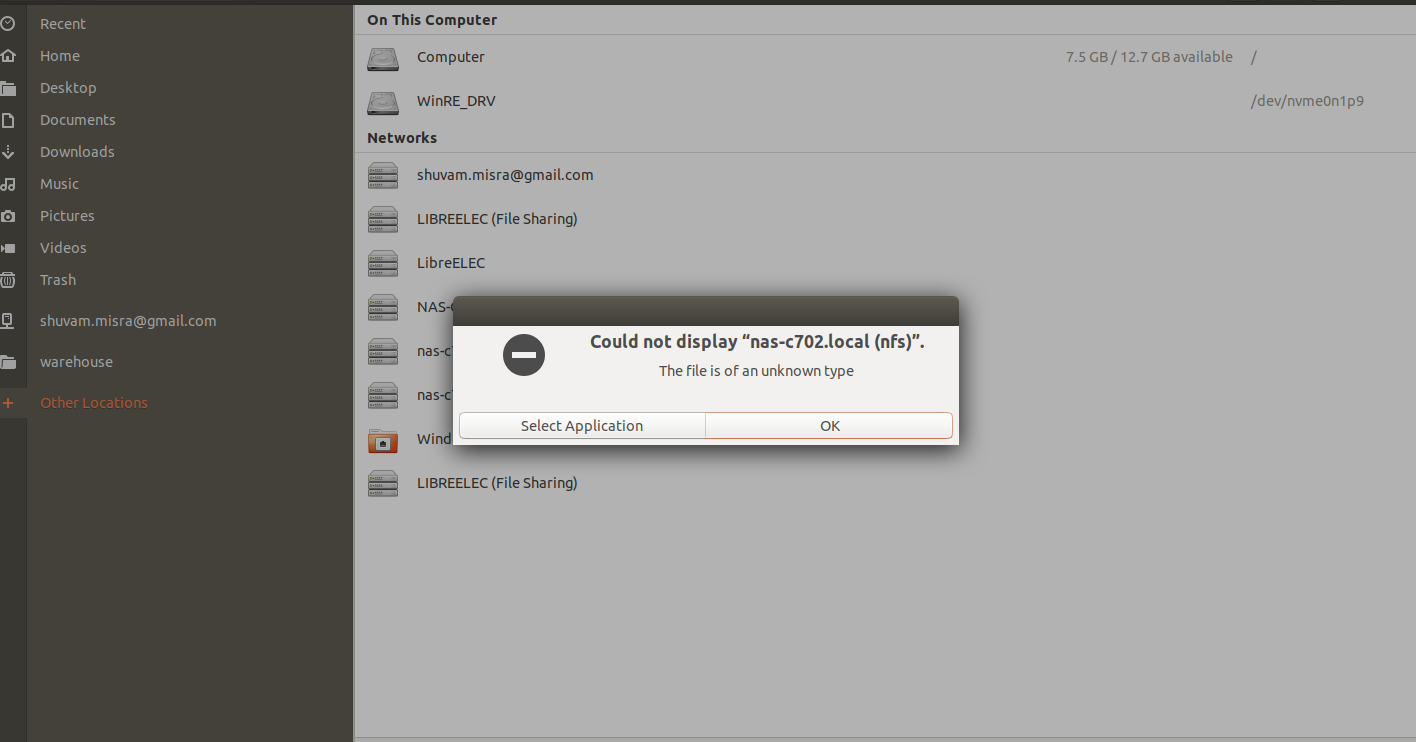
In my Nautilus file browser, when I access "Other locations", I see three entries for my NAS (screenshot attached):
- an all-caps entry NAS-C702
- a lower case entry nas-c702 (AFP) with "AFP" at its end
- a lower case entry, just nas-c702
I don't remember seeing the first of these three 2 days ago when I had last checked. Today, I tried the first one, all-caps, and I could access the shared area on the NAS.
The second area I have always ignored, since it says "AFP" (which is an Apple protocol, I believe).
The third one is the one which I used to use: nas-c702. It had stopped working a few days ago, and it's not working even now.
You're right about NFS service working -- the "System --> Settings" screen always showed NFS with a green light, even when I stopped being able to connect to it. Now, "System --> Settings" is showing both SMB and NFS with green. The SMB is clearly a fix -- it used to indicated inactive before.
- shuvamJul 03, 2019Aspirant
Screenshot of what I see when I try to access the NAS using the third entry in my file browser. This error has been consistent for the last 3+ days.
- shuvamJul 03, 2019Aspirant
I checked now from Kodi, running in LibreELEC on my Raspberry Pi.
From that device, whatever Kodi thinks is NFS is working. And of course, SMB is working too. So, I can say that this is a 100% fix.
Thanks a lot.
- Retired_MemberJul 03, 2019
Hi JohnCM_S, after this finally has been solved, would you mind giving a brief abstract on what the issue was and how Netgear's resources collectively resolved it?
Of course, you do not need to provide a detailed step-by-step description of the process, but getting a rough idea of the fix would support the approach of exchanging knowledge within the community, which is what you probably want to keep alive as much as possible, right?
Kind regards
- Retired_MemberJul 05, 2019
JohnCM_S, thanks a lot, I very much appreciate your responsiveness. Have a nice weekend and kind regards
- shuvamJul 05, 2019Aspirant
The smb.conf file does not look correct when we checked it so we restored that file to default to fix it.
Where did you restore the original contents from? Is there a path where the original file is stored on my NAS, from where I can restore it if it gets corrupted again?
- JohnCM_SJul 05, 2019NETGEAR Employee Retired
Retired_Member
You are welcome. You have a nice weekend as well. :)
The ReadyNAS OS keeps a list of default config files at /etc/default/config/ (Note: Never edit any files under /etc/default/config/).
L3 did a cp -rP /etc/default/config/etc/samba/smb.conf /etc/samba/smb.conf, manually changed the workgroup since you were using a custom workgroup, and then saved and restarted samba.
Regards,
Related Content
NETGEAR Academy

Boost your skills with the Netgear Academy - Get trained, certified and stay ahead with the latest Netgear technology!
Join Us!