NETGEAR is aware of a growing number of phone and online scams. To learn how to stay safe click here.
Forum Discussion

terpstra
May 01, 2007Aspirant
IPv6
I don't expect much here. Just please include the precompiled ipv6.o in the modules directory for the next RAIDiator release. :D
68 Replies
Replies have been turned off for this discussion
 useopenidAspirantIt would be nice if they'd list IPv6 support in the product comparison table; I'm guessing it's still not there anywhere, and as a result, I'm building a nexenta appliance instead of upgrading to a newer readynas.
- useopenidAspirantIPv6 is needed because IPv4 (the current IP protocol) has run out of room - all the available addresses have been allocated to the various regions, and ISPs are in the process of using them up. While NAT has allowed us to last this long, and to continue stretching it out for a while, IPv6 is a much better solution, and getting it up and running in parallel with IPv4 ("dual stacking") avoids doing under the gun when you *have* to. Granted, that's a long ways out, but the ball is rolling and the sooner everyone supports IPv6, the easier the transition will be. The one thing to watch out for is that with IPv6, you don't have the inherent basic firewall that NAT provides, so you have to make *sure* you are blocking incoming traffic you don't actually want at your firewall.
- sphardy1Apprentice
PapaBear wrote: sphardy - if the ISP is implementing it for home users, wouldn't that mean that the gateway would need to support it, but the home network wouldn't. If the home network would have to support it, then there is going to be a boatload of networked equipment that will no longer work. Not just older ReadyNAS units, but PCs, modems, printers etc. I can hear the screams of anguish now.
The gateway would typically be provided by the ISP and if it supports IPv4 on the backend then all is fine, but a) users may want to take advantage of IPv6 in which case all equipment needs to support it and/or b) I believe I've seen reports of at least one ISP (Possibly Belgian, but not 100% sure) where the gateway is IPv6 only.  PapaBear1Apprenticeuseopenid - All x-86 based ReadyNAS units running 4.2.16 or later support IPv6 as that was when it was added to RAIDiator. (I am running 4.2.17, but have the IPv6 assignment currently in the off position)
I fully understand the advantage of IPv6 in the WAN environment, but for the LAN in a home environment? I doubt many home networks will run out of addresses in the 192.168.1 or 192.168.0 subnets. We may have to replace old routers, but that is a far easier task than replacing all the printers and other non-compliant devices.
That may put the final nail in Windows XP as well, as I don't believe Windows XP supports IPv6. agconmetAspirant+1 IPv6 is needed to continue to be a viable platform...at least implement it on the x86 platform.
- useopenidAspirantIt's only in the IPv6-only case that *everything* needs to support it. Currently, it's typical to dual stack the things that can be - the devices and applications that support IPv6 use it in preference to IPv4, those that don't just use IPv4 in blissful ignorance.
While it's true it isn't absolutely necessary for home users to switch to IPv6 exclusively, it makes life simpler if you only have to deal with one (which is one source of the inertia in switching).
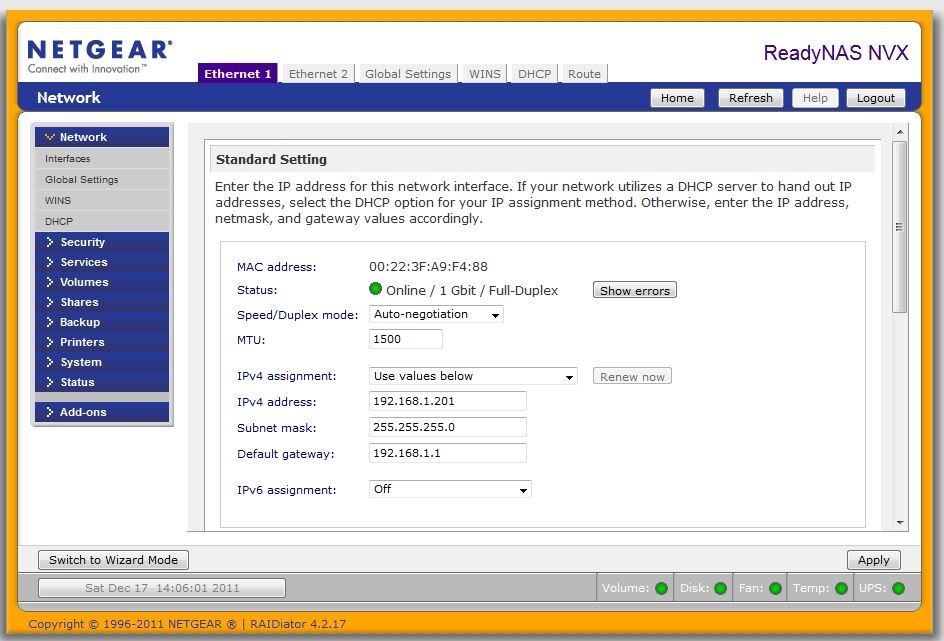
XP does support IPv6 (possibly only with later SPs, not sure), but you have to use some obscure command line tools to configure it. - PapaBear1Apprenticeagconmet - It is as long as you are running RAIDiator 4.2.16 or later. Here is a screen shot of my NVX Network settings page - note IPv6 settings at the bottom.
- sphardy1Apprentice
PapaBear wrote: I doubt many home networks will run out of addresses in the 192.168.1 or 192.168.0 subnets.
Not really the point - IPv6 means every device can have a unique IP address and so (if required) be fully accessible from the internet. No need for NAT and the reserved subnets such as 192.168.x.x, no messing with port mapping/triggering and the like. In fact no need for ports as each service could have its own IP address
Consider ReadyNAS Remote: It creates a secure link by assigning an additional separate IP address to the NAS, manages access to that via the netgear proxy service with the service opening ports as required and then implementing some form of encryption to secure the data. Such a capability is built directly into IPv6  grunnsatAspirantSome notes on IPv6:
- Every Windows version since Vista not only supports IPv6, but it is switched on by default, and it is the preferred protocol over IPv4 as with any IPv4 + IPv6 (dual stack) capable device. So if DNS returns an IPv4 address and an IPv6 address for a web site, any IPv6 enabled device will setup an IPv6 connection, never an IPv4 connection.
- Just type ipconfig/all in the command prompt of Vista and Windows-7, and you will see some special IPv6 addresses.
- Windows-XP can support IPv6, but you will have to install a special pack.
- Keep in mind that the IP stack of Windows-XP in general is quite poor compared to the IP stacks of Vista and later.
- IPv4 and IPv6 are not compatible. That means you will have to run a dual stack as long as you need to connect to IPv4 hosts (that will be for many years I'm afraid).
- The address space of IPv6 is indeed enormous. IPv4 is a 32 bit network, normally you would use what was called a Class-C network in your home LAN. That is a /24 network, and it leaves you with 32-24=8 bits for hosts on your LAN. These 8 bits will support 254 host addresses. IPv6 is a 128 bit network. A standard subnet with IPv6 is a /64 network. That leaves you with 128-64=64 bits for host addresses on this subnet. Compare that with the 32 bits for the entire IPv4 Internet. Normally your provider will give you a /48 network, leaving you with 128-48=80 bits of address space. Since a normal subnet is a /64 network, the remaining 80-64=16 bits can be used to set up 65536 subnets. Should be sufficient I think.
- If you're buying a new router, make sure it has IPv6! Also check if your present router supports it, or if there is a new firmware release that supports it, or ask the manufacturer if they are planning a firmware release with IPv6.
- Normally an IPv6 SOHO router will by default block all incoming IPv6 traffic, so your IPv6 equipment is quite safe.
- Android phones, and I'm sure iPhones as well, support IPv6 by default.
- If you router supports it, you can also set up an IPv6 tunnel over IPv4 (assuming your provider doesn't support IPv6 yet). It will also give you real IPv6 addresses on your home LAN.
- grunnsatAspirantAs far as I know the Readynas Sparc software is build with the Debian Linux kit for 32 bit Sparc cpus. There is some support for IPv6 in this Linux distribution kit, as you can see here: http://packages.debian.org/search?arch=sparc&searchon=names&keywords=ipv6. I just don't know if this is sufficient for the Readynas developers. It would be nice if we can get a response from them.
Related Content
NETGEAR Academy

Boost your skills with the Netgear Academy - Get trained, certified and stay ahead with the latest Netgear technology!
Join Us!
