NETGEAR is aware of a growing number of phone and online scams. To learn how to stay safe click here.
Forum Discussion

haka1311
Mar 03, 2019Aspirant
NAS Neatgear network letter
I do have a NAS Netgear READYNAS NV RND4000 but since i have a new desktop i can`t connect a drive letter to my NAS.
I do see the NAS in Network connections and i multi media by these way i can...

StephenB
Mar 03, 2019Guru - Experienced User
The first step is to go into "turn windows features on or off" in the PC, and make sure that the SMB 1.0 client is installed. Have you done that?
Also, what firmware are you running in the NV+?
- haka1311Mar 04, 2019Aspirant
Stephen SMB1 .0 was turn off, but still have the same problem can not connect to ip adres of find a drive letter.
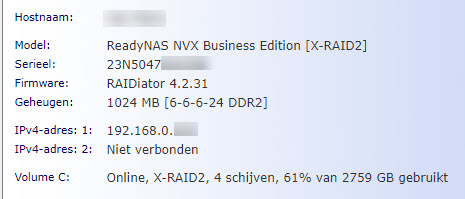
i do use firmware RAIDiator 4.2.31
hope you can help me further.
thanks
 HopchenMar 04, 2019Prodigy
Did you also enable SMBv1 in Windows settings? These older NAS units are, to my knowledge, only capable of SMBv1 so you must that.
- StephenBMar 04, 2019Guru - Experienced User
haka1311 wrote:
i do use firmware RAIDiator 4.2.31
Then you don't have an RND4000. Perhaps look again at the product label, or install RAIDar and tell us what model it gives you. https://kb.netgear.com/20684/ReadyNAS-Downloads#raidar
haka1311 wrote:
Stephen SMB1 .0 was turn off, but still have the same problem can not connect to ip adres of find a drive letter.
The SMB 1.0 client needs to be turned ON.
- haka1311Mar 04, 2019Aspirant
i did enable SMBv1 in Windows settings.
the model is RNDX4000 says the label see also attachment
Related Content
NETGEAR Academy

Boost your skills with the Netgear Academy - Get trained, certified and stay ahead with the latest Netgear technology!
Join Us!