NETGEAR is aware of a growing number of phone and online scams. To learn how to stay safe click here.
Forum Discussion

hnrkndr
Jun 23, 2022Aspirant
NAS212 : disk full, but stored data is much less than capacity
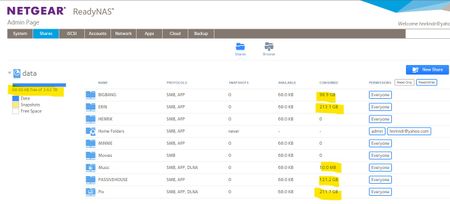
Hi! Newbie question about capacity of NAS212 with 2x 4TB, RAID1: Approaching 100% full disks, I have removed data (moved files back to the PC) from the NAS This cleared hundreds of GB, but after...
 Jun 24, 2022
It might be simplest to delete the volume, recreate it and the shares, and then move everything back.
StephenB
Jun 24, 2022Guru - Experienced User
It might be simplest to delete the volume, recreate it and the shares, and then move everything back.
- SandsharkJun 24, 2022Sensei
How much is in home folders? The GUI doesn't show usage there. Do you have any ISCSI targets?
- hnrkndrJun 24, 2022Aspirant
Ohhhh! On the home drive, I found are hundred of folders with thousands of copies of previously deleted desktop files!!!
Thanks for pointing me at this discovery 😉
The NAS seems to make timestamped copies of every file that once was placed on the desktop.
FYI, I use the PC desktop daily in my workflow as a temporary holding bay for up/downloaded files.
With 5 minutes of deleting some of these old temp files, I have gained substantial free space.
Thanks for your help 🙂
FYI, I do not use the "home" folders" for deliberate data storage at all; instead I have all my storage arranged in named shares.
- hnrkndrJun 24, 2022Aspirant
I learned from the software manual that iSCSI targets have something to do with LUNs / LUN group on the ReadyNAS. Or something with 'iSCSI-Attached Device'
I do not have any LUNs set up on my NAS.
No attached devices either as far as I know.
Regards
Henrik

Related Content
- Aug 07, 2016Retired_Member
NETGEAR Academy

Boost your skills with the Netgear Academy - Get trained, certified and stay ahead with the latest Netgear technology!
Join Us!

