NETGEAR is aware of a growing number of phone and online scams. To learn how to stay safe click here.
Forum Discussion

robertsturm
Sep 19, 2022Aspirant
No web UI radynas 102
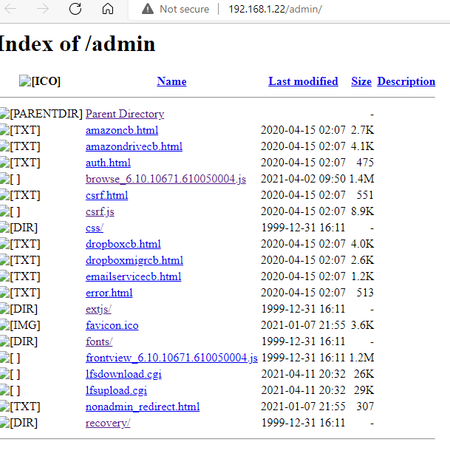
Hello, I am having the issue to setup my readynas 102 device. My original HDD failed beyond repair. I installed new 2 TB HDD and after trying to login with default admin password I got index of admi...
robertsturm
Sep 20, 2022Aspirant
Hi,
thank you for the answer. I am using chrome. I typed https://192.168.xxx.xxx
I got the message do you want to proceed and I have to click on advance button after that it asked for the login. I entered admin as user name and password for password.
I also tried Edge and newly installed firefox. They are all giving same result. Is there any port I have to manually go?
Thank you again.
Robert

StephenB
Sep 20, 2022Guru - Experienced User
robertsturm wrote:thank you for the answer. I am using chrome. I typed https://192.168.xxx.xxx
Does https://192.168.x.x/admin behave differently?
You might need to do an OS reinstall.
- robertsturmSep 21, 2022Aspirant
Hello,
I mange to get my RN102 working. I clean the HDD and did the USB reboot with 6.10.5 Hotfix 1 firmware. After the process was finished I was able to login to Admin UI and setup the nas.
Thank you
Related Content
NETGEAR Academy

Boost your skills with the Netgear Academy - Get trained, certified and stay ahead with the latest Netgear technology!
Join Us!
