NETGEAR is aware of a growing number of phone and online scams. To learn how to stay safe click here.
Forum Discussion

powellandy1
Aug 21, 2020Virtuoso
Add SSD to RN528X
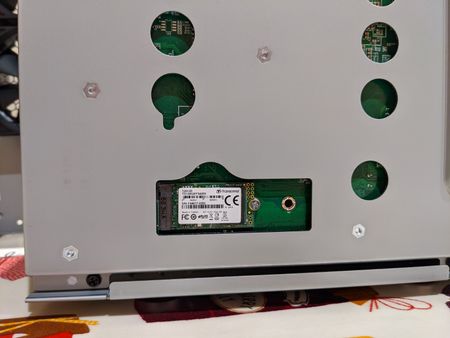
Hi Following on from https://community.netgear.com/t5/New-ReadyNAS-Users-General/Add-SSD-drive-s-to-RN528X/td-p/1776859 I've just had a go at adding an M2 SSD to my new 528X. It seems have wo...

powellandy1
Aug 21, 2020Virtuoso
Hi
First issue. It doesn't look like volume_util recognises the SSD:
root@MediaMaster:~# volume_util -s disk
==============================================
Disks
==============================================
Disk sda:
        HostID: 0a436c4c
        Flags: 0x3000
        Size: 3907029168 (1863 GB)
        Free: 14
        Controller 0
        Channel: 0
        Model: ST2000DM001-1CH164
        Serial: W1E24PDJ
        Firmware: CC24
        Class: SATA (3)
        RPM: 7200
        SMART data
                Latest Self Test:               Passed
Despite lsblk seeing it
root@MediaMaster:~# lsblk
NAME      MAJ:MIN RM   SIZE RO TYPE  MOUNTPOINT
sda         8:0    0   1.8T  0 disk
├─sda1      8:1    0     4G  0 part
│ └─md0     9:0    0     4G  0 raid1 /
├─sda2      8:2    0   512M  0 part
│ └─md1     9:1    0 511.4M  0 raid1 [SWAP]
└─sda3      8:3    0   1.8T  0 part
  └─md127   9:127  0   1.8T  0 raid1 /data
sdb         8:16   0 111.8G  0 disk
As a result I can't seem to use any of the other volume_util commands (expand/create/format etc..). Am I missing something??
Interestingly before I factory reset I ran volume_util -s as above and despite having created and added the partitions in the first post volume_util still only showed sda.
Thanks
Andy
powellandy1
Aug 21, 2020Virtuoso
Disk also doesn't appear here:
root@MediaMaster:~# rnutil get_disk_info
Device:             sda
Controller:         0
Channel:            0
Model:              ST2000DM001-1CH164
Serial:             W1E24PDJ
Firmware:           CC24
Class:              SATA
RPM:                7200
Sectors:            3907029168
Pool:               data
PoolType:           RAID JBOD
PoolState:          2
PoolHostId:         a436c4c
Health data
  ATA Error Count:                0
  Reallocated Sectors:            0
  Reallocation Events:            0
  Spin Retry Count:               0
  End-to-End Errors:              0
  Command Timeouts:               0
  Current Pending Sector Count:   0
  Uncorrectable Sector Count:     0
  Temperature:                    30
  Start/Stop Count:               37726
  Power-On Hours:                 26988
  Power Cycle Count:              5224
  Load Cycle Count:               178978
- SandsharkAug 22, 2020Sensei
That is odd. I don't have a NAS that accepts an M2 SSD, but I know I have given that advice before and got no feedback it didn't work.
The manual commands you gave it to partition and expand the OS and swap arrays clearly did work. Before I discovered volume_util, I did the same thing for my expansion chassis. If you don't plan to also create a volume on the SSD, then that's a pretty easy thing. To remain consistent with the OS in naming of the MDADM array and BTRFS volume takes a bit more effort. I can help you there if needed. I'm assuming that once created and mounted via FSTAB, the OS will be able to see and use the new volume.
As for the boundries of the partitions, I've not tried anything other than the ones the OS uses. Re-aligning should certainly work as far as MDADM is concerned, but I have no idea if it will cause any issues when you decide to further expand the NAS and it adds still more drives to the OS and swap RAIDs. Since you seem to be doing some experimenting with the NAS not containing a volume you actively use, you trying won't hurt and it could help others who follow in your footsteps.
- powellandy1Aug 22, 2020Virtuoso
Hi
Thanks. I haven't changed any array or volume names (knowingly) but please do tell me if I should do/need to.
Regarding FSTAB, again forgive me I'm pretty new to Linux, /etc/fstab just contains:
root@MediaMaster:~# cat /etc/fstab
LABEL=0a436c4c:data /data btrfs defaults 0 0
So I don't think I need to add anything there. The SSD is not visible anywhere in the GUI so it's rather difficult to know if it's being used.
Good thought about the effect of adding another drive. I'll try that and report back.
Thanks
Andy
- powellandy1Aug 22, 2020Virtuoso
Added another 2TB HDD. Interestingly it seems the changes made above are only preserved for md0 (which is the root isn't it)?
root@MediaMaster:~# cat /proc/mdstat
Personalities : [raid0] [raid1] [raid10] [raid6] [raid5] [raid4]
md1 : active raid1 sdc2[1] sda2[0]
      523264 blocks super 1.2 [2/2] [UU]

md127 : active raid1 sdc3[1] sda3[0]
      1948664832 blocks super 1.2 [2/1] [U_]
      [>....................]  recovery =  0.2% (5598592/1948664832) finish=558.9min speed=57935K/sec

md0 : active raid1 sdc1[2] sda1[0](W) sdb1[1]
      4190208 blocks super 1.2 [3/3] [UUU]

unused devices: <none>
I also made the SSD partitions on a 2048 sector boundary - this seems to be fine. The boundaries are now:
start 2048 end 8390655
start 8390656 end 9439232
Cheers
A

Related Content
NETGEAR Academy

Boost your skills with the Netgear Academy - Get trained, certified and stay ahead with the latest Netgear technology!
Join Us!
