NETGEAR is aware of a growing number of phone and online scams. To learn how to stay safe click here.
Forum Discussion

powellandy1
Aug 21, 2020Virtuoso
Add SSD to RN528X
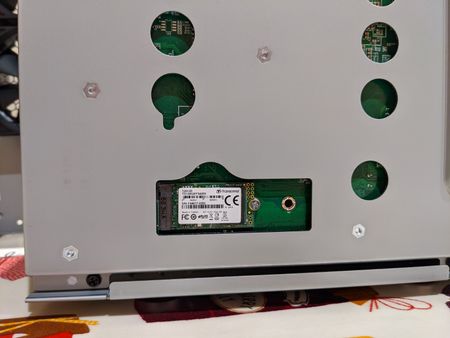
Hi Following on from https://community.netgear.com/t5/New-ReadyNAS-Users-General/Add-SSD-drive-s-to-RN528X/td-p/1776859 I've just had a go at adding an M2 SSD to my new 528X. It seems have wo...

powellandy1
Aug 22, 2020Virtuoso
Hi
Thanks. I haven't changed any array or volume names (knowingly) but please do tell me if I should do/need to.
Regarding FSTAB, again forgive me I'm pretty new to Linux, /etc/fstab just contains:
root@MediaMaster:~# cat /etc/fstab
LABEL=0a436c4c:data /data btrfs defaults 0 0
So I don't think I need to add anything there. The SSD is not visible anywhere in the GUI so it's rather difficult to know if it's being used.
Good thought about the effect of adding another drive. I'll try that and report back.
Thanks
Andy
powellandy1
Aug 22, 2020Virtuoso
Added another 2TB HDD. Interestingly it seems the changes made above are only preserved for md0 (which is the root isn't it)?
root@MediaMaster:~# cat /proc/mdstat
Personalities : [raid0] [raid1] [raid10] [raid6] [raid5] [raid4]
md1 : active raid1 sdc2[1] sda2[0]
      523264 blocks super 1.2 [2/2] [UU]

md127 : active raid1 sdc3[1] sda3[0]
      1948664832 blocks super 1.2 [2/1] [U_]
      [>....................]  recovery =  0.2% (5598592/1948664832) finish=558.9min speed=57935K/sec

md0 : active raid1 sdc1[2] sda1[0](W) sdb1[1]
      4190208 blocks super 1.2 [3/3] [UUU]

unused devices: <none>
I also made the SSD partitions on a 2048 sector boundary - this seems to be fine. The boundaries are now:
start 2048 end 8390655
start 8390656 end 9439232
Cheers
A
Related Content
NETGEAR Academy

Boost your skills with the Netgear Academy - Get trained, certified and stay ahead with the latest Netgear technology!
Join Us!
