NETGEAR is aware of a growing number of phone and online scams. To learn how to stay safe click here.
Forum Discussion

Ihshinron
Apr 17, 2025Aspirant
ReadyNas 212 HELP needed
Hello all, I have a Readynas 212 and I need help after making many errors. I currently have 2x 4TB drives. Drive #1 is older and had data already. I turned from JBOD to RAID1 by moving for X-RAID...
 Apr 23, 2025
Ihshinron wrote:
is there anything that can be done to try to recover the data on either 4TB #1 or #2?
First, don't bother with tailed drive. Boot up the system with only the 4 TB drive in place.
If you are still using password as the NAS admin password, then change that to something. Then double-check that ssh is still enabled in system->settings->services->ssh.
You can then download WinSCP ( https://winscp.net/eng/index.php ). That supports a protocol called SFTP. Set up a connection that uses that protocol.
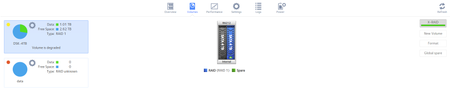
Use the IP address of your Nas (not the one in the screen shot).
After you connect, the right pane should look something like this:
Somewhere in that list you should see your DSK-4TB folder. Navigate into it, and see if your shares are listed. If they are, you can copy them to a disk on the PC.
StephenB
Apr 18, 2025Guru - Experienced User
Ihshinron wrote:
Should l eliminate/destroy that "data" volume that is showing up there with 0 for Data and 0 for Free Space?
No. Doing that will make it even more difficult to recover.
Ihshinron wrote:
Then saw that Drive #2 is degraded,
Drives are never degraded. Volumes are degraded. Shuffling around drives might have made recovery more difficult.
FWIW, if you were running XRAID before, all you needed to do was hot-insert the new drive.
Ihshinron wrote:
I've downloaded the logs
I can take a look if you like. Upload the full log zip to cloud storage (dropbox, google drive, etc), and send me a PM (private message) with a link. Make sure the permissions are set so anyone with the link can download. You send a PM using the envelope link in the upper right of the forum page.
Don't post the link publicly, there is some privacy leakage when you do that.

Sandshark
Apr 18, 2025Sensei
Have you left out some steps? I think you may have done this:
Started with a 6TB drive in bay 1 and 4TB drive in bay 2 as separate JBOD volumes. You then powered down and removed the 6TB before doing what you've listed. But6 how you had two volumes and were still in XRAID mode has me questioning this. At any rate, the 6TB is involved somehow, and you need to include it in your description.
NAS are not designed to be drive bays in which you can swap drives back and forth. So if I'm right, then you have very much confused the OS. It looks like it marked the original 4TB as RAID1 but couldn't add the other to that RAID, thus it is degraded. I've never done this, so i can't be sure, but I suspect the problem is that the OS still reserved bay 1 for the 6TB drive.
It also appears to me that your 6TB was the primary volume and the 4TB the secondary, which made the situation even worse by booting without the primary drive.
It's unclear to me why you wanted to go to RAID1 when you wouldn't have room for all three drives. Was this an attempt to create a "backup"?
If I'm right, then I believe that you've only confused the GUI and you can get to your files via SSH.
You can probably get everything back and get the GUI to recognize everything by booting with the two original drives. But I'd do so in read-only mode first (via the reset button menu) just in case that doesn't work. The 4TB volume will still show as degraded, but I think you'll get access back. If this all works, once you back up the data and feel comfortable booting in read/write mode, I can tell you how can use SSH to tell the NAS that the 4TB is actually JBOD so it doesn't complain about the volume being degraded.
- IhshinronApr 18, 2025Aspirant
Sandshark wrote:Have you left out some steps? I think you may have done this:
Started with a 6TB drive in bay 1 and 4TB drive in bay 2 as separate JBOD volumes. You then powered down and removed the 6TB before doing what you've listed. But6 how you had two volumes and were still in XRAID mode has me questioning this. At any rate, the 6TB is involved somehow, and you need to include it in your description.
NAS are not designed to be drive bays in which you can swap drives back and forth. So if I'm right, then you have very much confused the OS. It looks like it marked the original 4TB as RAID1 but couldn't add the other to that RAID, thus it is degraded. I've never done this, so i can't be sure, but I suspect the problem is that the OS still reserved bay 1 for the 6TB drive.
It also appears to me that your 6TB was the primary volume and the 4TB the secondary, which made the situation even worse by booting without the primary drive.
It's unclear to me why you wanted to go to RAID1 when you wouldn't have room for all three drives. Was this an attempt to create a "backup"?
If I'm right, then I believe that you've only confused the GUI and you can get to your files via SSH.
You can probably get everything back and get the GUI to recognize everything by booting with the two original drives. But I'd do so in read-only mode first (via the reset button menu) just in case that doesn't work. The 4TB volume will still show as degraded, but I think you'll get access back. If this all works, once you back up the data and feel comfortable booting in read/write mode, I can tell you how can use SSH to tell the NAS that the 4TB is actually JBOD so it doesn't complain about the volume being degraded.
Yes, you are absolutely right. I did not mention that because did not want to make the post too long.
I used to have the 6TB Bay1 and old 4TB (Drive#1) Bay2. Both as JBOD. Using them just fine but did not know that I could still do a RAID1 with a 6TB and a 4TB, now I know it can be done not sure how though but doesn't mind now.
All of a sudden the 6TB started making a click noise and could not be accessed so I thought I had lost all data in that drive and because it was JBOD I knew I had to turn everything into a 4TB Raid1. I turned everything off and a couple of months later ordered and received 2 new 4TB drives. I turned it back on and I don't know why but 6TB drive works fine now...
I moved data from 6TB to 4TB, then removed 6TB and turned 4TB into Raid1. But I think there's an issue with the OS that I got the system confused by not formatting and starting all from the ground up. Then inserted a new 4TB drive, al synced good but then there were some issues with DLNA not being able to turn on due to "Volume issues" (of course). I panicked and did watever came to mind.... and I think I made things worse because I did OS reinstall on both drives etc. Now I cant access the data because I believe I have removed the logical order or whatever is needed to recognize the raid1.
Question: If I boot in Read-Only mode with both 4TB drives in should I be able to see the files and copy them out to my PC? Would I be able to then boot again and have the drives in read/write again?
For the future, how should I start over?
Place both drives in the NAS, format all and create 1 volume name with both 4TB disks?
If I wanted at some point to insert the 6TB drive to copy some data from there... would I be able to do so?
Thanks,
- IhshinronApr 19, 2025Aspirant
If I save the data, format everthing and have the 212 in RAID1 with 2x TB disks. Would I be able to connect the 6TB via USB to the 212 to read the 6TB and move data to the RAID1?
Windows can't read the 6TB disk, I guess it cannot read the format. Is there any software that could help to read the disk without having to Initiate the disk to assign a drive letter? (this would also format the disk, right?)
Thank you
- SandsharkApr 19, 2025Sensei
Why are you looking for ways to read the 6TB outside the NAS? Unless the volume is bad, you can simply put it in the NAS and boot. If the original 4TB isn't also there, then that volume will be flagged as missing. But your primary volume will be there, so things should be accessible.
As with booting with both drives (which I still think is the most likely way to make everything available), it would be best to, at least at first, boot in read-only mode.
I have heard of folks trying to read a previously internal drive as an external one on USB and not having success. But I've not tried it. From a pure Linux standpoint, it ought to work. But the OS may be doing something in the auto-mounting process that prevents it. The drive is in a Linux format, so a Linux computer (which could just be any computer booted from a "Live" CD or USB drive) with mdadm and BTRFS installed. Unless your volume is damaged, there should be no need for expensive recovery software.
- SandsharkApr 19, 2025Sensei
One problem is you didn't tell the OS that you were removing the 6TB volume by EXPORTing or DESTROYing it. That can be especially bad because it was your primary volume, where app and some other data is exclusively stored (so they don't fill up the OS partition). The OS designates the other drive as primary once you EXPORT or DESTROY the primary, but you didn't do that. But at this point with the 6TB not actually present, I don't know if DESTROYing it would be a good or bad thing.
I don't know a lot about how ReadyDLNA works, but it sounds like it probably also has items only on the primary drive, which is now gone. There may simply be things the OS refuses to do with no primary volume present. These are things that Netgear has never disclosed -- I've just learned what I can by doing a lot of drive removal experiments.
I don't think booting with both 4TB is going to be any different than booting with the original 4TB only. That volume is showing as degraded, meaning the second drive was never actually synced as RAID1. You can certainly try it and see if you can see the data via SSH. But if you've not previously enabled SSH, there is a chance you won't be able to because of the missing primary volume.
Does the 6TB no longer work or is there some other reason booting with the two original drives, as I previously suggested, isn't an option?
- StephenBApr 19, 2025Guru - Experienced User
Sandshark wrote:
I don't think booting with both 4TB is going to be any different than booting with the original 4TB only. That volume is showing as degraded, meaning the second drive was never actually synced as RAID1. You can certainly try it and see if you can see the data via SSH. But if you've not previously enabled SSH, there is a chance you won't be able to because of the missing primary volume.
One of the 4 TB disks has failed. It's not clear yet whether the system can boot with only the second 4 TB disk installed - although the volume did successfully resync about a week ago, unfortunately there has been a lot of disk shuffling since then. If a resync was interrupted, then the volume might not mount.
I've asked for fresh logs if the volume doesn't mount with only the good 4 TB drive installed, so I can see the current error details.
Related Content
NETGEAR Academy

Boost your skills with the Netgear Academy - Get trained, certified and stay ahead with the latest Netgear technology!
Join Us!
