NETGEAR is aware of a growing number of phone and online scams. To learn how to stay safe click here.
Forum Discussion

phantomcsa
Mar 07, 2024Tutor
Readynas 316 disk state unknown after replacement
I have having problems replacing a drive in my ReadyNas 316. I have added/replaced drives many times and this is the 1st time I have run into this issue. In the past the NAS accepted the drive and...
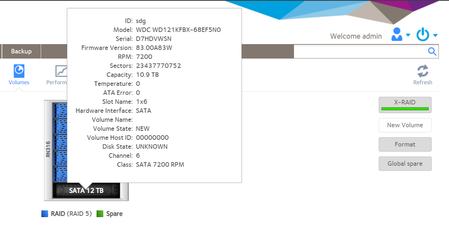
phantomcsa
Mar 07, 2024Tutor
Yes, lots more information in the downloaded log file. Is there something specific I'm looking for?
Thanks

StephenB
Mar 07, 2024Guru - Experienced User
I'd be looking for errors in various logs (system, kernel, systemd-journal) around the time you inserted the new disk. Also I'd check mdstat to see if the new disk was synced to the OS partition (md0) or not. Probably look in disk_info.log also.
If you like, I could take a look. You'd need to PM me a download link to the logs.
But I think the first step would be to test the disk. That can be done with WD's utility in a Windows PC, but also you could run the long test with smartctl from the linux command line. Do you have ssh enabled (and have experience with the linux command line)?
- phantomcsaMar 07, 2024Tutor
Found this in the rn-expand.log file
Looks like it might be a bad drive? I will take it out and try it in a PC.
-- Logs begin at Thu 2024-03-07 13:59:04 EST, end at Thu 2024-03-07 16:41:10 EST. --
Mar 07 13:59:40 nas01 rn-expand[3579]: Changing root RAID member count from 6 to 5
Mar 07 13:59:42 nas01 rn-expand[3579]: find_available_disk: Searching for disk to repair 'data'...
Mar 07 13:59:42 nas01 rn-expand[3579]: find_available_disk: Checking disk 0:1 (sdb,WDC_WD80EFZX-68UW8N0,7452GB)...
Mar 07 13:59:42 nas01 rn-expand[3579]: find_available_disk: Checking disk 0:2 (sdc,WDC_WD80EFZX-68UW8N0,7452GB)...
Mar 07 13:59:42 nas01 rn-expand[3579]: find_available_disk: Checking disk 0:0 (sda,WDC_WD120EFAX-68UNTN0,11176GB)...
Mar 07 13:59:42 nas01 rn-expand[3579]: find_available_disk: Checking disk 0:3 (sdd,WDC_WD120EFAX-68UNTN0,11176GB)...
Mar 07 13:59:42 nas01 rn-expand[3579]: find_available_disk: Checking disk 0:4 (sde,WDC_WD120EFBX-68B0EN0,11176GB)...
Mar 07 13:59:42 nas01 rn-expand[3579]: find_available_disk: Checking disk 0:5 (sdg,WDC_WD121KFBX-68EF5N0,11176GB)...
Mar 07 13:59:42 nas01 rn-expand[3579]: find_available_disk: Disk 0:5 (sdg,WDC_WD121KFBX-68EF5N0,11176GB) is available
Mar 07 13:59:42 nas01 rn-expand[3579]: repair_pool: Trying to repair pool [data]
Mar 07 13:59:42 nas01 rn-expand[3579]: prepare_disk: Prepare disk 0:5 (sdg,WDC_WD121KFBX-68EF5N0,11176GB) with partition size 7804595824
Mar 07 13:59:42 nas01 rn-expand[3579]: Found sdg is not a member of root
Mar 07 13:59:46 nas01 rn-expand[3579]: Partitioning failed! [4]
Mar 07 13:59:46 nas01 rn-expand[3579]: output: Warning! Read error 5; strange behavior now likely!;Warning! Read error 5; strange behavior now likely!;Creating new GPT entries in memory.;Warning! GPT main header not overwritten! Error is 5;Warning: The kernel is still using the old partition table.;The new table will be used at the next reboot or after you;run partprobe(8) or kpartx(8);GPT data structures destroyed! You may now partition the disk using fdisk or;other utilities.;Warning! MBR not overwritten! Error is 5!;Warning! Read error 5; strange be
Mar 07 13:59:46 nas01 rn-expand[3579]: adding partition failed [5]
Mar 07 13:59:46 nas01 rn-expand[3579]: Found sdg is not a member of swap
Mar 07 13:59:47 nas01 rn-expand[3579]: Partitioning failed! [4]
Mar 07 13:59:47 nas01 rn-expand[3579]: output: Warning! Read error 5; strange behavior now likely!;Warning! Read error 5; strange behavior now likely!;Creating new GPT entries in memory.;Unable to save backup partition table! Perhaps the 'e' option on the experts';menu will resolve this problem.;Warning! An error was reported when writing the partition table! This error;MIGHT be harmless, or the disk might be damaged! Checking it is advisable.;
Mar 07 13:59:48 nas01 rn-expand[3579]: Partitioning failed! [4]
Mar 07 13:59:48 nas01 rn-expand[3579]: output: Warning! Read error 5; strange behavior now likely!;Warning! Read error 5; strange behavior now likely!;Creating new GPT entries in memory.;Unable to save backup partition table! Perhaps the 'e' option on the experts';menu will resolve this problem.;Warning! An error was reported when writing the partition table! This error;MIGHT be harmless, or the disk might be damaged! Checking it is advisable.;
Mar 07 13:59:48 nas01 rn-expand[3579]: add_partition: Input/output error [5]
Mar 07 13:59:48 nas01 rn-expand[3579]: repair_pool: prepare disk failed: Input/output error
Mar 07 13:59:48 nas01 rn-expand[3579]: Trying auto-extend (grow onto additional disks)
Mar 07 13:59:48 nas01 rn-expand[3579]: Trying xraid-expand (tiered expansion)- StephenBMar 07, 2024Guru - Experienced User
phantomcsa wrote:
Found this in the rn-expand.log file
Looks like it might be a bad drive? I will take it out and try it in a PC.
I agree that is likely.
- phantomcsaMar 08, 2024Tutor
Thank you again. It was a bad drive! I replaced the drive and the NAS is now syncing
Related Content
NETGEAR Academy

Boost your skills with the Netgear Academy - Get trained, certified and stay ahead with the latest Netgear technology!
Join Us!
