NETGEAR is aware of a growing number of phone and online scams. To learn how to stay safe click here.
Forum Discussion

phantomcsa
Mar 07, 2024Tutor
Readynas 316 disk state unknown after replacement
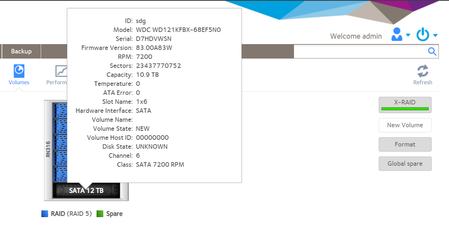
I have having problems replacing a drive in my ReadyNas 316. I have added/replaced drives many times and this is the 1st time I have run into this issue. In the past the NAS accepted the drive and...
phantomcsa
Mar 07, 2024Tutor
Found this in the rn-expand.log file
Looks like it might be a bad drive? I will take it out and try it in a PC.
-- Logs begin at Thu 2024-03-07 13:59:04 EST, end at Thu 2024-03-07 16:41:10 EST. --
Mar 07 13:59:40 nas01 rn-expand[3579]: Changing root RAID member count from 6 to 5
Mar 07 13:59:42 nas01 rn-expand[3579]: find_available_disk: Searching for disk to repair 'data'...
Mar 07 13:59:42 nas01 rn-expand[3579]: find_available_disk: Checking disk 0:1 (sdb,WDC_WD80EFZX-68UW8N0,7452GB)...
Mar 07 13:59:42 nas01 rn-expand[3579]: find_available_disk: Checking disk 0:2 (sdc,WDC_WD80EFZX-68UW8N0,7452GB)...
Mar 07 13:59:42 nas01 rn-expand[3579]: find_available_disk: Checking disk 0:0 (sda,WDC_WD120EFAX-68UNTN0,11176GB)...
Mar 07 13:59:42 nas01 rn-expand[3579]: find_available_disk: Checking disk 0:3 (sdd,WDC_WD120EFAX-68UNTN0,11176GB)...
Mar 07 13:59:42 nas01 rn-expand[3579]: find_available_disk: Checking disk 0:4 (sde,WDC_WD120EFBX-68B0EN0,11176GB)...
Mar 07 13:59:42 nas01 rn-expand[3579]: find_available_disk: Checking disk 0:5 (sdg,WDC_WD121KFBX-68EF5N0,11176GB)...
Mar 07 13:59:42 nas01 rn-expand[3579]: find_available_disk: Disk 0:5 (sdg,WDC_WD121KFBX-68EF5N0,11176GB) is available
Mar 07 13:59:42 nas01 rn-expand[3579]: repair_pool: Trying to repair pool [data]
Mar 07 13:59:42 nas01 rn-expand[3579]: prepare_disk: Prepare disk 0:5 (sdg,WDC_WD121KFBX-68EF5N0,11176GB) with partition size 7804595824
Mar 07 13:59:42 nas01 rn-expand[3579]: Found sdg is not a member of root
Mar 07 13:59:46 nas01 rn-expand[3579]: Partitioning failed! [4]
Mar 07 13:59:46 nas01 rn-expand[3579]: output: Warning! Read error 5; strange behavior now likely!;Warning! Read error 5; strange behavior now likely!;Creating new GPT entries in memory.;Warning! GPT main header not overwritten! Error is 5;Warning: The kernel is still using the old partition table.;The new table will be used at the next reboot or after you;run partprobe(8) or kpartx(8);GPT data structures destroyed! You may now partition the disk using fdisk or;other utilities.;Warning! MBR not overwritten! Error is 5!;Warning! Read error 5; strange be
Mar 07 13:59:46 nas01 rn-expand[3579]: adding partition failed [5]
Mar 07 13:59:46 nas01 rn-expand[3579]: Found sdg is not a member of swap
Mar 07 13:59:47 nas01 rn-expand[3579]: Partitioning failed! [4]
Mar 07 13:59:47 nas01 rn-expand[3579]: output: Warning! Read error 5; strange behavior now likely!;Warning! Read error 5; strange behavior now likely!;Creating new GPT entries in memory.;Unable to save backup partition table! Perhaps the 'e' option on the experts';menu will resolve this problem.;Warning! An error was reported when writing the partition table! This error;MIGHT be harmless, or the disk might be damaged! Checking it is advisable.;
Mar 07 13:59:48 nas01 rn-expand[3579]: Partitioning failed! [4]
Mar 07 13:59:48 nas01 rn-expand[3579]: output: Warning! Read error 5; strange behavior now likely!;Warning! Read error 5; strange behavior now likely!;Creating new GPT entries in memory.;Unable to save backup partition table! Perhaps the 'e' option on the experts';menu will resolve this problem.;Warning! An error was reported when writing the partition table! This error;MIGHT be harmless, or the disk might be damaged! Checking it is advisable.;
Mar 07 13:59:48 nas01 rn-expand[3579]: add_partition: Input/output error [5]
Mar 07 13:59:48 nas01 rn-expand[3579]: repair_pool: prepare disk failed: Input/output error
Mar 07 13:59:48 nas01 rn-expand[3579]: Trying auto-extend (grow onto additional disks)
Mar 07 13:59:48 nas01 rn-expand[3579]: Trying xraid-expand (tiered expansion)

StephenB
Mar 07, 2024Guru - Experienced User
phantomcsa wrote:
Found this in the rn-expand.log file
Looks like it might be a bad drive? I will take it out and try it in a PC.
I agree that is likely.
- phantomcsaMar 08, 2024Tutor
Thank you again. It was a bad drive! I replaced the drive and the NAS is now syncing
Related Content
NETGEAR Academy

Boost your skills with the Netgear Academy - Get trained, certified and stay ahead with the latest Netgear technology!
Join Us!
