NETGEAR is aware of a growing number of phone and online scams. To learn how to stay safe click here.
Forum Discussion

knorman5
Dec 13, 2021Aspirant
readynas 4360 how to replace a drive that was removed by the NAS
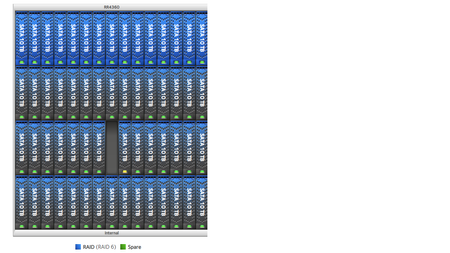
I have a redynas 4360. flly loaded. that apparently removed a drive from slot 39 of the 3rd raid volume so. I inserted a compatible drive from another system. when i insert the new drive the drive...

StephenB
Dec 13, 2021Guru - Experienced User
knorman5 wrote:
I inserted a compatible drive from another system.
Did you unformat it first? If it was from another ReadyNAS, the system might have gotten confused.
Not sure what to make of the issue with slot 38, but the best solution for slot 39 is to hot-insert a blank (unformatted) disk. Alternatively, format it as NTFS. Then hot-insert it, and format it again from the NAS volume page.
- knorman5Dec 13, 2021Aspirant
OK, after sync is complete. reformat the drive externally (NTFS) , pull the failing drive from slot 39, Insert the newly re-formated drive in its place. Will the NAS prompt me to format the drive?
After the volume re-syncs i think i will reseat the drive in slot 38? is that a safe plan?
Note: this replacement drive was previously part of a raid 6 array on a synology NAS that died. it is the same drive as we have in the readynas.
- StephenBDec 14, 2021Guru - Experienced User
knorman5 wrote:
OK, after sync is complete. reformat the drive externally (NTFS) , pull the failing drive from slot 39, Insert the newly re-formated drive in its place. Will the NAS prompt me to format the drive?
No, the NAS won't prompt you. You'll need to select it and format it.
Though if you are formatting with Windows, you can just delete the partitions with Windows Disk Manager instead. Then just hot-insert the drive. Then there is no need to reformat on the NAS.
knorman5 wrote:
After the volume re-syncs i think i will reseat the drive in slot 38? is that a safe plan?
That is reasonable, and should be safe.
You could look in the logs first - you should see an entry for the removal when it became unseated.
- knorman5Dec 14, 2021Aspirant
The drive in slot 39 was removed because it was blinking red and replaced. = on dec 13th at 3PM when the replacement drive in slot 39 was inserted. the drive in slot 38 was removed (by the NAS not by me. it was never physically unseated.) the NAS then got very consused ans asked to remove several drives (odd that this does not show up in the logs). so decided to put the original disk back into slot 39.(in hopes of resolving what evert happened to the disk in slot 38. here are what the the logs DO show . the admin Gui reported that the resync had finished about 8:40 this morning then at 8:40:06 the Nas said it removed the disc from channel 39 then readded it and resync is starting Over, any idea why?
are we in a loop? should i sit on my hands for a week? is it safe to physically reseat the disk on slot 38 while this second resync is in progress? or is there some diagnostic proceedure i can perform to determine what is really going on?
this is a 15 Disk Raid60 volme (one of 4 identical Raid volumes)
Dec 14, 2021 08:41:47 Volume: Resyncing started for Volume data.
Dec 14, 2021 08:41:38 Disk: Disk Model:ST10000VN0004-1ZD101 Serial:ZA2717S0 was added to Channel 39 of the head unit.
Dec 14, 2021 08:40:06 Volume: The resync operation finished on volume data. However, the volume is still degraded.
Dec 14, 2021 08:40:00 Disk: Disk Model:ST10000VN0004-1ZD101 Serial:ZA2717S0 was removed from Channel 39 of the head unit.
Dec 14, 2021 01:00:19 Volume: Volume data is Degraded.Dec 13, 2021 15:20:34 Volume: Resyncing started for Volume data.
Dec 13, 2021 15:20:18 Disk: Disk Model:ST10000VN0004-1ZD101 Serial:ZA2717S0 was added to Channel 39 of the head unit.
Dec 13, 2021 15:17:41 Disk: Disk Model:ST10000VN0004-1ZD101 Serial:ZA28TXWB was removed from Channel 39 of the head unit.
Dec 13, 2021 15:01:53 Disk: Disk Model:ST10000VN0004-1ZD101 Serial:ZA27FVSW was removed from Channel 38 of the head unit.
Dec 13, 2021 15:01:47 Disk: Disk Model:ST10000VN0004-1ZD101 Serial:ZA28TXWB was added to Channel 39 of the head unit.
Related Content
NETGEAR Academy

Boost your skills with the Netgear Academy - Get trained, certified and stay ahead with the latest Netgear technology!
Join Us!
