NETGEAR is aware of a growing number of phone and online scams. To learn how to stay safe click here.
Forum Discussion

Bjornels
Nov 03, 2020Aspirant
Readynas cannot connect to Mac Pro - help me, please !!!!
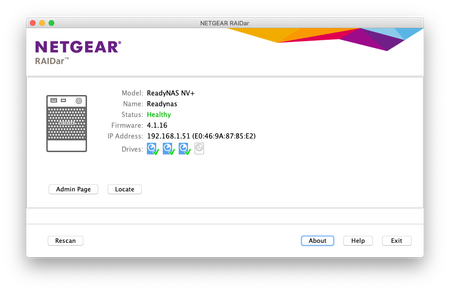
Hi. First post here. I use this Nas already 6 years without any problems. Last month I could not get a connection to my Nas anymore. I am using a Mac Pro with mojave (10.14.6). I tried to reins...

StephenB
Nov 03, 2020Guru - Experienced User
You have an RND4000 v1, not a v2. The v2 runs 5.3.x firmware, not 4.1.x. The labeling on the original NV+ is confusing, so a lot of people do make that mistake.
What happens when you browse to https://192.168.1.51/admin ?
If you can reach the admin page, then one option is to enable FTP as a file sharing protocol. You could then use an FTP client (Filezilla is one) to offload your files to a backup.
Bjornels
Nov 04, 2020Aspirant
Hi
Thanks for the quick replay. When i try to connect to the nas admin page or other page I get this image cannot connect to server.
- StephenBNov 04, 2020Guru - Experienced User
RAIDar said the NAS IP was 192.168.1.51. Your Safari screenshot says you were browsing to 192.168.1.11.
Did the IP address change, or did you accidently browse to the wrong IP address?
Related Content
NETGEAR Academy

Boost your skills with the Netgear Academy - Get trained, certified and stay ahead with the latest Netgear technology!
Join Us!
