NETGEAR is aware of a growing number of phone and online scams. To learn how to stay safe click here.
Forum Discussion

ISvevo
Mar 06, 2021Aspirant
ReadyNAS NVX Pioneer RNDX400E; Can't Create Backup prior to Replacing Failing Drive
Apologies for not finding this if others have already posted solution. SETUP: Model: ReadyNAS NVX Pioneer Edition [X-RAID2] Firmware: RAIDiator 4.2.28 Memory: 1024 MB [6-6...

StephenB
Mar 07, 2021Guru - Experienced User
ISvevo wrote:
Replacement (Refurbed) same model Samsung HDD arriving in 2 days
The size of the replacement needs to match, but the model doesn't need to match. Personally I would have purchased a new drive.
ISvevo wrote:
PROBLEM:
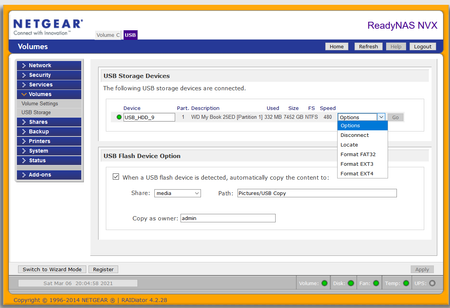
Shows that the USB HDD is in NTFS format but doesn't allow me to create a backup job. When I try to select path to a folder on the selected share, it just hangs up (pls see photos) and won’t illuminate the “Test connection” button.
Not sure what is going on. But I do have a suggestion. Your new USB drive is USB-3, but your old NAS only does USB-2. Normally you'd get much faster speeds if you connect to the drive to a PC that is connected to your network using ethernet. Even using WiFi might get you better speeds. Note that your failing (or failed) disk will slow down the backup speed.
In any event, I suggest doing the backup over the network. Although with some pain you can use a NAS backup job, I suggest instead that you use a backup utility on the PC. FreeFileSync is a free one. You could also just do drag-and-drop, but I'd suggest going with a more robust utility instead.
It is possible that the failing drive is causing your problem. If you are certain that it is the only failing drive in the system, you could also just pull it now and try again. But I'd try shifting the backup to the PC first - at the very least that will give you more visibility into what's going on.
- ISvevoMar 11, 2021Aspirant
@StephenB Thanks! I left it alone long enough to have it finally show the share, but it still wouldn't allow me to get to test connection option, and now it shows that share as "Empty" which it isn't.
I put that effort on hold and took your advice for direct connection to the laptop and ethernet to the LAN using FFS. It took several attempts, but I think I’m close to having a backup to the USB drive of the key data.
The #2 Drive is now showing this:
“Thu Mar 11 08:39:03 CST 2021 Detected increasing ATA errors on disk 2[SAMSUNG HD204UI, S2H7J1CZA02139] 628 times in the past 30 days. This often indicates an impending failure. Please be prepared to replace this disk to maintain data redundancy.”
Absolutely concur on the Refurb vs New but I read on many posts here that the hot swap replacement should be the same model, and given how old these are (since purchased) I'm not smart enough to know the compatibility of this ReadyNAS to accept new.
I do have a brand new HDD which I purchased about the same time I built the ReadyNAS. It’s a 2TB SATA/64MB Cache/WD20EZRX. Do you recommend I try it vice the used HDD I bought but haven’t opened yet and could return? If so, do I hotswap while the machine ReadyNAS is powered up or do I power it down, swap and then power up? I’m just antsy about hot swapping onto a powered bus.
Once the hard drive swap has been completed and that drive has been rebuilt, I’ll tackle getting the ReadyNAS to recognize the USB HDD connected directly to it.
Thanks for your ongoing assistance!
- SandsharkMar 11, 2021Sensei
"Green" drives such as your WD20EZRX are a poor choice for RAID. There is no need for the drives to be matched, and NAS-purposed drive are a good choice. BUT, the current WD Red line is SMR, which is also a poor choice for RAID, so you should stick with the Red Plus, Red Pro, or Seagate Ironwolf. Enterprise drives will also work, but there is little need for the additional cost with your NAS.
- ISvevoMar 11, 2021Aspirant
Sandshark Thanks for the advice, especially to avoid SMR drives for RAID.
Am still plugging away at getting all shares onto the USB HDD per StephenB 's guidance. #2 HDD in ReadyNAS continues to amass failures and is now resynching again.
I am on borrowed time:
Thu Mar 11 22:24:43 CST 2021 ATA error count has increased in the last day. Disk 2: Previous count: 36 Current count: 742 Growing SMART errors indicate a disk that may fail soon. If the errors continue to increase, you should be prepared to replace the disk.
Thu Mar 11 22:21:41 CST 2021 Detected increasing ATA errors on disk 2[SAMSUNG HD204UI, S2H7J1CZA02139] 743 times in the past 30 days. This often indicates an impending failure. Please be prepared to replace this disk to maintain data redundancy.
Thu Mar 11 22:21:29 CST 2021 System is up.
Thu Mar 11 22:13:08 CST 2021 The disk on channel 2 has failed. Shutting down the system to prevent possible data loss resulting from additional failed drives.
Thu Mar 11 21:43:02 CST 2021 The disk on channel 2 has failed. The NAS will automatically shutdown in 30 minutes to prevent possible data loss resulting from additional failed drives.
Will this plan work?:
- Use the Green drive as an interim to stabilize the RAID while I determine upgrade capacity.
- What is the largest HDD I can put into the RNDX400E? I've seen 4TB from other users but not sure how old theirs are compared to mine
- What is your opinion on the reliability of the diskless bay which I purchased several years ago? It is home use and I have it set to spin down when not in use and it is on a UPS. I've replaced the fan and the PS
- I've seen this unit listed with "EOL" at the end on this site. Does this mean End of Life and NetGear is going to cease supporting software/BIOS for it?
- I'd like to upgrade to 4TB per bay min (the Seagate IronWolf 4TB NAS Internal Hard Drive HDD – CMR 3.5 Inch SATA 6Gb/s 5900 RPM 64MB Cache for RAID Network Attached Storage – Frustration Free Packaging (ST4000VN008) seems the right price point on TB/$) and then get a 12TB USB HDD to connect directly to it (understanding this unit is only USB 2.0 and slow, but use that for incremental backups) and tackle the original problem I started out with. However, buying 4x4TB drives would mean I’m hoping to get another 4 years out of the unit before having to abandon it. Is that a reasonable expectation?
Thanks!

Related Content
NETGEAR Academy

Boost your skills with the Netgear Academy - Get trained, certified and stay ahead with the latest Netgear technology!
Join Us!
