NETGEAR is aware of a growing number of phone and online scams. To learn how to stay safe click here.
Forum Discussion

justsumdad
Apr 23, 2025Aspirant
ReadyNAS RN104 fresh setup to replace Seagate NAS
hello, just a fresh user of the ReadyNAS system 🙂 I just acquired (used) a ReadyNAS 104 and stuck in four 4tb WD purple drives I had salvaged and tested good. Its taking days to sync,...
 Apr 23, 2025
justsumdad wrote:
any input on the two issues?
Sorry, I thought I'd posted that.
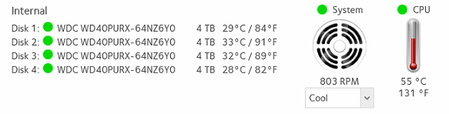
My RN102 has the same processor, and runs at 50C when idle. So your CPU temp is typical.
The NAS has a back up job capability that can copy directly from the Synology. Protocol include rsync (which is what I use), smb, and NFS.
StephenB
Apr 23, 2025Guru - Experienced User
justsumdad wrote:
All searches show the WD40PURX as CMR
It is CMR. FWIW, an early RN104 review said it took 32 hours to sync a 4x3TB array. Since the time is linear with storage 4x4TB should take 4/3 * 32 hours or about 43 hours.
So this appears to be slower than usual. Since one cause of a slow sync time is a failing disk, it is worth checking the logs I mentioned to see if anything is going wrong.
justsumdad
Apr 23, 2025Aspirant
will the contents of the zip log be different from what i can see in the GUI?
Can you direct me a little on how to access this zip log plz?
- StephenBApr 23, 2025Guru - Experienced User
justsumdad wrote:
will the contents of the zip log be different from what i can see in the GUI?
Yes.
justsumdad wrote:
Can you direct me a little on how to access this zip log plz?
Just click on "Download Logs" on the log page in the web ui.
- justsumdadApr 24, 2025Aspirant
Related Content
NETGEAR Academy

Boost your skills with the Netgear Academy - Get trained, certified and stay ahead with the latest Netgear technology!
Join Us!
