NETGEAR is aware of a growing number of phone and online scams. To learn how to stay safe click here.
Forum Discussion

kuroneko1971
Jul 20, 2023Aspirant
ReadyNAS RN214 RAID5 disk upgrading
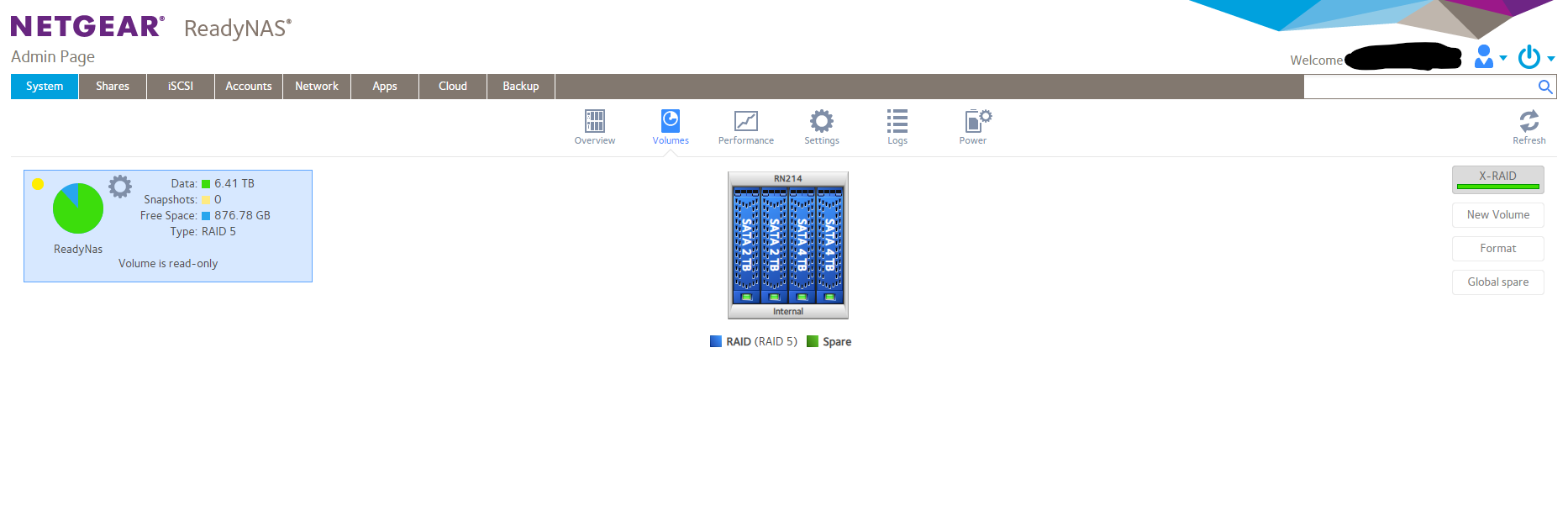
I have a Netgear ReadyNAS 214 4-bay with 2 4TB drives and 2 2TB drives configured in RAID 5. X-RAID is turned on. Last night, the display read: find_get_entry+5c and I could not log into the device v...
kuroneko1971
Jul 22, 2023Aspirant
StephenB I meant I hadn't heard back by 3:30, when I attempted this, "fix." I saw your reply at 5 something. Anyway, long story short, at midnight it was frozen around 97.48% for an hour and a half, so I tried inserting the new disk. Nothing. I put the old one back in, and it started re-syncing again - this was around 1:30am PST. It just finished, but with tons of errors. I don't think I'm going to be able to back up before catastrophic failure.

StephenB
Jul 23, 2023Guru - Experienced User
kuroneko1971 wrote:
StephenB I meant I hadn't heard back by 3:30, when I attempted this, "fix." I saw your reply at 5 something. Anyway, long story short, at midnight it was frozen around 97.48% for an hour and a half, so I tried inserting the new disk. Nothing. I put the old one back in, and it started re-syncing again - this was around 1:30am PST. It just finished, but with tons of errors. I don't think I'm going to be able to back up before catastrophic failure.
Are you able to access your data?
Is the volume showing a degraded status?
- SandsharkJul 23, 2023Sensei
kuroneko1971 , neither StephenB nor I work for Netgear or receive any compensation for our contributions here. Given that, you have unrealistic expectations of when you will receive a response without even considering any time zone differences. If you really want help, don't go off doing things on your own. As with the re-boot (which you think you couldn't avoid, but now we'll never know), you are doing more damage to your volume every time.
- kuroneko1971Jul 24, 2023Aspirant
Sandshark StephenB
I appreciate your contributions. I do not have unrealistic expectations; I merely attempted to try something on my own while waiting for a response that I knew could come days later. I am not trying to be rude.The volume does not show as degraded. It did briefly show as degraded, but that was when it crashed during a Google Drive backup attempt. At this point, barring any last ditch ideas/solutions to recover the data from this missing volume, I am fully prepared to insert the new replacement drives and wipe out everything and start over fresh.
This was my Plex server; I had ripped over 2400 movies and tv shows from my DVD and BluRay collection to this RAID. I'll just have to rip new .mkvs all over again.- SandsharkJul 24, 2023Sensei
No, your volume is not "degraded", which simply means still accessible, but lacking redundancy. It's unmountable, aka "lost" Exactly what I warned you was a likely occurrence when I told you "DO NOT, under any circumstances, reboot the NAS to try to fix this. The more likely result will be nothing best case or loss of your volume worst case." There was a chance, assuming you have SSH enabled, that a reboot wasn't necessary. But now we'll never know.
Each time you've "tried something on your own" you have made things worse and made helping you a moving target. I understand you aren't trying to be rude, but you are impatient You want to fix the problem, and you want to do it now. But if you want help, you have to wait for it and you need to heed the advise given to you.
At this point, somebody (not me, I'm not an expert there) will need to analyze your logs and see if you can mount your volume manually, assuming you are comfortable doing so via SSH or Telnet and the Linux command line. Then, if it is mountable, you'll need to copy the files to another device before you factory default the NAS and restore the files. There will likely still be issues with some files, which may or may not be readily apparent. So it's now up to you whether you want to go through the task of trying to recover at least some files (probably most if you can mount it) or just start from scratch now.
And, you may also want to consider a backup plan. Given Netgear is clearly exiting the NAS market, getting another brand of NAS to become your primary and relegating the ReadyNAS to backup duty could be a good choice.

Related Content
NETGEAR Academy

Boost your skills with the Netgear Academy - Get trained, certified and stay ahead with the latest Netgear technology!
Join Us!