NETGEAR is aware of a growing number of phone and online scams. To learn how to stay safe click here.
Forum Discussion

AnnoyedUser
Dec 12, 2020Tutor
ReadyNAS Ultra 4 - Shares no longer available
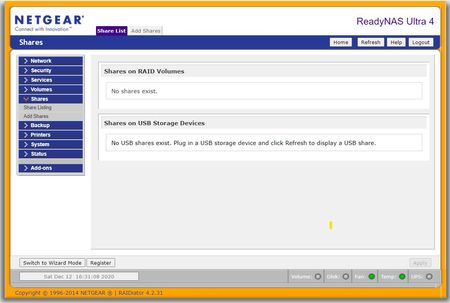
Model: RNDU4000 ReadyNAS Ultra 4 [X-RAID2] Firmware: RAIDiator 4.2.31 Shares are no longer accessable. When I log in to ReadyNAS Frontview as ADMIN, the [Share>Share Listing] states, "N...

AnnoyedUser
Dec 23, 2020Tutor
StephenB Thanks for for your response. I am certain we had a power failure in building during the period. (and no UPS)
[Frontview>Status>Logs] currently "No logs exist." And, attempt to DL logs displays the following:
"<payload>Empty No Support</payload>"
mdgm Thanks for the response. Both the Frontview landing page and the Volumes menu *do not* show any volumes.
If the above indicates a lost cause. So be it.
I appreciate any assessment.
Happy holidays to all!

StephenB
Dec 24, 2020Guru - Experienced User
AnnoyedUser wrote:
I am certain we had a power failure in building during the period. (and no UPS)
[Frontview>Status>Logs] currently "No logs exist." And, attempt to DL logs displays the following:
"<payload>Empty No Support</payload>"
If the above indicates a lost cause. So be it.
There are a couple of possibilities here.
- The most common is that the volume is now out of sync due to the power failure. That would happen if there were cached writes in the NAS that hadn't been written to the disks when the power failed.
- The second is that a power surge either damaged the disks, or provoked a hardware failure. If no other equipment was damaged, then this is unlikely.
As far as data recovery goes, if you are skilled with Linux you can attempt to forcibly mount the volume. If you can connect the disks to a PC (either with SATA or using USB adapter/docks), you can also use RAID recovery software to extract the data. R-Studio is a reasonable option ( https://www.r-studio.com/ ). Either way, there could be some file system corruption.
- AnnoyedUserDec 24, 2020Tutor
StephenB wrote:
AnnoyedUser wrote:I am certain we had a power failure in building during the period. (and no UPS)
[Frontview>Status>Logs] currently "No logs exist." And, attempt to DL logs displays the following:
"<payload>Empty No Support</payload>"
If the above indicates a lost cause. So be it.
There are a couple of possibilities here.
- The most common is that the volume is now out of sync due to the power failure. That would happen if there were cached writes in the NAS that hadn't been written to the disks when the power failed.
- The second is that a power surge either damaged the disks, or provoked a hardware failure. If no other equipment was damaged, then this is unlikely.
As far as data recovery goes, if you are skilled with Linux you can attempt to forcibly mount the volume. If you can connect the disks to a PC (either with SATA or using USB adapter/docks), you can also use RAID recovery software to extract the data. R-Studio is a reasonable option ( https://www.r-studio.com/ ). Either way, there could be some file system corruption.
Thank you for your suggestions.
For now I'll consider this item closed.
Related Content
NETGEAR Academy

Boost your skills with the Netgear Academy - Get trained, certified and stay ahead with the latest Netgear technology!
Join Us!
