NETGEAR is aware of a growing number of phone and online scams. To learn how to stay safe click here.
Forum Discussion

module12
Nov 02, 2022Apprentice
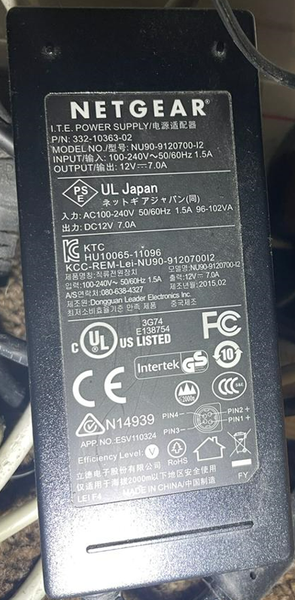
Replacement power brick for ReadyNAS 204
Hi, My current power brick comes on for about 5-10 seconds then goes out - the light on the power brick is actually going out. Tried a new fuse and 3-pin cable completely with no difference. I'm re...

StephenB
Nov 02, 2022Guru - Experienced User
module12 wrote:
I'm really struggling to find a NETGEAR original replacement!
I think you'll need to settle for a third-party power brick.
- SandsharkNov 03, 2022Sensei
Look for a third-party one for a Synology DS410/411/412, which have the same pin-out and slightly higher input current requirement.. Plenty of options on Amazon in the $25US range.
 module12Nov 03, 2022Apprentice
Thanks both.
Sandshark I've just found another of your replies about this here: RN104 will not power up - NETGEAR Communities
I'm interested in the "moving disks to another OS6 model" in case it turns out to not be the power brick. My current config. is 4x disks in RAID 10. Is there a special process or can I just buy another 4-bay ReadyNAS and literally move the disks as-is (assuming I need to move slot-for-slot)?
Thanks again
- StephenBNov 03, 2022Guru - Experienced User
module12 wrote:
I'm interested in the "moving disks to another OS6 model" in case it turns out to not be the power brick. My current config. is 4x disks in RAID 10. Is there a special process or can I just buy another 4-bay ReadyNAS and literally move the disks as-is (assuming I need to move slot-for-slot)?
You can literally just move the disks to any other OS-6 NAS. If you move to an x86 NAS (RN300 or higher), then you will loose any apps - the NAS can convert the OS and the ReadyNAS software from arm to x86, but not the apps.
You could also migrate to an Ultra or Pro ReadyNAS, but you would need to convert them to OS-6 first.
Though I do recommend checking out the replacement first. Try installing a single test disk. If that works, update it to either match the current firmware, or update it to match what you were running in the RN204. The make sure that the NAS boots with that disk in every slot.

Related Content
NETGEAR Academy

Boost your skills with the Netgear Academy - Get trained, certified and stay ahead with the latest Netgear technology!
Join Us!
