NETGEAR is aware of a growing number of phone and online scams. To learn how to stay safe click here.
Forum Discussion

christianrogari
Nov 21, 2020Aspirant
RN10200 two bays - adding a new drive
Good morning to everyone, Some time ago I bought a readynas 10200 for home use. I started using it with only one disk, configuring it in RAID 1 (mirror) for document backup use. Now I have decided ...

StephenB
Nov 21, 2020Guru - Experienced User
christianrogari wrote:
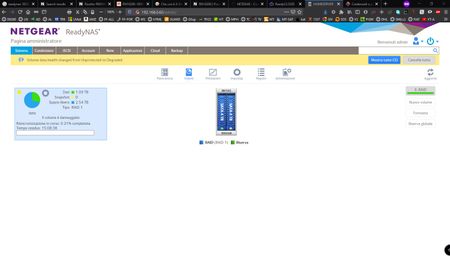
Instead, at the top of the display, warning messages such as 'volume data changed from unprotected to degraded' appear and now I'm worrying: this is only a transitory message, because the synchronization is not yet completed and which will then disappear when the operation is finished or did I make some mistake while installing the second disk?
Everything is normal, no need to worry. The volume is shown as degraded because the resyncing isn't complete. Once it finishes, it will become redundant.

Sandshark
Nov 22, 2020Sensei
And with only one drive, it wasn't redundant before, anyway.
 christianrogariNov 22, 2020Aspirant
I think It din't have redundance with only one disk, because always I knew that the redundancy is produced by the two disks in RAID. Only I say that before installing the second HDD, the control panel always showed the volume status as "HEALTHY". and immediately after the installation of the second HDD the Nas has changed the volume status from unprotected to degraded.
below here's a screenshot of the ReadyNas registry:
Now I just would like to be able to restore the volume status to "HEALTHY" without losing the data on the system and enjoy again a safe, fully functional and totally reliable Nas .
Could you help me please?
Related Content
NETGEAR Academy

Boost your skills with the Netgear Academy - Get trained, certified and stay ahead with the latest Netgear technology!
Join Us!
