NETGEAR is aware of a growing number of phone and online scams. To learn how to stay safe click here.
Forum Discussion

christianrogari
Nov 21, 2020Aspirant
RN10200 two bays - adding a new drive
Good morning to everyone, Some time ago I bought a readynas 10200 for home use. I started using it with only one disk, configuring it in RAID 1 (mirror) for document backup use. Now I have decided ...

christianrogari
Nov 22, 2020Aspirant
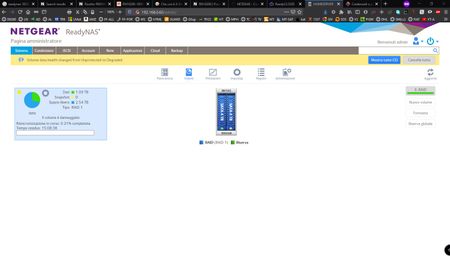
Stephen thanks, but maybe there's something wrong.....as you can see in the attached picture, at the end of the Sync, both the disks are online (both have green led) but the blue little window on the left of the screen still show "il volume è danneggiato" (volume damaged)....
............Some suggestion to fix the problem?

StephenB
Nov 22, 2020Guru - Experienced User
What are you seeing on the log tab?
- christianrogariNov 23, 2020Aspirant
That's what I'm seeing in the log tab:
in the right of the screen also there's a feature "registry download"....I clicked on it and the browser downloaded a zip file...I opened it, there's a lot of files inside I can't understand what to search and check.....
- JohnCM_SNov 25, 2020NETGEAR Employee Retired
Hi christianrogari,
You may provide the log zip file to us and we will try checking what could be the issue. You may upload it to a cloud storage site then send me the download link via private message.
Regards,
- christianrogariDec 05, 2020Aspirant
Hello Everyone, after reading your suggestions I turned off the nas, extracted the disks one by one and checked with the pc if they had hardware errors, bad blocks, etc., but both disks were healthy.
At this point, I reinserted the two HDDs into the NAS, connected a USB hard drive to one of the NAS USB port and backed up all the data stored on the NAS (during the backup, a couple of files were found to be non-transferable), then I ran on the NAS the factoy default reset process.
After a few hours the NAS had automatically reset all the settings, formatted the disks, created the new array under XRAID by setting the RAID to RAID1 (mirroring.... which was what I wanted).
The shocking thing was that upon completion of the procedure, the NAS was able to see the volume perfectly intact, healty and with no errors of any kind.
Now I have transferred the data from the backup that I had made, back to the NAS and everything is working flawlessly so far.
I keep wondering what went wrong originally, while adding the new HDD, to determine the problem that occurred.
If someone have had a similar experience before and understood what caused the problem that I have also had, I will be happy to have his opinion.
thanks to everyone who helped me in this forum.

Related Content
NETGEAR Academy

Boost your skills with the Netgear Academy - Get trained, certified and stay ahead with the latest Netgear technology!
Join Us!
