NETGEAR is aware of a growing number of phone and online scams. To learn how to stay safe click here.
Forum Discussion

Shivani
Jun 26, 2017Aspirant
RN24100 not able to connect to after the admin login page
Hi,
After connecting to the admin login page using the default User name and Password provided, the page the does not display any options to configure the ReadyNAS RN 21400 model.
I am also not able to connect to the Readycloud.netgear.com page for configuration options.
Please help..
3 Replies
Replies have been turned off for this discussion
 StephenBGuru - Experienced User
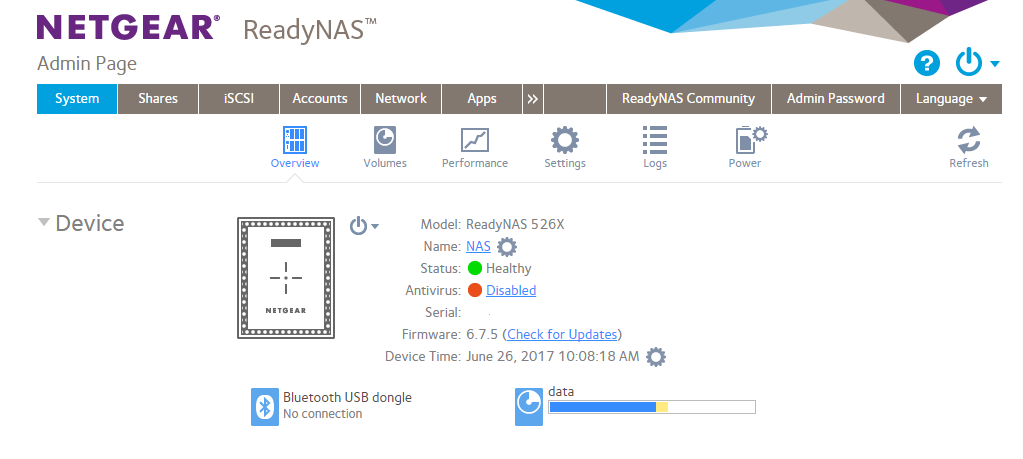
Are you using https://nas-ip-address/admin
If so, what do you see when you log in?
It should look like this:
- ShivaniAspirant
Hi,
I can see only the following after I login. It does not proceed beyond that point.
NETGEAR
ReadyNAS
Version 6.4.1
I am using WIndows 10 OS.
- StephenBGuru - Experienced User
Shivani wrote:
NETGEAR
ReadyNAS
Version 6.4.1
How long are you waiting? That's a splash page, and it should either shift to something like the page above, or time out.
Did you just purchase? You do have 90-day phone support after purchase, and that would be a good option if you still have it.
Related Content
NETGEAR Academy

Boost your skills with the Netgear Academy - Get trained, certified and stay ahead with the latest Netgear technology!
Join Us!
