NETGEAR is aware of a growing number of phone and online scams. To learn how to stay safe click here.
Forum Discussion

Bergradler
Mar 20, 2021Tutor
rn314 network set-up in my home network
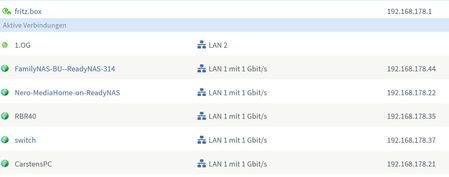
Hello, I have the following network set-up at home on my Fritzbox Router 4590: I recently added a second RN314 as back-up-NAS to the network named "FamilyNAS-BU". My first NAS was named "FamilyNAS"...

StephenB
Mar 20, 2021Guru - Experienced User
Did you mean the Fritz box 5490??
Bergradler wrote:
My first NAS was named "FamilyNAS" but is now named "Nero-MediaHome-on-ReadyNAS" which is not clear to me why the name changed (on the admin page the name remaines "FamilyNAS")?
Do you have the Nero Mediahome app installed on the NAS? Assuming you do, try turning it off and then reboot the NAS. I think if you do that, the Nero Mediahome name will disappear from the router. I think the router is seeing the DLNA server name. Note this is a test - after you check this you can turn the app back on. Though I am wondering why you aren't using the built-in DLNA server (just out of curiousity).
But I don't think you'll see FamilyNAS on the router when you do this test - because you've assigned it a static IP address. If you change the NAS configuration to use DHCP, you can use IP reservation in the router to make sure the router always assigns it the same address. With the Fritz router, this is the setting to "always assign this network device the same address". At least that is what it is called in the 5490 manual.
Bergradler wrote:
Furthermore I do not see my first NAS anymore in the WIN10 explorer under the "Networks" but I see the new NAS "FamilyNAS_BU). Nevertheless all folders on my first are accessible using the Win10 explorer
Windows does its own network discovery to find the network devices - it's not getting the list from the router. It often does miss things - I haven't seen any good guide on how to resolve that. It's possible that switching back to DHCP will help.
If that doesn't resolve it, you can work around the problem by entering the IP address in the file explorer address bar ( \\192.168.1.22 ). You can also create desktop shortcuts that will open file explorer and show either the full NAS share list or show a specific share.
Bergradler wrote:
What do I have to do either in the set-up of my windows home network or in the NAS share configurations to have access to all shares from all PCs?
Normally you'd have a user account set up on the NAS - not sure if you'd done that or not. Since you want the two of you to have the same access, then you can share use the same account for both PCs. The account name shouldn't match the PC name, or the name of a share on the NAS.
You can also use the same account name(s) and password(s) on both the old and new NAS.
Then you go into the Windows Credential Manager on the two PCs, and enter that credential for the NAS. I recommend entering it twice for each NAS - one using the NAS hostname and once using the NAS IP address. The PC treats those as different machines, so it won't apply the hostname credential when you use the IP address (or vice versa). So you will need 4 credentials all together.
Related Content
NETGEAR Academy

Boost your skills with the Netgear Academy - Get trained, certified and stay ahead with the latest Netgear technology!
Join Us!

