NETGEAR is aware of a growing number of phone and online scams. To learn how to stay safe click here.
Forum Discussion

Bergradler
Mar 20, 2021Tutor
rn314 network set-up in my home network
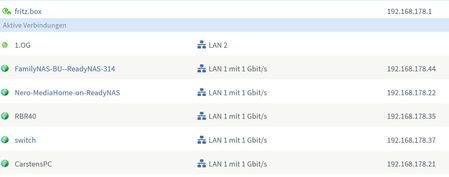
Hello, I have the following network set-up at home on my Fritzbox Router 4590: I recently added a second RN314 as back-up-NAS to the network named "FamilyNAS-BU". My first NAS was named "FamilyNAS"...

StephenB
Mar 20, 2021Guru - Experienced User
Bergradler wrote:
Maybe you can help as well regarding VPN installation with the Fritzbox in combination with the NAS. I learned after calling the Fritz support that I have to change the IP-Address of the fritzbox from the standard to a different address. By this I experienced loosing all connections within my home network which is somehow expected but I was not able to reassign all my devices to the new IP address.
How can I do such an IP address change in a controlled manner to assure a smooth reconfiguration of my home network?
Sorry - I've never owned a Fritzbox, so my only resource on that would be the manual. With Netgear routers, there is no need to change any IP addresses to use the integrated OpenVPN feature.

Sandshark
Mar 20, 2021Sensei
I also don't own a Frizbox, but there are some general things to look for.
Are the devices that you cannot get onto the new subnet using a static IP address assigned in the device? If so, you'll have to manaully change that on each device and re-boot. If it's a headless device like a NAS, then that's a bit of a chicken-and-egg situation. If there are switches between the router and device, you sometimes also need to re-boot them. If they are smart switches, there may be more to do. But it is generally better to reserve IP addresses in the router instead of using static IP's to avoid problems like this unless you have more devices than your router has IP reservations.
Windows10 can have issues with using the NAS by name, and it's not a problem unique to ReadyNAS. Some seem to have it, others not. I have it and am yet to see a true solution. My work-around is to use the IP address instead of the name and/or put the NAS IP in each PC's hosts file. Of course, that entry also needs to be changed if the NAS changes IP address.
Related Content
NETGEAR Academy

Boost your skills with the Netgear Academy - Get trained, certified and stay ahead with the latest Netgear technology!
Join Us!

