NETGEAR is aware of a growing number of phone and online scams. To learn how to stay safe click here.
Forum Discussion

synth54
May 20, 2022Aspirant
RN316 - Read Only status during resyncing task on EDA500 extension
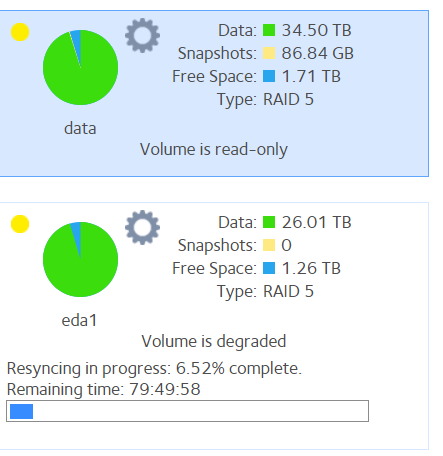
Hi, I'm facing an issue with my NAS system, which is made of a RN316 and a EDA500 with mainly all 8TB HDD (except 2 10TB ones). The problem is : an error occured on the 3rd HDD of the EDA500 mod...

StephenB
May 20, 2022Guru - Experienced User
synth54 wrote:
Resyncing task is still in progress, I don't know what to do.
Download the full log zip file now, as that will likely contain clues to what is happening with the main volume. If you have no backup of the main volume, then back it up while you are waiting for the resync to complete. Don't reboot the NAS until you complete the backup and the EDA500 resync completes.
At that point, I'd try rebooting the NAS, and see if the main volume remains read-only. I suspect it will (and it might not be mounted at all). But it is unusual that the read-only status was coincident with the EDA500 error, so it is possible that the main volume will end up read/write.
After that, you could either get a support contract with Netgear, and see if they can resolve the issue with the main volume remotely. Or you can try creating a new volume, and restore the files from your backup.
synth54 wrote:
I don't understand why the volume of the main device has a read-only status due to resyncing task of the extension
It's likely not related to the resync, but it might be linked to the EDA disk error somehow. You could look in the log zip, and see what underlying errors happened - but focus on completing/updating your backup first. The data is definitely at risk.

Sandshark
May 20, 2022Sensei
The NAS usually puts a volume in read-only mode when it detects a problem with that volume. It's protecting the data from further damage. As StephenB said, it is critical that you back up data before re-booting. After re-boot, the main volume may not even mount.
Before you re-boot, it may also be a good idea to EXPORT and disconnect the (fully re-synced) EDA volume. If you end up having to factory default, you can later add an exported volume, but you cannot add a volume that wasn't. And if you end up just having to destroy and re-create the main volume, the act of destroying it with the EDA attached will make the EDA volume primary, which is not a good situation with the eSATA multiplier interface it uses. If all ends up well after the re-boot, or after you fix the problem, you just power down, re-connect the EDA and power up, which will automatically import the EDA volume. Just make sure you don't duplicate any share names from the EDA if you have to start over with the main volume.
I suppose the problem with the main volume may have been caused in part by the re-sync of the EDA volume. The eSATA interface is, frankly, a poor choice for the EDA. An issue on the bus may have "spilled over" to the main volume. But that "spill over" may be real damage to the volume or just a perceived one, which will determine whether a re-boot fixes it or not.
If you end up not having exported the EDA volume and later need to add it to a newly created main one, there is a work-around. You put just the EDA drives in the main NAS, boot, then export. That'll work for you since you have a 6-bay NAS. But those with a smaller main NAS don't have that option.
Related Content
NETGEAR Academy

Boost your skills with the Netgear Academy - Get trained, certified and stay ahead with the latest Netgear technology!
Join Us!
