NETGEAR is aware of a growing number of phone and online scams. To learn how to stay safe click here.
Forum Discussion

synth54
May 20, 2022Aspirant
RN316 - Read Only status during resyncing task on EDA500 extension
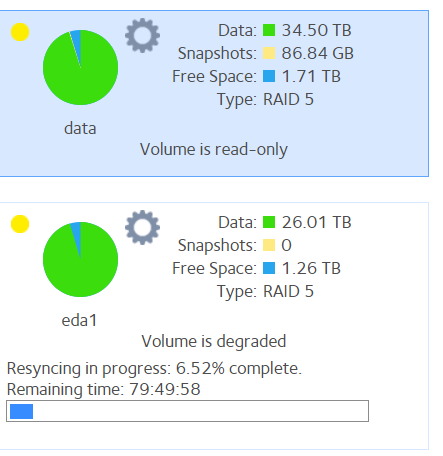
Hi, I'm facing an issue with my NAS system, which is made of a RN316 and a EDA500 with mainly all 8TB HDD (except 2 10TB ones). The problem is : an error occured on the 3rd HDD of the EDA500 mod...

synth54
Jun 14, 2022Aspirant
Dear All,
I have finally succeeded to save all data and EXPORT the EDA extension device.
After disconnecting it I have reboot and the Read-Only Status disappeared.
And it's possible to add/remove files.
Then I have shut downed the system and reconnected the EDA module, restarted it and bad news : the main volume (on the RD316) got again the read-only status.
It seems that the connection with the EDA device generates this status.
I don't know what to do ....
Do you have some recommendations to fix this issue?
Thanks for your support
- SandsharkJun 14, 2022Sensei
If you disconnect the EDA (power off- -- don't export) is the main volume still read-only? The NAS will complain about the missing volume, and will need to re-sync the OS partition of the EDA drives when you re-connect, but the volume should be fine so long as you are connecting to the same main volume.
You can try using another eSATA port. I believe port 3 (the red one) uses a different controller than the other two and the main drives. eSATA is the Achilles heel of the EDA500. If disconnecting doesn't clear the read-only flag of the main volume, you'll have to export, make a new one, then try connecting to another port. Maybe try with a single-drive main volume before all drives and RAID sync of the main volume.

Related Content
NETGEAR Academy

Boost your skills with the Netgear Academy - Get trained, certified and stay ahead with the latest Netgear technology!
Join Us!
