NETGEAR is aware of a growing number of phone and online scams. To learn how to stay safe click here.
Forum Discussion

synth54
May 20, 2022Aspirant
RN316 - Read Only status during resyncing task on EDA500 extension
Hi, I'm facing an issue with my NAS system, which is made of a RN316 and a EDA500 with mainly all 8TB HDD (except 2 10TB ones). The problem is : an error occured on the 3rd HDD of the EDA500 mod...

synth54
Jun 15, 2022Aspirant
Dear Sandshark
please find my answers in your text
If you disconnect the EDA (power off- -- don't export) is the main volume still read-only? ==> YES
The NAS will complain about the missing volume, and will need to re-sync the OS partition of the EDA drives when you re-connect, but the volume should be fine so long as you are connecting to the same main volume.
After that I have shutdowned the main device and startet it again, booting is stuck at 25% for 2 hours .... no progress
You can try using another eSATA port. I believe port 3 (the red one) uses a different controller than the other two and the main drives.
==> There is no red one port and I've tried to use the second one without different result
eSATA is the Achilles heel of the EDA500. If disconnecting doesn't clear the read-only flag of the main volume, you'll have to export, make a new one, then try connecting to another port. Maybe try with a single-drive main volume before all drives and RAID sync of the main volume.
still waiting for end of booting ....
- SandsharkJun 16, 2022Sensei
I was thinking the 316 had three eSATA ports like the 516.
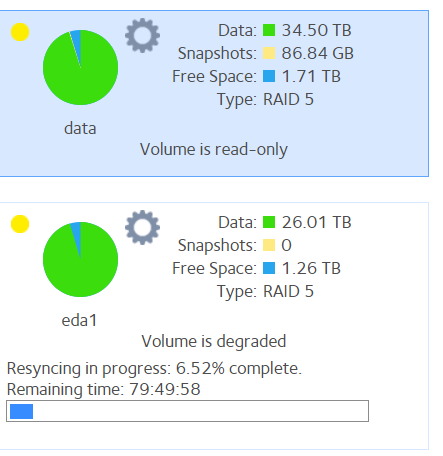
The first picture is with the EDA removed and the second is after it was re-connected with power off and then powered on? Then you re-booted and it doesn't even get that far? That would tend to indicate that the EDA volume had a problem before it was removed, but it didn't show up.
I doubt it's going to get any farther, but you can wait longer if you want to.
I don't have a lot of hope it will fix it, but you could power down and move the EDA drives to the main chassis. If it does boot, it'll make that volume into a primary one and you'll have to export it from the main NAS before you put the drives back in the EDA and mate it with the 316. And if you try and mate it with a main volume that shows the "missing" eda volume instead of a newly-created one, you'll have to destroy that (which will just make it forget the eda since it won't really be connected at that point).

Related Content
NETGEAR Academy

Boost your skills with the Netgear Academy - Get trained, certified and stay ahead with the latest Netgear technology!
Join Us!
