NETGEAR is aware of a growing number of phone and online scams. To learn how to stay safe click here.
Forum Discussion

jimk1963
Dec 27, 2023Virtuoso
Snapshots shows "0" even though I see many snapshots in the shares
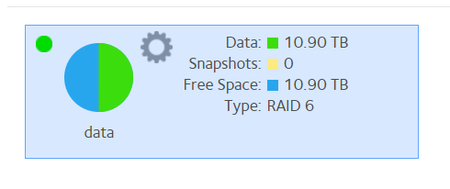
RN528X shows 0 snapshots (pic below), even though when I go into the individual shares (clicking the settings wheel and clicking "Recover" to see the snapshots), I see tons of snapshots for every sha...

jimk1963
Dec 27, 2023Virtuoso
Thanks StephenB :
1) Yes all 3 NAS are using Smart Snapshots. I had read your earlier posts explaining the use of customized snapshots. I was investigating that when I came across this "0" snapshot issue.
2) Understand the snapshot number is the allocation in bytes - it's part of the overall disk allocation (which the pie chart also shows). What doesn't make sense is, on the RN528X and RN212, I can see many snapshots in the various shares, by going to Settings --> Recover , which brings up a list of snapshots. Since there are a bunch of snapshots, for every share, this number should not be 0. It should be a significant number of gigabytes.
3) Re: "quota" checkbox in Volume Settings to display the Snapshots cumulative size, I inspected all 3 NAS boxes:
- RN528X: quota box is checked (shows "0" for snapshots)
- RN424: quota box is checked (shows 292GB for snapshots - more on that later)
- RN212: quota box is unchecked (shows "0" for snapshots)
On the RN212, I checked the quota box, and restarted the NAS. It came back up with "0" snapshots again.
On the RN528X, I unchecked/re-checked the quota box, hit "Apply", and restarted that NAS. It too came back up with "0" snapshots again. Maybe it takes some time for snapshot sizing to appear?
Re: the RN424, something miraculous happened. I made only one change this morning, which was to delete a single snapshot file from one share (Documents), the oldest snapshot in the list, from November 18. After the deletion, I observed no change in Free Space nor Snapshots size. As it happens, I had to head out for appointments. I returned 4 hours later, and the RN424 has managed to freed up a ton of space - way more than that snapshot could have provided (the Documents share has barely been touched in months). All of a sudden my snapshots dropped by 600+GB and my Free Space jumped up by 1.6TB - huge! I'm speculating that the file deletions I made a few days ago (coincidentally about 1.6TB worth) finally showed up in the volume allocation. Not sure why it would take days, and also not sure why it wouldn't have been cleaned up by the "Balance" that I ran yesterday. The NAS was in "red" territory with <10% space remaining, perhaps in that state it takes much much longer for major file deletions to be accounted for... ??? Weird. But I'll take it!

StephenB
Dec 27, 2023Guru - Experienced User
jimk1963 wrote:
Re: the RN424, something miraculous happened. I made only one change this morning, which was to delete a single snapshot file from one share (Documents), the oldest snapshot in the list, from November 18. After the deletion, I observed no change in Free Space nor Snapshots size. As it happens, I had to head out for appointments. I returned 4 hours later, and the RN424 has managed to freed up a ton of space - way more than that snapshot could have provided (the Documents share has barely been touched in months). All of a sudden my snapshots dropped by 600+GB and my Free Space jumped up by 1.6TB - huge!
It can take a while for the free space to be reclaimed (particularly when you don't do a balance).
Whatever happened, it's good that you got back that much free space.
jimk1963 wrote:
On the RN212, I checked the quota box, and restarted the NAS. It came back up with "0" snapshots again.
On the RN528X, I unchecked/re-checked the quota box, hit "Apply", and restarted that NAS. It too came back up with "0" snapshots again. Maybe it takes some time for snapshot sizing to appear?
It can, so perhaps wait a bit. Or maybe run another balance on those two NAS.
Snapshots can use no space though, so that is another thing to keep in mind. When you first create the snapshot, it takes no extra disk space. All the disk blocks are shared between the snapshot and the main share. If you then delete a file in the main share, then the blocks holding the deleted files are allocated to the snapshot. Similarly for files you edit/modify.
Related Content
- Jun 06, 2017Retired_Member
NETGEAR Academy

Boost your skills with the Netgear Academy - Get trained, certified and stay ahead with the latest Netgear technology!
Join Us!
