Forum Discussion

Stultis
Dec 01, 2018Aspirant
Trouble setting up FTP on ReadyNAS 102 with Linksys router EA6900
Hello, I am having trouble setting up my ReadyNAS for FTP. I have a Linksys router (EA6900) I am using for WIFI. I have the FTP enabled on the ReadyNAS and can see and use the FTP settings around my ...

StephenB
Dec 02, 2018Guru - Experienced User
Some apps do use FTP for streaming, but it isn't the best protocol for that. I think you'll likely get better results with Plex.
Stultis wrote:
The Linksys website says that I can hook a NAS up to the USB port on the back of it and have it show up as an external storage unit. I am unsure if the ReadyNAS 102 will work that way.
It won't. ReadyNAS has to be connected to your router via ethernet.
Stultis wrote:
I am stumped as to how to get the FTP to work when I am not at home.
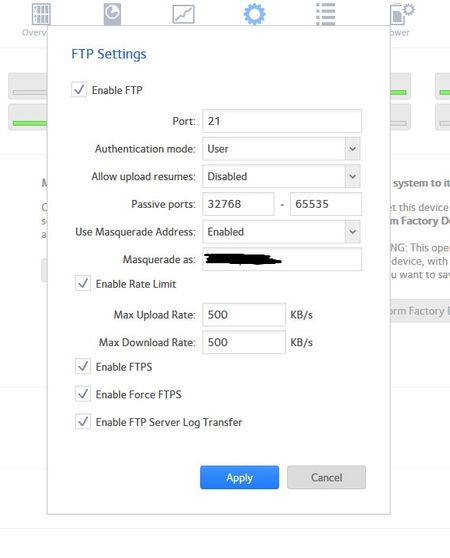
On the NAS setup, you need to set a smaller range of passive ports. I suggest 4 ports per simultaneous user - so if your ipad Pro is the only device, then you'd want 4 passive ports. It's best to assign them in the range betwen 49152-65535. So maybe use 50001-50004 instead of 32768-65535.
I'd also disable the rate limit, especially if you intend to stream HD content. 500 kbs is too low for a lot of HD content.
You also need to know how to set up the router (and you will need to look at the router manual for help on this).
Port 21, and 50001-50004 need to be forwarded to the NAS IP address. In order for that to be "sticky" you should also reserve the IP address in the router - making sure the NAS always gets the same IP address. Netgear routers call this "address reservation", sometimes it is called "ARP binding" or "Mac Address Reservation". So look for that feature.
In addition, you will need a DDNS service installed, so you can access your NAS using a name that is reachable over the internet. The DDNS service assigns that name to your router's current external address. Most newer routers support this service. NoIP.com offers a free DDNS service, so you could look into that.
Many FTP/FTPS clients don't require masquerading (and AVPlayerHD in particular doesn't need it). So you might try disabling masquerading. Note that when it is used, it would be set to the DDNS name, not to an internal IP address. Using masquerading can sometimes prevent access from inside your home access (depending on the router).
- StultisDec 02, 2018Aspirant
Hello StephenB,
Thanks for the reply!
I'm not trying to stream movies or tv, just books and comics from my NAS. I might look into plex if I ever decide to stream movies or tv, thanks for that suggestion.
I started to do the setup as you described. The "sticky" IP address is called a "DHCP Reservation" on the Linksys system, or at least that was the closest thing I could find to your description.
My hold up is the DDNS. The Linksys only offers 2 website options for this, and they are Dyn.com and TZO.com. The Dyn site is pay and the TZO doesn't seem to exist anymore.
I think it may be in my best interest to get a Netgear router to replace the Linksys I currently have. The cost of the Dyn site is $55/year. In two years I would have paid for a decent router that could use the free NoIP site.
I'm going to leave this question open until after I get a new router and set it up. This way I can come back and ask questions if I get stuck.
Thanks for your help.
- StephenBDec 04, 2018Guru - Experienced User
Stultis wrote:
I think it may be in my best interest to get a Netgear router to replace the Linksys I currently have. The cost of the Dyn site is $55/year. In two years I would have paid for a decent router that could use the free NoIP site.
Netgear also will give you a free XXXX.mynetgear.com DDNS name. I believe that's actually provided through noip.com. If you go that route, I suggest getting a Nighthawk (or Orbi) with OpenVPN. That avoids the need for port forwarding.
Another approach you could use is Resilio Sync. There's a selective sync feature there that will download specific files. It uses peer to peer technology, and doesn't need DDNS or any ports being forwarded.
ReadyCloud should also work for this (though it's not a service I use myself).
- StultisDec 06, 2018Aspirant
Hello,
Thanks for the suggestions. I went with the AC1750. I don't have a big place and it was in my price range.
I have not been able to try setting up the ftp protocals yet. I am having trouble with my ReadyNAS backing up. It keeps encountering a failure that freezes the system up. I am wondering if it is the way I found the system after I installed the new router and cable modem. I found the system by copying the ip address from the router's webpage and pasteing it into the search bar. Do I need to go back and try to discover it from by another method? When I installed the new modem and router I received a new ip address for my computer and readynas. I updated this ip address in all of my backups. While doing this I noticed that the browse option for my computer files would not work. Testing the connection said everything was fine, so I continued on. The ReadyNAS did perform most of the backup jobs. It just keeps hanging up on this one backup job and tells me "failure." The system then freezes up and will not respond.
I should mention that the ReadyNAS is connected to the router by an ethernet cable in a different room than my computer. I have my computer using wifi. They are both on the same network, just not physically connected. I do not use the readycloud app on the computer to backup my system. I connect across the internet from the admin page.
I'm wondering if I should have used the RAIDar program to discover my ReadyNAS system after installing the new modem and router. Should I go back and try finding it using the RAIDar program?
Related Content
NETGEAR Academy

Boost your skills with the Netgear Academy - Get trained, certified and stay ahead with the latest Netgear technology!
Join Us!
