NETGEAR is aware of a growing number of phone and online scams. To learn how to stay safe click here.
Forum Discussion

RDD
May 03, 2016Guide
What is this RN204 doing?
I initally created the system with 4x1.5TB drives. No problem. A few weeks later, I replaced the 1.5 in slot 1 with a 4 TB drive. I think it took a little over 24 hours to resync, but again no pr...
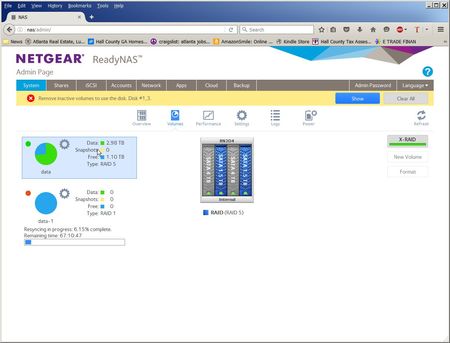
- May 11, 2016
Hi RDD,
I believe this is the setup that you want but it took a few hiccups and lot of time to accomplish. Anyway, let me thank you for providing feedback and for updating the thread that you've started. We would like to encourage you to mark this thread resolved by clicking the "Accept as Solution" button in one of the responses that you received.
Kind regards,
BrianL
NETGEAR Community Team


StephenB
May 03, 2016Guru - Experienced User
RDD wrote:
Am I crazy or is thing acting a little bizzare?
It is acting bizarre. It should have simply expanded the original xraid volume to 8 TB.
Netgear (perhaps mdgm-ntgr ) should look at it, Try emailing the logs to the address here: http://kb.netgear.com/app/answers/detail/a_id/21543/~/how-do-i-send-all-logs-to-readynas-community-moderators%3F Include a link to this thread in the body and Attn: mdgm in the subject line.
- mdgm-ntgrMay 09, 2016NETGEAR Employee Retired
Thanks for the logs. You should open a support case and let me know the case number.
 RDDMay 11, 2016Guide
Sorry jak0lantash and mdgm, I am 70 years old and what little patience I had is long gone. I powered down the NAS and disconnected the 2 1.5 TB drives. Powered up and the OS could find no volumes. Powered down, reconnected and my data was available again. The OS is really confused about volumes and drives.
From reading other posts in this community, it looks like 6.4.2 has a number of problems with hot swapping.
So I upgraded the firmware to 6.5 RC3. No improvement.
Saturday night I stopped Acronis backup up jobs on all my PCs. I put a 3 TB and a 2 TB (both NTFS) in a Sabrent USB3 docking station. The RN204 mounted both of them and I created 5 backup jobs to copy all my backup folders. They were done the next morning and by my rought math they averaged at around 81 MB/s.
Huge range in speeds. One folder at 126 MB/s and another at 54 MB/s. Looks like the 3tb Toshiba is considerabilly faster that the 2tb Seagate. Bottom line, 2.7 TB in 9.4 hours.
Saved the NAS configuration.
Did a "Perform Factory Default" from the GUI.
Restored configuration.
Showing a single RAID 5 volume (4tb WD, 4tb WD, 1.5tb Seagate, 1.5tb Samsung) with 36.38 MB of data (not sure what that is) and free 6.35 TB with a 10:50 resync time.
After resyncing finished re-enabeled all Acronis jobs. As of today (Wed) all seems to be running normally. Retired_MemberMay 11, 2016
RDD wrote:
2.7 TB in 9.4 hours.
About 80MB/s average, that sounds really good to me.
RDD wrote:
36.38 MB of data (not sure what that is)That's metadata (I believe it's accounted in the value), and some ReadyNAS OS config files (applications, snapshots, shares, etc.). 36.38MB, so half nothing ;)

Related Content
NETGEAR Academy

Boost your skills with the Netgear Academy - Get trained, certified and stay ahead with the latest Netgear technology!
Join Us!
