NETGEAR is aware of a growing number of phone and online scams. To learn how to stay safe click here.
Forum Discussion

Richard1982
Feb 13, 2018Aspirant
What Ready Nas
I picked up this readynas duo from a friend who owed me some money. I was going to drop it on ebay after testing it but I have had nothing but issues with it. I dropped a drive in it and waited for...
 Feb 13, 2018
wrote:
ok, next question is am I stuck at firmware version 4 with no samba v2/3 ?
Yes. OS 5.x also is SMB 1.0.
There is experimental support for SMB 2.0 in the Samba version your Duo uses, but I don't know how reliable that is. To enable it you'd have to first enable SSH by installing an add-on, and then log into the linux shell and tinker with a configuration file. Note that the OS is installed on the disks, so anyone installing new disks would need to repeat this procedure.
My own Duo v1 is used only to back up bigger/faster NAS, and I only have rsync enabled on it.
As far as performance goes, SMB speed is ~15-20 MB/s on a gigabit network. Disk size is limited to 2 TB, because GPT formatting is not supported. This model was replaced by the v2 in November, 2011.
StephenB
Feb 13, 2018Guru - Experienced User
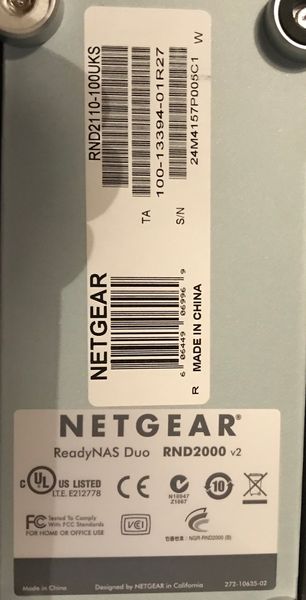
It is a Duo v1 that uses a sparc processor. More pedantically, it is hardware revision 2 of the Duo v1.
The labeling is confusing - Netgear should have branded the Duo v2 differently.
A Duo v2 would have a v2 label on front and the part number would end with -200UKS.
Richard1982
Feb 13, 2018Aspirant
ok, next question is am I stuck at firmware version 4 with no samba v2/3 ?
- StephenBFeb 13, 2018Guru - Experienced User
wrote:
ok, next question is am I stuck at firmware version 4 with no samba v2/3 ?
Yes. OS 5.x also is SMB 1.0.
There is experimental support for SMB 2.0 in the Samba version your Duo uses, but I don't know how reliable that is. To enable it you'd have to first enable SSH by installing an add-on, and then log into the linux shell and tinker with a configuration file. Note that the OS is installed on the disks, so anyone installing new disks would need to repeat this procedure.
My own Duo v1 is used only to back up bigger/faster NAS, and I only have rsync enabled on it.
As far as performance goes, SMB speed is ~15-20 MB/s on a gigabit network. Disk size is limited to 2 TB, because GPT formatting is not supported. This model was replaced by the v2 in November, 2011.
- Richard1982Feb 13, 2018Aspirant
OK ... A update incase anyone else can make use of this :
I hit google and found the add-ons you mentioned here
Then I used putty and logged in and found the samba file at : /etc/samba/smb.conf
I tried to use nano to edit it to find it was not installed so I had to use vi and I needed google to remember the commands for editing, save and exit. Anyway I added the lines :
min protocol = SMB2
max protocol = SMB2
at the end of the [global] section.
I then rebooted the system and mapped the network drive in windows 10 at the command line :
net use t: \\192.168.1.115\Share /user:admin Pa55W0rd
and bam! All working ...
I then done a few tests and got an average of 9.3MB upload to the NAS and 11.3MB download (nothing on my DS1812+)
So .. The box does work ... Thanks for the push in the right direction, I didnt know the box was over 6 years old.
- StephenBFeb 14, 2018Guru - Experienced User
I'm glad you're up and running.
Many Windows systems now include an NFS client that can be turned on, so that is potentially another way to go.
Richard1982 wrote:
nothing on my DS1812+
That NAS is similar to the ReadyNAS 300 series, and is of course much faster. Currently shipping ReadyNAS can all saturate a gigabit connection for sustained file transfers.
Related Content
NETGEAR Academy

Boost your skills with the Netgear Academy - Get trained, certified and stay ahead with the latest Netgear technology!
Join Us!
