NETGEAR is aware of a growing number of phone and online scams. To learn how to stay safe click here.
Forum Discussion

fifer55
Jul 06, 2013Apprentice
DropBox: Not able to link account
Hello everyone, I recently purchased the following addon - Dropbox (vInstall-rnx86-1.0.1):
viewtopic.php?f=48&t=58647
It was installed on a newly updated (factory reset) ReadyNas Pro Business Edition.
Currently, the following addons are also installed:
In addition, the following services are running:
Now, the installs goes without a hitch. The current Installed version is: 2.2.8. I immediately update to the latest stable release of 2.2.9. So far, so good.
Next, I follow the instructions on how to configure the Drobox add on:
viewtopic.php?f=48&t=58647
This is where I get stuck, specifically the configuration step. After enabling the add on and the Global dropbox, the daemon starts, then stops. After which it never starts again.
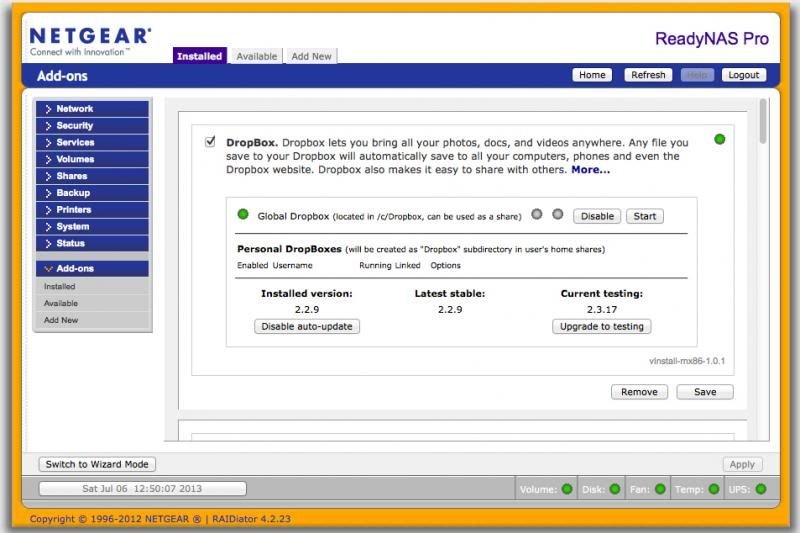
The only way to have it start again is to remove the addon, then manually remove all dropbox folders, even after clearing my web caches on several web browsers and rebooting the ReadyNAS itself. Before I remove the addon and after, no dice. The same when I remove, reboot, re-install.
After removing the add on and clicking on "Cancel" during removal, I am manually deleting the following folders by doing:
which returns directories in:
/c/.dropbox/
/c/.dropbox-dist.2.2.8/
/c/.dropbox-dist.2.2.9/
/c/Dropbox (this one is OK, it is a share that I created, since Dropbox doesn't automatically create one for Global)
A simple
Now, no directories exist except my share, however, there are also some text files in "/tmp/"
./tmp/dropbox_error1DQn6M.txt
./tmp/dropbox_errorcxtOPP.txt
./tmp/dropbox_errorNW9OrF.txt
./tmp/dropbox_errorSUJlLz.txt
./tmp/dropbox_errorxOa2mm.txt
./tmp/dropbox_error4ecQAi.txt
./tmp/dropbox_errorPi68YR.txt
./tmp/dropbox_error5aCw15.txt
WTH!?
From here, the rest of the error logs return the same content.
Now, I have been reading the following topics:
viewtopic.php?f=36&t=65909
hmm, I have PHP enabled...
viewtopic.php?f=36&t=60941&start=30#p349866
Not an issue for me, I use the following:
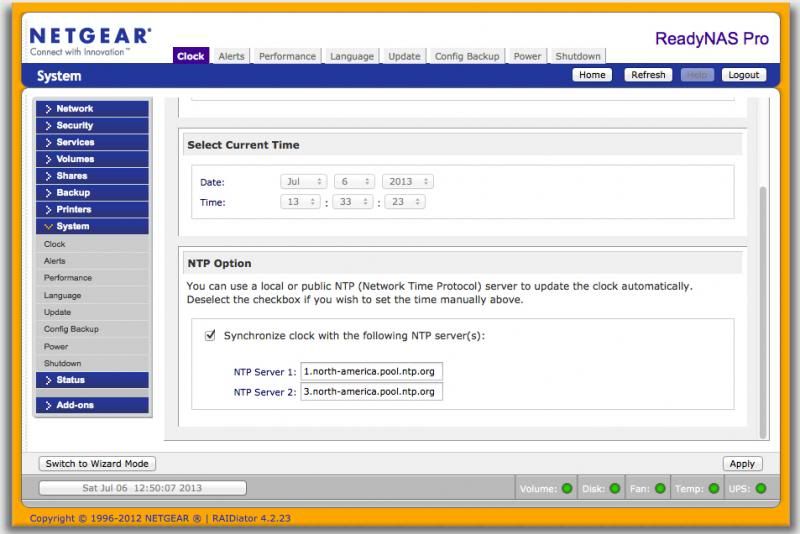
Finally, here is some information that might be useful:
I have an account and everything with dropbox, but I just can't get the thing up and running. Any help would be greatly appreciated.
viewtopic.php?f=48&t=58647
It was installed on a newly updated (factory reset) ReadyNas Pro Business Edition.
Currently, the following addons are also installed:
DAAPD!!FireFly!!1.0.3!!start-stop-daemon -S -q -x /usr/sbin/mt-daapd!!start-stop-daemon -K -n mt-daapd
PYTHON27!!Python2.7!!2.7.3-rnx86-1.0.1!!/etc/frontview/addons/bin/PYTHON27/start.sh!!/etc/frontview/addons/bin/PYTHON27/stop.sh!!Other!!current_url==http://readynasxtras.com/addons/x86/xml/PYTHON27_CURRENT.xml::detail_url==http://readynasxtras.com/readynas-x86-add-ons/python-27-x86::icon_url==/addons/PYTHON27/python_logo.gif
PHP5!!PHP5!!5.4.15-x86-4.4.0!!/etc/frontview/addons/bin/PHP5/start.sh!!/etc/frontview/addons/bin/PHP5/stop.sh!!Other!!current_url==http://readynasxtras.com/addons/x86/xml/PHP5_CURRENT.xml::detail_url==http://readynasxtras.com/readynas-x86-add-ons/php-53-x86::icon_url==http://readynasxtras.com/addons/x86/img/php_logo.gif
ENABLERSYNCSSH!!RsyncSsh!!x86-0.1.7!!/etc/frontview/addons/bin/ENABLERSYNCSSH/start.sh!!/etc/frontview/addons/bin/ENABLERSYNCSSH/stop.sh!!Other
PYLOAD!!PyLoad!!0.4.9-rnx86-0.3.3!!/etc/frontview/addons/bin/PYLOAD/start.sh!!/etc/frontview/addons/bin/PYLOAD/stop.sh!!Other!!current_url==http://readynasxtras.com/addons/x86/xml/PyLoad_CURRENT.xml::detail_url==http://readynasxtras.com/readynas-x86-add-ons/pyload-x86::icon_url==http://readynasxtras.com/addons/x86/img/pyload.jpg
ISTATD!!Istatd!!1.7!!/etc/frontview/addons/bin/ISTATD/start.sh!!/etc/frontview/addons/bin/ISTATD/stop.sh!!Other
NASMONITOR!!Nas Monitor!!3.6.11!!/etc/frontview/addons/bin/NASMONITOR/start.sh!!/etc/frontview/addons/bin/NASMONITOR/stop.sh!!Other!!current_url==https://www.readynas.com/contributed/super-poussin/x86/NASMONITOR_CURRENT.xml::detail_url==https://www.readynas.com/contributed/super-poussin/x86/NASMONITOR_REL.html::icon_url==https://www.readynas.com/contributed/super-poussin/x86/NASMONITOR_ICON.jpg
GITSCM!!gitscm!!1.7.1-readypro-0.1.2!!/etc/frontview/addons/bin/GITSCM/start.sh!!/etc/frontview/addons/bin/GITSCM/stop.sh!!Other
FFMPEG!!ffmpeg!!1.3!!/etc/frontview/addons/bin/FFMPEG/start.sh!!/etc/frontview/addons/bin/FFMPEG/stop.sh!!Other!!current_url==https://www.readynas.com/contributed/super-poussin/x86/FFMPEG_CURRENT.xml::detail_url==https://www.readynas.com/contributed/super-poussin/x86/FFMPEG_REL.html::icon_url==https://www.readynas.com/contributed/super-poussin/x86/ffmpeg-logo.png
In addition, the following services are running:
APACHE=0
APACHESSL=1
ATALKD=0
AUTOMATIC_VOLUME_EXPANSION=1
AUTO_CHECK_UPDATE=1
AUTO_DOWNLOAD_UPDATE=1
BONJOUR=0
BONJOUR_AFP=0
BONJOUR_FRONTVIEW=0
BONJOUR_PRINTER=0
BONJOUR_SUPPORT=1
CSV_USERADD_SUPPORT=1
DAAPD=0
DAAPD_SUPPORT=1
DISALLOW_PASSWORD_CHANGE=1
DISKCACHE=1
DOMAIN_SUPPORT=1
ENABLERSYNCSSH=1
ENABLERSYNCSSH_SUPPORT=1
ENABLE_POWERON_TIMER=0
ENABLE_POWERON_TIMER_SUPPORT=1
ENCODE=utf-8
FAN=1,1,0,0,0
FFMPEG=1
FFMPEG_SUPPORT=1
FLASH_AUTO_COPY=0
FLASH_OWNER=admin
FLASH_PATH=Pictures
FLASH_SHARE=media
FTP_MASQUERADE_ADDRESS=xxx.xxx.xxx.xxx
FTP_MODE=user
FTP_PASSIVE_END=xxxx
FTP_PASSIVE_START=xxxx
FTP_PORT=21
FTP_UPLOAD_RESUME=0
GITSCM=1
GITSCM_SUPPORT=1
HTTPS_SSL_KEY_HOST=192.168.168.168
IPV6_ASSIGN_bond0=OFF
IPV6_ASSIGN_eth0=OFF
IPV6_ASSIGN_eth1=OFF
ISTATD=1
ISTATD_PASSWORD=xxxxx
ISTATD_SUPPORT=1
JOURNAL=ordered
JUMBO_FRAMES_bond0=0
JUMBO_FRAMES_eth0=0
JUMBO_FRAMES_eth1=0
LANGUAGE=en-us
LANGUAGES_SUPPORTED=en-us/utf-8,en-us/ascii,ja/euc-jp,ko/euc-kr,ja/utf-8,ko/utf-8,zh-cn/utf-8,zh-tw/utf-8,ru/utf-8,es/utf-8,pt/utf-8,de/utf-8,fr/utf-8,it/utf-8,nl/utf-8,pl/utf-8,cs/utf-8,hu/utf-8,nb/utf-8,da/utf-8,fi/utf-8,sv/utf-8
MONITOR=board_temp,fan,disk_full,quota_exceeded,disk_temp
NASMONITOR=1
NASMONITOR_SUPPORT=1
NETATALK=1
NFS=1
NTPDATE=1
OPTIMIZE_FOR_MAC=1
PHP5=1
PHP5_SUPPORT=1
PROFTPD=1
PYLOAD=1
PYLOAD_SUPPORT=1
PYTHON27=1
PYTHON27_SUPPORT=1
RAID_MODE=1
READYTIVOD=0
RESYNC_UNCLEAN_SHUTDOWN=1
RSYNC=0
RSYNC_SUPPORT=1
SAMBA=0
SHAREACCESS=SAMBA,NETATALK
SHUTDOWN_ON_DISK_OVERTEMP=1
SMTP_PROVIDER=ITEM_ALERTS_CUSTOM
SNMP=1
SNMP_COMMUNITY=public
SNMP_SUPPORT=1
SPEED_DUPLEX_eth0=AUTO_NEGOTIATION
SPEED_DUPLEX_eth1=AUTO_NEGOTIATION
SSH=1
SSHKEY=rsa
SUPPORT_UTF8_NAMES=1
TEMP=1,1,0
UDHCPD=0
UPNP=0
UPNPAV=0
UPNPAV_SUPPORT=1
UPNP_SUPPORT=1
UPS_LOWBATT_PCT=0
UPS_SHARING=0
USER_HOME_DIRECTORY=0
WAKE_ON_LAN=1
WIZD=0
WIZD_SUPPORT=0
Now, the installs goes without a hitch. The current Installed version is: 2.2.8. I immediately update to the latest stable release of 2.2.9. So far, so good.
Next, I follow the instructions on how to configure the Drobox add on:
viewtopic.php?f=48&t=58647
This is where I get stuck, specifically the configuration step. After enabling the add on and the Global dropbox, the daemon starts, then stops. After which it never starts again.
The only way to have it start again is to remove the addon, then manually remove all dropbox folders, even after clearing my web caches on several web browsers and rebooting the ReadyNAS itself. Before I remove the addon and after, no dice. The same when I remove, reboot, re-install.
After removing the add on and clicking on "Cancel" during removal, I am manually deleting the following folders by doing:
ProBiz-NAS:/# find -iname *dropbox*
which returns directories in:
/c/.dropbox/
/c/.dropbox-dist.2.2.8/
/c/.dropbox-dist.2.2.9/
/c/Dropbox (this one is OK, it is a share that I created, since Dropbox doesn't automatically create one for Global)
A simple
rm-rf .dropbox*removes all directories pertaining to Dropbox that are left behind.
Now, no directories exist except my share, however, there are also some text files in "/tmp/"
./tmp/dropbox_error1DQn6M.txt
./tmp/dropbox_errorcxtOPP.txt
./tmp/dropbox_errorNW9OrF.txt
./tmp/dropbox_errorSUJlLz.txt
./tmp/dropbox_errorxOa2mm.txt
./tmp/dropbox_error4ecQAi.txt
./tmp/dropbox_errorPi68YR.txt
./tmp/dropbox_error5aCw15.txt
WTH!?
ProBiz-NAS:/tmp# cat dropbox_error1DQn6M.txt
pid:	6277
ppid:	6276
uid:	98
user_info:	pwd.struct_passwd(pw_name='admin', pw_passwd='x', pw_uid=98, pw_gid=98, pw_gecos='', pw_dir='/c/home/admin', pw_shell='/bin/false')
effective_user_info:	pwd.struct_passwd(pw_name='admin', pw_passwd='x', pw_uid=98, pw_gid=98, pw_gecos='', pw_dir='/c/home/admin', pw_shell='/bin/false')
euid:	98
gid:	98
egid:	98
group_info:	grp.struct_group(gr_name='admin', gr_passwd='x', gr_gid=98, gr_mem=[])
effective_group_info:	grp.struct_group(gr_name='admin', gr_passwd='x', gr_gid=98, gr_mem=[])
appdata:	u'/c/.dropbox'
real_path=u'/c/.dropbox'
	mode=040700	uid=98	gid=98
parent	mode=040777	uid=0	gid=0
dropbox_path:	u'/c/Dropbox'
real_path=u'/c/Dropbox'
	mode=041700	uid=65534	gid=65534
parent	mode=040777	uid=0	gid=0
HOME:	/c
tempdir:	'/tmp'
real_path='/tmp'
	mode=041777	uid=0	gid=0
parent	mode=040755	uid=0	gid=0
Traceback (most recent call last):
  File "dropbox/client/main.py", line 1239, in main_startup
  File "dropbox/client/main.py", line 765, in run
  File "dropbox/client/main.py", line 712, in create_keystore_and_unlink_cookie
Exception: statvfs failed with retval -1
ProBiz-NAS:/tmp# cat dropbox_errorcxtOPP.txt
pid:	6831
ppid:	6829
uid:	98
user_info:	pwd.struct_passwd(pw_name='admin', pw_passwd='x', pw_uid=98, pw_gid=98, pw_gecos='', pw_dir='/c/home/admin', pw_shell='/bin/false')
effective_user_info:	pwd.struct_passwd(pw_name='admin', pw_passwd='x', pw_uid=98, pw_gid=98, pw_gecos='', pw_dir='/c/home/admin', pw_shell='/bin/false')
euid:	98
gid:	98
egid:	98
group_info:	grp.struct_group(gr_name='admin', gr_passwd='x', gr_gid=98, gr_mem=[])
effective_group_info:	grp.struct_group(gr_name='admin', gr_passwd='x', gr_gid=98, gr_mem=[])
appdata:	u'/c/.dropbox'
real_path=u'/c/.dropbox'
	mode=040700	uid=98	gid=98
parent	mode=040777	uid=0	gid=0
dropbox_path:	u'/c/Dropbox'
real_path=u'/c/Dropbox'
	mode=041700	uid=65534	gid=65534
parent	mode=040777	uid=0	gid=0
HOME:	/c
tempdir:	'/tmp'
real_path='/tmp'
	mode=041777	uid=0	gid=0
parent	mode=040755	uid=0	gid=0
Traceback (most recent call last):
  File "dropbox/client/main.py", line 1239, in main_startup
  File "dropbox/client/main.py", line 765, in run
  File "dropbox/client/main.py", line 712, in create_keystore_and_unlink_cookie
Exception: statvfs failed with retval -1
ProBiz-NAS:/tmp# cat dropbox_errorNW9OrF.txt
pid:	6682
ppid:	6681
uid:	98
user_info:	pwd.struct_passwd(pw_name='admin', pw_passwd='x', pw_uid=98, pw_gid=98, pw_gecos='', pw_dir='/c/home/admin', pw_shell='/bin/false')
effective_user_info:	pwd.struct_passwd(pw_name='admin', pw_passwd='x', pw_uid=98, pw_gid=98, pw_gecos='', pw_dir='/c/home/admin', pw_shell='/bin/false')
euid:	98
gid:	98
egid:	98
group_info:	grp.struct_group(gr_name='admin', gr_passwd='x', gr_gid=98, gr_mem=[])
effective_group_info:	grp.struct_group(gr_name='admin', gr_passwd='x', gr_gid=98, gr_mem=[])
appdata:	u'/c/.dropbox'
real_path=u'/c/.dropbox'
	mode=040700	uid=98	gid=98
parent	mode=040777	uid=0	gid=0
dropbox_path:	u'/c/Dropbox'
real_path=u'/c/Dropbox'
	mode=041700	uid=65534	gid=65534
parent	mode=040777	uid=0	gid=0
HOME:	/c
tempdir:	'/tmp'
real_path='/tmp'
	mode=041777	uid=0	gid=0
parent	mode=040755	uid=0	gid=0
Traceback (most recent call last):
  File "dropbox/client/main.py", line 1239, in main_startup
  File "dropbox/client/main.py", line 765, in run
  File "dropbox/client/main.py", line 712, in create_keystore_and_unlink_cookie
Exception: statvfs failed with retval -1
From here, the rest of the error logs return the same content.
Now, I have been reading the following topics:
viewtopic.php?f=36&t=65909
hmm, I have PHP enabled...
viewtopic.php?f=36&t=60941&start=30#p349866
Not an issue for me, I use the following:
Finally, here is some information that might be useful:
ProBiz-NAS:/# ls -la /tmp
total 1196
drwxrwxrwt  5 root  root     4096 2013-07-06 13:17 .
drwxr-xr-x 23 root  root     4096 2013-07-06 13:00 ..
drwxrwxrwx  2 admin admin    4096 2013-07-06 12:51 addons
-rw-r--r--  1 root  root       12 2013-07-04 22:11 .dhcp_server
-rw-------  1 admin admin    1114 2013-07-06 12:51 dropbox_error1DQn6M.txt
-rw-------  1 admin admin    1114 2013-07-06 12:52 dropbox_error4ecQAi.txt
-rw-------  1 admin admin    1114 2013-07-06 12:52 dropbox_error5aCw15.txt
-rw-------  1 admin admin    1114 2013-07-06 12:53 dropbox_errorcxtOPP.txt
-rw-------  1 admin admin    1114 2013-07-06 12:53 dropbox_errorNW9OrF.txt
-rw-------  1 admin admin    1114 2013-07-06 12:53 dropbox_errorPi68YR.txt
-rw-------  1 admin admin    1114 2013-07-06 12:52 dropbox_errorSUJlLz.txt
-rw-------  1 admin admin    1114 2013-07-06 12:59 dropbox_errorxOa2mm.txt
-rw-r--r--  1 root  root        0 2013-07-05 10:42 errors_001.log
-rw-r--r--  1 root  root        0 2013-07-05 08:56 group.16698
-rw-r--r--  1 root  root        0 2013-07-05 01:14 group.8976
drwxrwxrwt  2 root  root     4096 2013-07-04 23:37 .ICE-unix
-rw-r--r--  1 root  root      935 2010-04-22 21:57 istat.conf
-rwxr-xr-x  1 root  root  1155175 2012-11-23 10:57 istatd
srwxr-xr-x  1 admin admin       0 2013-07-06 12:40 istatd.sock
srw-------  1 root  root        0 2013-07-06 12:40 pureftpd.sock
drwxrwxrwt  2 root  root     4096 2013-07-04 23:37 .X11-unix
ProBiz-NAS:/# df -h
Filesystem            Size  Used Avail Use% Mounted on
/dev/md0              4.0G  462M  3.4G  12% /
tmpfs                  16K     0   16K   0% /USB
/dev/c/c               19T  2.4T   16T  14% /c
/c/fortressftp         19T  2.4T   16T  14% /home/ftp/fortressftp
/c/janftp              19T  2.4T   16T  14% /home/ftp/janftp
I have an account and everything with dropbox, but I just can't get the thing up and running. Any help would be greatly appreciated.
26 Replies
Replies have been turned off for this discussion
- mdgm-ntgrNETGEAR Employee RetiredTry
# chmod 1777 /tmp
# chown admin:admin /tmp  fifer55Apprentice
mdgm wrote: Try
# chmod 1777 /tmp
# chown admin:admin /tmp
I tried the above and now I only get one error:ProBiz-NAS:/tmp# cat dropbox_error6z89lj.txt
pid: 17954
ppid: 17952
uid: 98
user_info: pwd.struct_passwd(pw_name='admin', pw_passwd='x', pw_uid=98, pw_gid=98, pw_gecos='', pw_dir='/c/home/admin', pw_shell='/bin/false')
effective_user_info: pwd.struct_passwd(pw_name='admin', pw_passwd='x', pw_uid=98, pw_gid=98, pw_gecos='', pw_dir='/c/home/admin', pw_shell='/bin/false')
euid: 98
gid: 98
egid: 98
group_info: grp.struct_group(gr_name='admin', gr_passwd='x', gr_gid=98, gr_mem=[])
effective_group_info: grp.struct_group(gr_name='admin', gr_passwd='x', gr_gid=98, gr_mem=[])
appdata:   u'/c/.dropbox'
real_path=u'/c/.dropbox'
   mode=040700   uid=98   gid=98
parent   mode=040777   uid=0   gid=0
dropbox_path:   u'/c/Dropbox'
real_path=u'/c/Dropbox'
   mode=041700   uid=65534   gid=65534
parent   mode=040777   uid=0   gid=0
HOME:   /c
tempdir:   '/tmp'
real_path='/tmp'
   mode=041777   uid=98   gid=98
parent   mode=040755   uid=0   gid=0
Traceback (most recent call last):
File "dropbox/client/main.py", line 1239, in main_startup
File "dropbox/client/main.py", line 765, in run
File "dropbox/client/main.py", line 712, in create_keystore_and_unlink_cookie
Exception: statvfs failed with retval -1
Here is the new permissions and owner of tmp:ProBiz-NAS:/# ls -lG
drwxrwxrwt 5 admin 4096 2013-07-06 14:46 tmp
Still a no go, even after a reboot and me deleting all /tmp/dropbox_error* logs.
Anytime I try to start the daemon for the global user, I get a new error in /tmp/ and it is always the same content.- mdgm-ntgrNETGEAR Employee RetiredWhat about the testing release? Does that work?
- fifer55Apprentice
mdgm wrote: What about the testing release? Does that work?
No beans.
Before updating to latest beta:ProBiz-NAS:/# cd tmp/
ProBiz-NAS:/tmp# ls
addons errors_001.log group.8976 istatd pureftpd.sock
dropbox.admin group.16698 istat.conf istatd.sock
After updating to latest beta:ProBiz-NAS:/tmp# ls
addons dropbox_errorQBlVhw.txt group.16698 istat.conf istatd.sock
dropbox.admin errors_001.log group.8976 istatd pureftpd.sock
ProBiz-NAS:/tmp# cat dropbox_errorQBlVhw.txt
pid: 6382
ppid: 6380
uid: 98
user_info: pwd.struct_passwd(pw_name='admin', pw_passwd='x', pw_uid=98, pw_gid=98, pw_gecos='', pw_dir='/c/home/admin', pw_shell='/bin/false')
effective_user_info: pwd.struct_passwd(pw_name='admin', pw_passwd='x', pw_uid=98, pw_gid=98, pw_gecos='', pw_dir='/c/home/admin', pw_shell='/bin/false')
euid: 98
gid: 98
egid: 98
group_info: grp.struct_group(gr_name='admin', gr_passwd='x', gr_gid=98, gr_mem=[])
effective_group_info: grp.struct_group(gr_name='admin', gr_passwd='x', gr_gid=98, gr_mem=[])
appdata: u'/c/.dropbox'
real_path=u'/c/.dropbox'
mode=040700 uid=98 gid=98
parent mode=040777 uid=0 gid=0
dropbox_path: u'/c/Dropbox'
real_path=u'/c/Dropbox'
mode=041700 uid=65534 gid=65534
parent mode=040777 uid=0 gid=0
HOME: /c
tempdir: '/tmp'
real_path='/tmp'
mode=041777 uid=98 gid=98
parent mode=040755 uid=0 gid=0
Traceback (most recent call last):
File "dropbox/client/main.py", line 1377, in main_startup
File "dropbox/client/main.py", line 895, in run
File "dropbox/client/main.py", line 844, in create_keystore_and_unlink_cookie
Exception: statvfs failed with retval -1
The now installed version is 2.3.17ProBiz-NAS:/c/.dropbox-dist# cat VERSION
2.3.17
UPDATE:
Tried to look at the traceback calls and found that "dropbox/client/main.py" does not exist?!ProBiz-NAS:/# find -iname main.py
./usr/lib/python2.7/lib2to3/main.py
./usr/lib/python2.7/unittest/main.py
ProBiz-NAS:/#
UPDATE (v2):
I wonder is this has anything to do with anything:appdata: u'/c/.dropbox'
real_path=u'/c/.dropbox'
mode=040700 uid=98 gid=98
parent mode=040777 uid=0 gid=0
dropbox_path: u'/c/Dropbox'
real_path=u'/c/Dropbox'
mode=041700 uid=65534 gid=65534
parent mode=040777 uid=0 gid=0
HOME: /c
tempdir: '/tmp'
real_path='/tmp'
mode=041777 uid=98 gid=98
parent mode=040755 uid=0 gid=0
User and Group ID's are correct (root), but the Dropbox share mount is nobody... but that shouldn't matter, since that share is not executing anything.
UPDATE (v3):
Looking up my issue, I found this:
http://superuser.com/questions/365500/d ... ions-error
Luckily, not this!
Also found this:
http://ubuntuforums.org/archive/index.p ... 44078.html
Don't think it is this either.
Seems to be an issue with statvfs:
http://pubs.opengroup.org/onlinepubs/00 ... atvfs.html
But I can't find what the return value of -1 really is! - fifer55ApprenticeOK, seems that there is someone in Turkey that also had this problem:
https://www.pardus.org.tr/forum/-/messa ... _480178929
(Google Translate to the rescue)
There are a couple of places that say to download the Debian (.deb) 32-bit from:
https://www.dropbox.com/install?os=lnx
And replace the following directories that are installed with add-on:
/c/.dropbox/
/c/.dropbox-dist/
with the ones that are installed from the above link.
Hopefully this works... - mdgm-ntgrNETGEAR Employee RetiredThe add-on should have installed the 32-bit version already.
An issue is that due to the use of a 64-bit kernel Dropbox thinks it can use the 64-bit version when it can't. - fifer55ApprenticeDecided to take a more manual approach. Here is what I did.
first, went to my Dropbox share directory and ran:wget --no-check-certificate -O - "https://www.dropbox.com/download?plat=lnx.x86" | tar xzf -
A new directory was created in my DB share:
/Dropbox/.dropbox-dist/
checked the version: 2.2.8
Now I install the app using Frontview. I verify the version installed (/c/.dropbox-dist/) is the same: 2.2.8. It is.
I copy the contents of the wget version from /Dropbox/.dropbox-dist to/c/.dropbox-dist (essentially overwriting the add on install, which looks to be the exact same version!)
OK, now I enable Global Dropbox account daemon. This runs without issue. no errors logged in /tmp that pertain to dropbox.
Now, I start the Global Dropbox user daemon. Nothing starts. No error logs in tmp, FV logs show no errors. Nothing appears to be happening.
Decide to enable the DropBox add-on now. Dropbox add-on service start with no issues. Confirmed in Frontview logs and no errors logged in /tmp.
Attempting to start again the Global Dropbox user daemon… Nothing! No errors anywhere?! OK, I disable Global Dropbox account Daemon… Restart… nothing.
Now, let me try to upgrade from Frontview to latest stable (2.2.9) release. Update successful.
Seems that the contents of /c/.dropbox-dist get updated to whatever build is reflected on Frontview as "Installed Version" and the old contents get put in a new directory called /c/.dropbox-dist.2.2.8, where previous build is reflected.
Let me try to start the Global Dropbox user daemon… Now I get an error in /tmp! same one.
Ugh, I don't know what "Exception: statvfs failed with retval -1" means. I mean, I know what it means, but what is the return value of -1, specifically?
Back to square one... - mdgm-ntgrNETGEAR Employee RetiredAre you using Internet Explorer? Can you try using a different web browser?
 WhoCares_MentorWow, there may well be some problems interacting here. First, as mdgm suggested, there are some browsers (especially on Windows but I don't want to rule out the Mac here although I've never run into the problem) that won't reflect status changes properly. IE is the major source of problems here but older versions of Firefox did show that problem too.
Next, the scripts managing the different Dropbox daemons are meant to run under the "admin" account. By manually starting/stopping/installing stuff there's a good chance that the ownership of some files needed by the web interface and the daemons has changed which in turn could prevent the whole system from functioning properly. What would be interesting to see is the contents of the /tmp directory. There should be some files that contain the logs of the various deamons talking to the Dropbox master server. If those aren't created or contain nothing the starting/stopping/authenticating will fail. Generally it's a very *bad* idea to try to fix things manually using the "root" account. This is more likely to break things than to fix them.
The same is true for the global /c/Dropbox share. As with other parts of the add-on, it is crucial that the ownership as well as the permissions of that directory match what is expected by the daemons and the Frontview tools. Manually creating the directory is more likely to create problems instead of fixing them. The Dropbobx add-on should create all needed directories for you and if it doesn't that points to a more basic problem preventing the add-on from installing properly.
-Stefan- fifer55Apprentice
mdgm wrote: Are you using Internet Explorer? Can you try using a different web browser?
No sir. I am strictly in a OS X environment.
Tried on:
Firefox (22.0) - which is my main web browser
Safari (Version 6.0.5 (8536.30.1)) - which is my back up web browser
No other web browsers have been tried, since no other web browsers are installed. Maybe it is worth trying Chrome?

Related Content
- Apr 16, 2020Retired_Member
NETGEAR Academy

Boost your skills with the Netgear Academy - Get trained, certified and stay ahead with the latest Netgear technology!
Join Us!
