NETGEAR is aware of a growing number of phone and online scams. To learn how to stay safe click here.
Forum Discussion

fifer55
Jul 06, 2013Apprentice
DropBox: Not able to link account
Hello everyone, I recently purchased the following addon - Dropbox (vInstall-rnx86-1.0.1):
viewtopic.php?f=48&t=58647
It was installed on a newly updated (factory reset) ReadyNas Pro Business Edition.
Currently, the following addons are also installed:
In addition, the following services are running:
Now, the installs goes without a hitch. The current Installed version is: 2.2.8. I immediately update to the latest stable release of 2.2.9. So far, so good.
Next, I follow the instructions on how to configure the Drobox add on:
viewtopic.php?f=48&t=58647
This is where I get stuck, specifically the configuration step. After enabling the add on and the Global dropbox, the daemon starts, then stops. After which it never starts again.
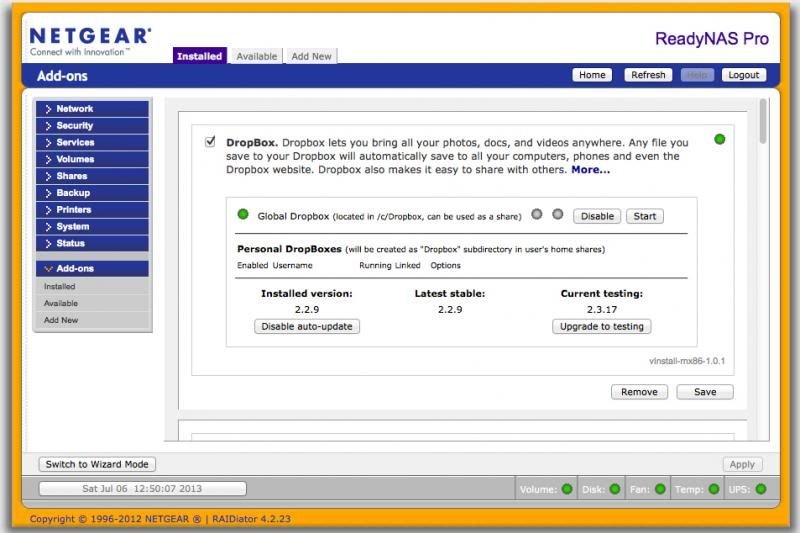
The only way to have it start again is to remove the addon, then manually remove all dropbox folders, even after clearing my web caches on several web browsers and rebooting the ReadyNAS itself. Before I remove the addon and after, no dice. The same when I remove, reboot, re-install.
After removing the add on and clicking on "Cancel" during removal, I am manually deleting the following folders by doing:
which returns directories in:
/c/.dropbox/
/c/.dropbox-dist.2.2.8/
/c/.dropbox-dist.2.2.9/
/c/Dropbox (this one is OK, it is a share that I created, since Dropbox doesn't automatically create one for Global)
A simple
Now, no directories exist except my share, however, there are also some text files in "/tmp/"
./tmp/dropbox_error1DQn6M.txt
./tmp/dropbox_errorcxtOPP.txt
./tmp/dropbox_errorNW9OrF.txt
./tmp/dropbox_errorSUJlLz.txt
./tmp/dropbox_errorxOa2mm.txt
./tmp/dropbox_error4ecQAi.txt
./tmp/dropbox_errorPi68YR.txt
./tmp/dropbox_error5aCw15.txt
WTH!?
From here, the rest of the error logs return the same content.
Now, I have been reading the following topics:
viewtopic.php?f=36&t=65909
hmm, I have PHP enabled...
viewtopic.php?f=36&t=60941&start=30#p349866
Not an issue for me, I use the following:
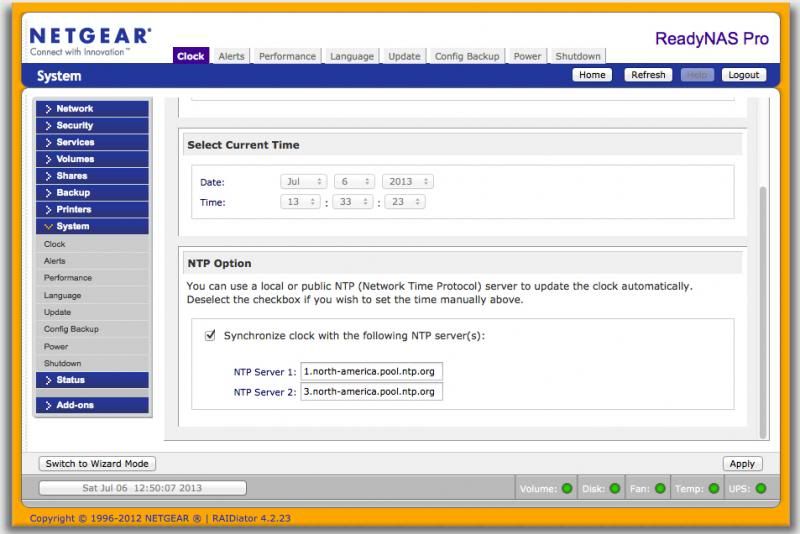
Finally, here is some information that might be useful:
I have an account and everything with dropbox, but I just can't get the thing up and running. Any help would be greatly appreciated.
viewtopic.php?f=48&t=58647
It was installed on a newly updated (factory reset) ReadyNas Pro Business Edition.
Currently, the following addons are also installed:
DAAPD!!FireFly!!1.0.3!!start-stop-daemon -S -q -x /usr/sbin/mt-daapd!!start-stop-daemon -K -n mt-daapd
PYTHON27!!Python2.7!!2.7.3-rnx86-1.0.1!!/etc/frontview/addons/bin/PYTHON27/start.sh!!/etc/frontview/addons/bin/PYTHON27/stop.sh!!Other!!current_url==http://readynasxtras.com/addons/x86/xml/PYTHON27_CURRENT.xml::detail_url==http://readynasxtras.com/readynas-x86-add-ons/python-27-x86::icon_url==/addons/PYTHON27/python_logo.gif
PHP5!!PHP5!!5.4.15-x86-4.4.0!!/etc/frontview/addons/bin/PHP5/start.sh!!/etc/frontview/addons/bin/PHP5/stop.sh!!Other!!current_url==http://readynasxtras.com/addons/x86/xml/PHP5_CURRENT.xml::detail_url==http://readynasxtras.com/readynas-x86-add-ons/php-53-x86::icon_url==http://readynasxtras.com/addons/x86/img/php_logo.gif
ENABLERSYNCSSH!!RsyncSsh!!x86-0.1.7!!/etc/frontview/addons/bin/ENABLERSYNCSSH/start.sh!!/etc/frontview/addons/bin/ENABLERSYNCSSH/stop.sh!!Other
PYLOAD!!PyLoad!!0.4.9-rnx86-0.3.3!!/etc/frontview/addons/bin/PYLOAD/start.sh!!/etc/frontview/addons/bin/PYLOAD/stop.sh!!Other!!current_url==http://readynasxtras.com/addons/x86/xml/PyLoad_CURRENT.xml::detail_url==http://readynasxtras.com/readynas-x86-add-ons/pyload-x86::icon_url==http://readynasxtras.com/addons/x86/img/pyload.jpg
ISTATD!!Istatd!!1.7!!/etc/frontview/addons/bin/ISTATD/start.sh!!/etc/frontview/addons/bin/ISTATD/stop.sh!!Other
NASMONITOR!!Nas Monitor!!3.6.11!!/etc/frontview/addons/bin/NASMONITOR/start.sh!!/etc/frontview/addons/bin/NASMONITOR/stop.sh!!Other!!current_url==https://www.readynas.com/contributed/super-poussin/x86/NASMONITOR_CURRENT.xml::detail_url==https://www.readynas.com/contributed/super-poussin/x86/NASMONITOR_REL.html::icon_url==https://www.readynas.com/contributed/super-poussin/x86/NASMONITOR_ICON.jpg
GITSCM!!gitscm!!1.7.1-readypro-0.1.2!!/etc/frontview/addons/bin/GITSCM/start.sh!!/etc/frontview/addons/bin/GITSCM/stop.sh!!Other
FFMPEG!!ffmpeg!!1.3!!/etc/frontview/addons/bin/FFMPEG/start.sh!!/etc/frontview/addons/bin/FFMPEG/stop.sh!!Other!!current_url==https://www.readynas.com/contributed/super-poussin/x86/FFMPEG_CURRENT.xml::detail_url==https://www.readynas.com/contributed/super-poussin/x86/FFMPEG_REL.html::icon_url==https://www.readynas.com/contributed/super-poussin/x86/ffmpeg-logo.png
In addition, the following services are running:
APACHE=0
APACHESSL=1
ATALKD=0
AUTOMATIC_VOLUME_EXPANSION=1
AUTO_CHECK_UPDATE=1
AUTO_DOWNLOAD_UPDATE=1
BONJOUR=0
BONJOUR_AFP=0
BONJOUR_FRONTVIEW=0
BONJOUR_PRINTER=0
BONJOUR_SUPPORT=1
CSV_USERADD_SUPPORT=1
DAAPD=0
DAAPD_SUPPORT=1
DISALLOW_PASSWORD_CHANGE=1
DISKCACHE=1
DOMAIN_SUPPORT=1
ENABLERSYNCSSH=1
ENABLERSYNCSSH_SUPPORT=1
ENABLE_POWERON_TIMER=0
ENABLE_POWERON_TIMER_SUPPORT=1
ENCODE=utf-8
FAN=1,1,0,0,0
FFMPEG=1
FFMPEG_SUPPORT=1
FLASH_AUTO_COPY=0
FLASH_OWNER=admin
FLASH_PATH=Pictures
FLASH_SHARE=media
FTP_MASQUERADE_ADDRESS=xxx.xxx.xxx.xxx
FTP_MODE=user
FTP_PASSIVE_END=xxxx
FTP_PASSIVE_START=xxxx
FTP_PORT=21
FTP_UPLOAD_RESUME=0
GITSCM=1
GITSCM_SUPPORT=1
HTTPS_SSL_KEY_HOST=192.168.168.168
IPV6_ASSIGN_bond0=OFF
IPV6_ASSIGN_eth0=OFF
IPV6_ASSIGN_eth1=OFF
ISTATD=1
ISTATD_PASSWORD=xxxxx
ISTATD_SUPPORT=1
JOURNAL=ordered
JUMBO_FRAMES_bond0=0
JUMBO_FRAMES_eth0=0
JUMBO_FRAMES_eth1=0
LANGUAGE=en-us
LANGUAGES_SUPPORTED=en-us/utf-8,en-us/ascii,ja/euc-jp,ko/euc-kr,ja/utf-8,ko/utf-8,zh-cn/utf-8,zh-tw/utf-8,ru/utf-8,es/utf-8,pt/utf-8,de/utf-8,fr/utf-8,it/utf-8,nl/utf-8,pl/utf-8,cs/utf-8,hu/utf-8,nb/utf-8,da/utf-8,fi/utf-8,sv/utf-8
MONITOR=board_temp,fan,disk_full,quota_exceeded,disk_temp
NASMONITOR=1
NASMONITOR_SUPPORT=1
NETATALK=1
NFS=1
NTPDATE=1
OPTIMIZE_FOR_MAC=1
PHP5=1
PHP5_SUPPORT=1
PROFTPD=1
PYLOAD=1
PYLOAD_SUPPORT=1
PYTHON27=1
PYTHON27_SUPPORT=1
RAID_MODE=1
READYTIVOD=0
RESYNC_UNCLEAN_SHUTDOWN=1
RSYNC=0
RSYNC_SUPPORT=1
SAMBA=0
SHAREACCESS=SAMBA,NETATALK
SHUTDOWN_ON_DISK_OVERTEMP=1
SMTP_PROVIDER=ITEM_ALERTS_CUSTOM
SNMP=1
SNMP_COMMUNITY=public
SNMP_SUPPORT=1
SPEED_DUPLEX_eth0=AUTO_NEGOTIATION
SPEED_DUPLEX_eth1=AUTO_NEGOTIATION
SSH=1
SSHKEY=rsa
SUPPORT_UTF8_NAMES=1
TEMP=1,1,0
UDHCPD=0
UPNP=0
UPNPAV=0
UPNPAV_SUPPORT=1
UPNP_SUPPORT=1
UPS_LOWBATT_PCT=0
UPS_SHARING=0
USER_HOME_DIRECTORY=0
WAKE_ON_LAN=1
WIZD=0
WIZD_SUPPORT=0
Now, the installs goes without a hitch. The current Installed version is: 2.2.8. I immediately update to the latest stable release of 2.2.9. So far, so good.
Next, I follow the instructions on how to configure the Drobox add on:
viewtopic.php?f=48&t=58647
This is where I get stuck, specifically the configuration step. After enabling the add on and the Global dropbox, the daemon starts, then stops. After which it never starts again.
The only way to have it start again is to remove the addon, then manually remove all dropbox folders, even after clearing my web caches on several web browsers and rebooting the ReadyNAS itself. Before I remove the addon and after, no dice. The same when I remove, reboot, re-install.
After removing the add on and clicking on "Cancel" during removal, I am manually deleting the following folders by doing:
ProBiz-NAS:/# find -iname *dropbox*
which returns directories in:
/c/.dropbox/
/c/.dropbox-dist.2.2.8/
/c/.dropbox-dist.2.2.9/
/c/Dropbox (this one is OK, it is a share that I created, since Dropbox doesn't automatically create one for Global)
A simple
rm-rf .dropbox*removes all directories pertaining to Dropbox that are left behind.
Now, no directories exist except my share, however, there are also some text files in "/tmp/"
./tmp/dropbox_error1DQn6M.txt
./tmp/dropbox_errorcxtOPP.txt
./tmp/dropbox_errorNW9OrF.txt
./tmp/dropbox_errorSUJlLz.txt
./tmp/dropbox_errorxOa2mm.txt
./tmp/dropbox_error4ecQAi.txt
./tmp/dropbox_errorPi68YR.txt
./tmp/dropbox_error5aCw15.txt
WTH!?
ProBiz-NAS:/tmp# cat dropbox_error1DQn6M.txt
pid:	6277
ppid:	6276
uid:	98
user_info:	pwd.struct_passwd(pw_name='admin', pw_passwd='x', pw_uid=98, pw_gid=98, pw_gecos='', pw_dir='/c/home/admin', pw_shell='/bin/false')
effective_user_info:	pwd.struct_passwd(pw_name='admin', pw_passwd='x', pw_uid=98, pw_gid=98, pw_gecos='', pw_dir='/c/home/admin', pw_shell='/bin/false')
euid:	98
gid:	98
egid:	98
group_info:	grp.struct_group(gr_name='admin', gr_passwd='x', gr_gid=98, gr_mem=[])
effective_group_info:	grp.struct_group(gr_name='admin', gr_passwd='x', gr_gid=98, gr_mem=[])
appdata:	u'/c/.dropbox'
real_path=u'/c/.dropbox'
	mode=040700	uid=98	gid=98
parent	mode=040777	uid=0	gid=0
dropbox_path:	u'/c/Dropbox'
real_path=u'/c/Dropbox'
	mode=041700	uid=65534	gid=65534
parent	mode=040777	uid=0	gid=0
HOME:	/c
tempdir:	'/tmp'
real_path='/tmp'
	mode=041777	uid=0	gid=0
parent	mode=040755	uid=0	gid=0
Traceback (most recent call last):
  File "dropbox/client/main.py", line 1239, in main_startup
  File "dropbox/client/main.py", line 765, in run
  File "dropbox/client/main.py", line 712, in create_keystore_and_unlink_cookie
Exception: statvfs failed with retval -1
ProBiz-NAS:/tmp# cat dropbox_errorcxtOPP.txt
pid:	6831
ppid:	6829
uid:	98
user_info:	pwd.struct_passwd(pw_name='admin', pw_passwd='x', pw_uid=98, pw_gid=98, pw_gecos='', pw_dir='/c/home/admin', pw_shell='/bin/false')
effective_user_info:	pwd.struct_passwd(pw_name='admin', pw_passwd='x', pw_uid=98, pw_gid=98, pw_gecos='', pw_dir='/c/home/admin', pw_shell='/bin/false')
euid:	98
gid:	98
egid:	98
group_info:	grp.struct_group(gr_name='admin', gr_passwd='x', gr_gid=98, gr_mem=[])
effective_group_info:	grp.struct_group(gr_name='admin', gr_passwd='x', gr_gid=98, gr_mem=[])
appdata:	u'/c/.dropbox'
real_path=u'/c/.dropbox'
	mode=040700	uid=98	gid=98
parent	mode=040777	uid=0	gid=0
dropbox_path:	u'/c/Dropbox'
real_path=u'/c/Dropbox'
	mode=041700	uid=65534	gid=65534
parent	mode=040777	uid=0	gid=0
HOME:	/c
tempdir:	'/tmp'
real_path='/tmp'
	mode=041777	uid=0	gid=0
parent	mode=040755	uid=0	gid=0
Traceback (most recent call last):
  File "dropbox/client/main.py", line 1239, in main_startup
  File "dropbox/client/main.py", line 765, in run
  File "dropbox/client/main.py", line 712, in create_keystore_and_unlink_cookie
Exception: statvfs failed with retval -1
ProBiz-NAS:/tmp# cat dropbox_errorNW9OrF.txt
pid:	6682
ppid:	6681
uid:	98
user_info:	pwd.struct_passwd(pw_name='admin', pw_passwd='x', pw_uid=98, pw_gid=98, pw_gecos='', pw_dir='/c/home/admin', pw_shell='/bin/false')
effective_user_info:	pwd.struct_passwd(pw_name='admin', pw_passwd='x', pw_uid=98, pw_gid=98, pw_gecos='', pw_dir='/c/home/admin', pw_shell='/bin/false')
euid:	98
gid:	98
egid:	98
group_info:	grp.struct_group(gr_name='admin', gr_passwd='x', gr_gid=98, gr_mem=[])
effective_group_info:	grp.struct_group(gr_name='admin', gr_passwd='x', gr_gid=98, gr_mem=[])
appdata:	u'/c/.dropbox'
real_path=u'/c/.dropbox'
	mode=040700	uid=98	gid=98
parent	mode=040777	uid=0	gid=0
dropbox_path:	u'/c/Dropbox'
real_path=u'/c/Dropbox'
	mode=041700	uid=65534	gid=65534
parent	mode=040777	uid=0	gid=0
HOME:	/c
tempdir:	'/tmp'
real_path='/tmp'
	mode=041777	uid=0	gid=0
parent	mode=040755	uid=0	gid=0
Traceback (most recent call last):
  File "dropbox/client/main.py", line 1239, in main_startup
  File "dropbox/client/main.py", line 765, in run
  File "dropbox/client/main.py", line 712, in create_keystore_and_unlink_cookie
Exception: statvfs failed with retval -1
From here, the rest of the error logs return the same content.
Now, I have been reading the following topics:
viewtopic.php?f=36&t=65909
hmm, I have PHP enabled...
viewtopic.php?f=36&t=60941&start=30#p349866
Not an issue for me, I use the following:
Finally, here is some information that might be useful:
ProBiz-NAS:/# ls -la /tmp
total 1196
drwxrwxrwt  5 root  root     4096 2013-07-06 13:17 .
drwxr-xr-x 23 root  root     4096 2013-07-06 13:00 ..
drwxrwxrwx  2 admin admin    4096 2013-07-06 12:51 addons
-rw-r--r--  1 root  root       12 2013-07-04 22:11 .dhcp_server
-rw-------  1 admin admin    1114 2013-07-06 12:51 dropbox_error1DQn6M.txt
-rw-------  1 admin admin    1114 2013-07-06 12:52 dropbox_error4ecQAi.txt
-rw-------  1 admin admin    1114 2013-07-06 12:52 dropbox_error5aCw15.txt
-rw-------  1 admin admin    1114 2013-07-06 12:53 dropbox_errorcxtOPP.txt
-rw-------  1 admin admin    1114 2013-07-06 12:53 dropbox_errorNW9OrF.txt
-rw-------  1 admin admin    1114 2013-07-06 12:53 dropbox_errorPi68YR.txt
-rw-------  1 admin admin    1114 2013-07-06 12:52 dropbox_errorSUJlLz.txt
-rw-------  1 admin admin    1114 2013-07-06 12:59 dropbox_errorxOa2mm.txt
-rw-r--r--  1 root  root        0 2013-07-05 10:42 errors_001.log
-rw-r--r--  1 root  root        0 2013-07-05 08:56 group.16698
-rw-r--r--  1 root  root        0 2013-07-05 01:14 group.8976
drwxrwxrwt  2 root  root     4096 2013-07-04 23:37 .ICE-unix
-rw-r--r--  1 root  root      935 2010-04-22 21:57 istat.conf
-rwxr-xr-x  1 root  root  1155175 2012-11-23 10:57 istatd
srwxr-xr-x  1 admin admin       0 2013-07-06 12:40 istatd.sock
srw-------  1 root  root        0 2013-07-06 12:40 pureftpd.sock
drwxrwxrwt  2 root  root     4096 2013-07-04 23:37 .X11-unix
ProBiz-NAS:/# df -h
Filesystem            Size  Used Avail Use% Mounted on
/dev/md0              4.0G  462M  3.4G  12% /
tmpfs                  16K     0   16K   0% /USB
/dev/c/c               19T  2.4T   16T  14% /c
/c/fortressftp         19T  2.4T   16T  14% /home/ftp/fortressftp
/c/janftp              19T  2.4T   16T  14% /home/ftp/janftp
I have an account and everything with dropbox, but I just can't get the thing up and running. Any help would be greatly appreciated.
26 Replies
Replies have been turned off for this discussion
- mdgm-ntgrNETGEAR Employee RetiredHow do the settings for the DNS and Gateway compare between the two NAS units?
 fifer55Apprentice
mdgm wrote: How do the settings for the DNS and Gateway compare between the two NAS units?
Exactly the same.
Teaming = IEEE 802.3ad LACP (Layer 3+4)
Domain Name Server 1 (DNS) for Ultra6-NAS = 192.168.1.1 (default gateway)
Domain Name Server 2 (DNS) for Ultra6-NAS = 192.168.1.239 (switch)
No Jumbo Frames, No VLAN, nothing special and this connects to available apps just fine to everything.
Teaming = IEEE 802.3ad LACP (Layer 3+4)
Domain Name Server 1 (DNS) for ProBiz-NAS = 192.168.1.1 (default gateway)
Domain Name Server 2 (DNS) for ProBiz-NAS = 192.168.1.239 (switch)
No Jumbo Frames, No VLAN, nothing special and this does NOT connects to available apps.
I have not even enables SSH after the factory reset on the ProBiz-NAS box.- mdgm-ntgrNETGEAR Employee RetiredIf you download the logs (Status > Logs > Download all logs) and extract the zip contents what does bios_ver.log look like?
- fifer55Apprentice
mdgm wrote: If you download the logs (Status > Logs > Download all logs) and extract the zip contents what does bios_ver.log look like?
07/26/2010 FLAME6-MB V2.0
Also, here is my "network_settings.log" content:bond0 Link encap:Ethernet HWaddr XX:XX:XX:XX:XX:XX
inet addr:19.XX.1.9 Bcast:19.XX.1.255 Mask:255.255.XXX.0
UP BROADCAST RUNNING MASTER MULTICAST MTU:1500 Metric:1
RX packets:84841 errors:0 dropped:40 overruns:0 frame:0
TX packets:14825 errors:0 dropped:0 overruns:0 carrier:0
collisions:0 txqueuelen:0
RX bytes:11735594 (11.1 MiB) TX bytes:8622555 (8.2 MiB)
eth0 Link encap:Ethernet HWaddr XX:XX:XX:XX:XX:XX
UP BROADCAST RUNNING SLAVE MULTICAST MTU:1500 Metric:1
RX packets:48611 errors:0 dropped:2 overruns:0 frame:0
TX packets:6556 errors:0 dropped:0 overruns:0 carrier:0
collisions:0 txqueuelen:1000
RX bytes:4278747 (4.0 MiB) TX bytes:3194320 (3.0 MiB)
Interrupt:16 Memory:ff6fc000-0
eth1 Link encap:Ethernet HWaddr XX:XX:XX:XX:XX:XX
UP BROADCAST RUNNING SLAVE MULTICAST MTU:1500 Metric:1
RX packets:36230 errors:0 dropped:6 overruns:0 frame:0
TX packets:8269 errors:0 dropped:0 overruns:0 carrier:0
collisions:0 txqueuelen:1000
RX bytes:7456847 (7.1 MiB) TX bytes:5428235 (5.1 MiB)
Interrupt:17 Memory:ff7fc000-0
lo Link encap:Local Loopback
inet addr:127.0.0.1 Mask:255.0.0.0
inet6 addr: ::1/128 Scope:Host
UP LOOPBACK RUNNING MTU:16436 Metric:1
RX packets:102041 errors:0 dropped:0 overruns:0 frame:0
TX packets:102041 errors:0 dropped:0 overruns:0 carrier:0
collisions:0 txqueuelen:0
RX bytes:7086164 (6.7 MiB) TX bytes:7086164 (6.7 MiB)
tunl0 Link encap:IPIP Tunnel HWaddr
NOARP MTU:1480 Metric:1
RX packets:0 errors:0 dropped:0 overruns:0 frame:0
TX packets:0 errors:0 dropped:0 overruns:0 carrier:0
collisions:0 txqueuelen:0
RX bytes:0 (0.0 b) TX bytes:0 (0.0 b)
IPV6_ASSIGN_eth0=OFF
IPV6_ASSIGN_eth1=OFF
JUMBO_FRAMES_eth0=0
JUMBO_FRAMES_eth1=0
SPEED_DUPLEX_eth0=AUTO_NEGOTIATION
SPEED_DUPLEX_eth1=AUTO_NEGOTIATION
Settings for bond0:
Link detected: yes
Settings for eth1:
Supported ports: [ TP ]
Supported link modes: 10baseT/Half 10baseT/Full
100baseT/Half 100baseT/Full
1000baseT/Half 1000baseT/Full
Supports auto-negotiation: Yes
Advertised link modes: 10baseT/Half 10baseT/Full
100baseT/Half 100baseT/Full
1000baseT/Half 1000baseT/Full
Advertised auto-negotiation: Yes
Speed: 1000Mb/s
Duplex: Full
Port: Twisted Pair
PHYAD: 0
Transceiver: internal
Auto-negotiation: on
Supports Wake-on: g
Wake-on: g
Link detected: yes
Settings for eth0:
Supported ports: [ TP ]
Supported link modes: 10baseT/Half 10baseT/Full
100baseT/Half 100baseT/Full
1000baseT/Half 1000baseT/Full
Supports auto-negotiation: Yes
Advertised link modes: 10baseT/Half 10baseT/Full
100baseT/Half 100baseT/Full
1000baseT/Half 1000baseT/Full
Advertised auto-negotiation: Yes
Speed: 1000Mb/s
Duplex: Full
Port: Twisted Pair
PHYAD: 0
Transceiver: internal
Auto-negotiation: on
Supports Wake-on: g
Wake-on: g
Link detected: yes
bond0:4:eth0,eth1:1
 cdenneenAspirantAny luck with this?
Sent from my SCH-I545 using Tapatalk- fifer55Apprentice
cdenneen wrote: Any luck with this?
Sent from my SCH-I545 using Tapatalk
No, this was never resolved. I just gave up on this application and feature.

Related Content
- Apr 16, 2020Retired_Member
NETGEAR Academy

Boost your skills with the Netgear Academy - Get trained, certified and stay ahead with the latest Netgear technology!
Join Us!
